Crypto tools
The Tools section of the side menu (RA workspace) offers two utilities to every signed-in user:
| Tool | What it does | Where the work is done |
|---|---|---|
| CSR Generator | Creates a private key and a certificate signing request (CSR) | On the PKIFactor server; the key is returned to your browser |
| P12 / PFX Builder | Assembles a certificate, its private key and an optional chain into a PKCS#12 file | In your browser; nothing is sent to the server |
There is no certificate decoder or format converter in this version. The request form checks and decodes the CSRs you provide (Requesting certificates), and the certificate detail page shows the decoded certificate and its chain (Managing certificates).
CSR Generator
Use it when a profile asks for your own CSR (Upload CSR mode) and you have no openssl at hand.
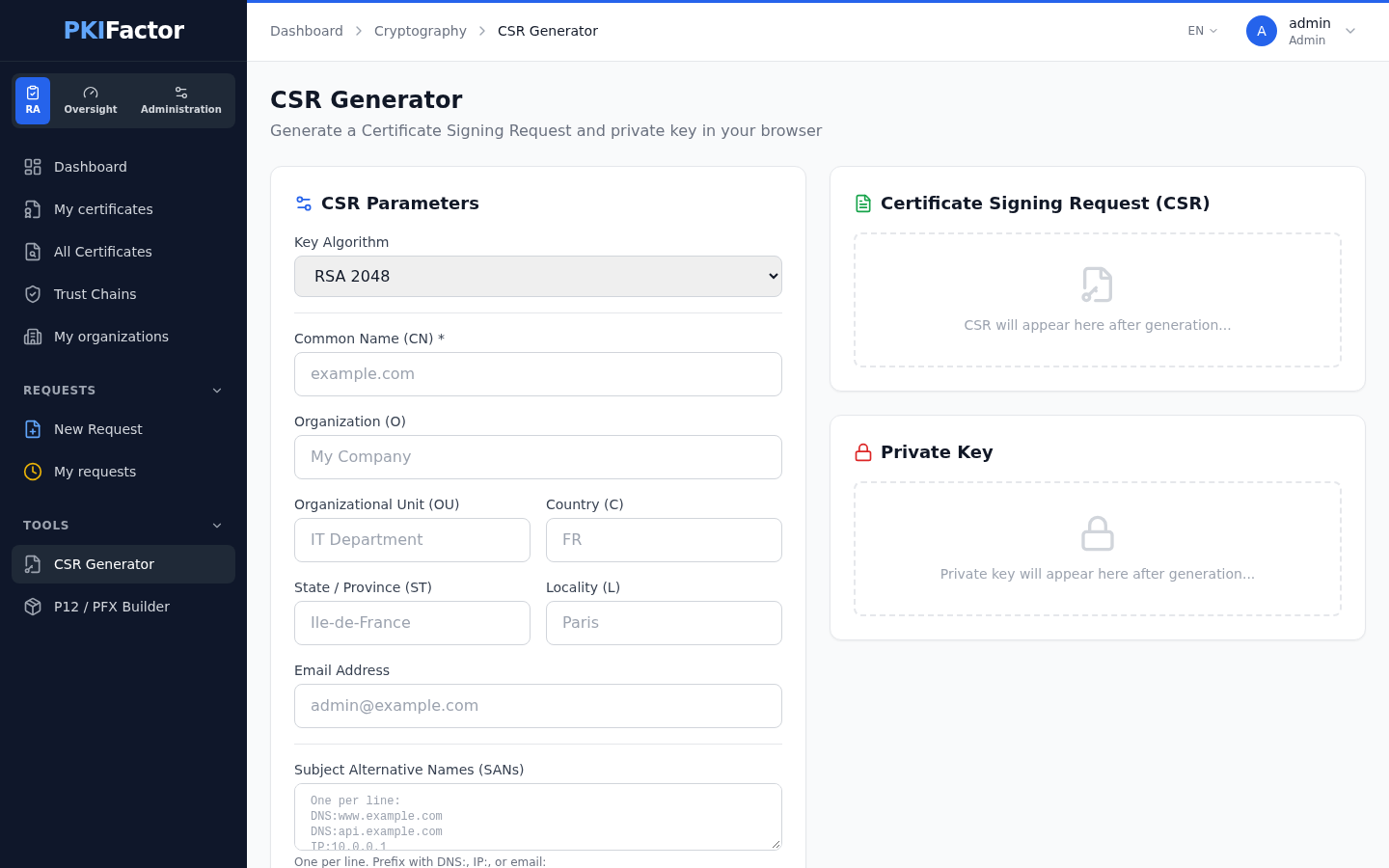
Captured with an administrator account.
- Open Tools > CSR Generator.
-
Fill in the CSR Parameters:
Field Notes Key Algorithm RSA 2048, RSA 3072, RSA 4096, ECC P-256 (prime256v1), ECC P-384 (secp384r1), ECC P-521 (secp521r1) Common Name (CN) Required, 253 characters at most Organization (O), Organizational Unit (OU), State / Province (ST), Locality (L), Email Address Optional Country (C) Optional, two letters ( FR)Subject Alternative Names (SANs) See the warning below -
Click Generate CSR.
The right-hand side then shows:
- Certificate Signing Request (CSR), with Copy and Download .csr (
<common name>.csr); - Private Key, with Copy and Download .key (
<common name>.key); - a Summary of the parameters.
Paste or upload the CSR in the request form, mode Upload CSR.
The private key is generated on the server and is not encrypted
Despite the page's subtitle (...in your browser), the key pair is generated by the PKIFactor server and sent back to your browser over HTTPS. PKIFactor does not keep it: if you leave the page without downloading it, it is lost. The key file is in PEM without a password (BEGIN RSA PRIVATE KEY or BEGIN EC PRIVATE KEY): store it with restricted permissions, or protect it, for example openssl pkey -in web01.key -aes256 -out web01-protected.key. For a key that never leaves your machine, generate it yourself:
openssl req -new -newkey rsa:3072 -nodes -keyout web01.key -out web01.csr \
  -subj "/CN=web01.example.com" \
  -addext "subjectAltName=DNS:web01.example.com,DNS:www.example.com"
Subject Alternative Names (SANs): one per line, written as a plain DNS name (www.example.com, *.example.com) or a plain IP address (192.0.2.10). PKIFactor recognizes the IP addresses by itself and writes every entry into the CSR (the common name is always included as a DNS name). As the field's hint says, an entry can also be prefixed with DNS:, IP: or email: (since version 1.8.50); email: adds an e-mail address to the SANs. An IP: entry that is not an IP address, or an email: entry that is not an e-mail address, is refused. Before version 1.8.29 the generated CSR contained no SANs: check older CSRs with openssl req -in web01.csr -noout -text.
P12 / PFX Builder
Use it to put a certificate and its key into one password-protected PKCS#12 file (.p12, .pfx), for example for IIS, a Java keystore (keytool -importkeystore) or a load balancer, when you requested the certificate with your own CSR.
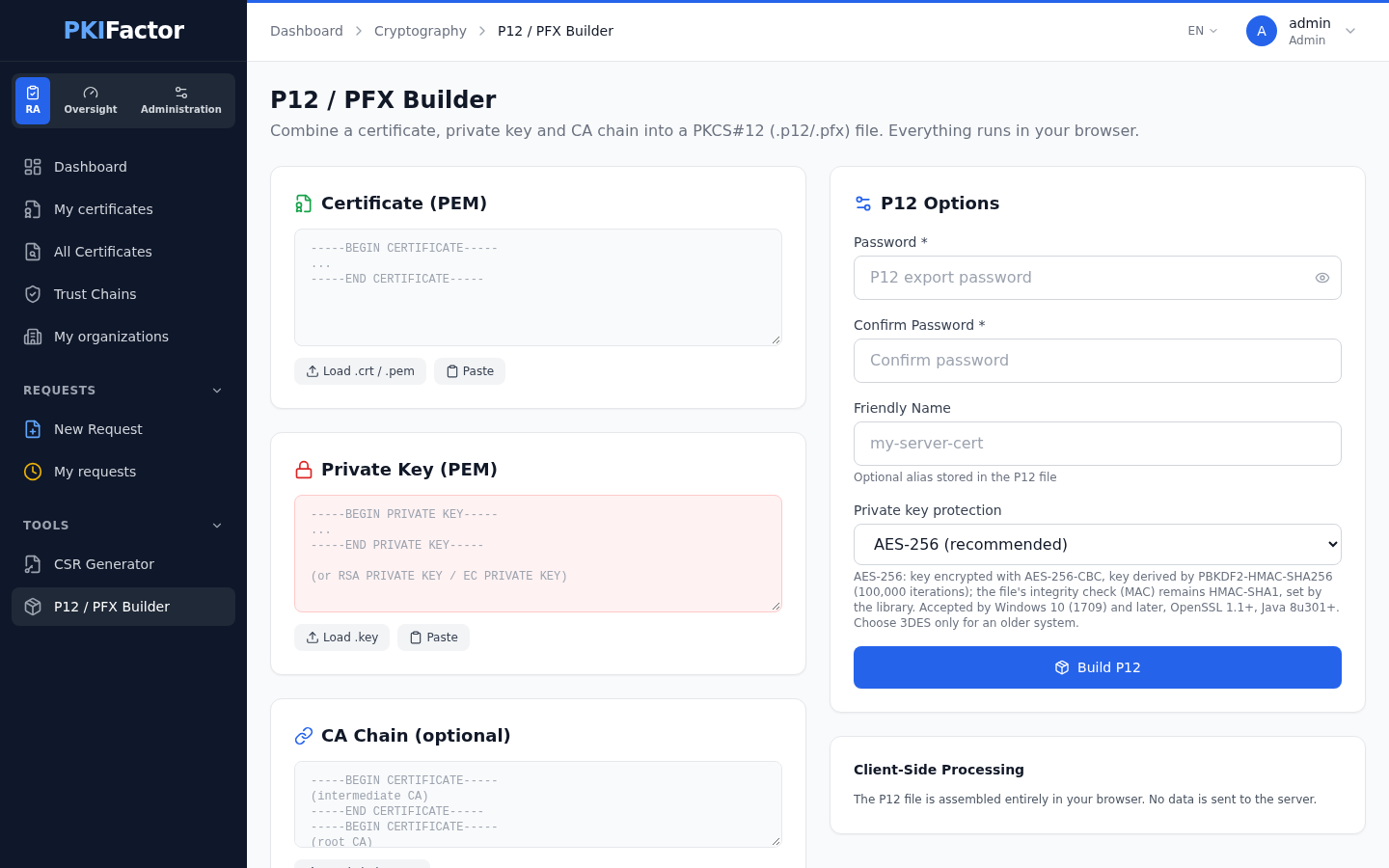
Captured with an administrator account.
- Open Tools > P12 / PFX Builder.
- Certificate (PEM): paste the certificate, or click Load .crt / .pem.
- Private Key (PEM): paste the key, or click Load .key. The key must be an RSA key, unencrypted, in
BEGIN PRIVATE KEYorBEGIN RSA PRIVATE KEYform. - CA Chain (optional): paste the intermediate and root certificates, one PEM block after the other, or click Load chain .pem (for example the
_chain.pemfile downloaded from the certificate detail page). A block that cannot be read is skipped. -
In P12 Options, type the Password and Confirm Password (required, no minimum length: choose a strong one), optionally a Friendly Name (the alias stored in the file; by default the certificate's common name), and choose the Private key protection:
- AES-256 (recommended), the default: the key is encrypted with AES-256-CBC, with a key derived by PBKDF2-HMAC-SHA256 (100,000 iterations). Accepted by Windows 10 (1709) and later, OpenSSL 1.1 and later, Java 8u301 and later;
- 3DES (compatibility with old systems): only for software that cannot read AES-256.
In both cases the file's integrity check (MAC) stays HMAC-SHA1, which the library imposes. 6. Click Build P12, check the summary (subject, issuer, serial, number of CA certificates included, size, key algorithm and size), then Download .p12 (
<common name>.p12).
The file is built by a JavaScript library in your browser: the key is not sent to PKIFactor.
What the builder does not do
-
It does not read EC keys (and therefore not the EC keys produced by the CSR Generator), nor encrypted keys. Decrypt an encrypted key first (
openssl pkey -in protected.key -out web01.key), and for an EC key build the file withopenssl:openssl pkcs12 -export -inkey web01.key -in web01.crt -certfile web01_chain.pem \ -name web01.example.com -out web01.p12 -
It does not check that the key belongs to the certificate. A wrong pair produces a file that the server will refuse. Compare the two public keys before building:
openssl x509 -in web01.crt -noout -pubkey | openssl sha256
openssl pkey -in web01.key -pubout | openssl sha256    # must print the same value
This tool is independent of the certificates managed by PKIFactor. When PKIFactor generated the key (Generate Key Pair mode), download the PKCS#12 file from the certificate instead (Managing certificates); that file does not contain the chain, which you download separately.
Via the API
The CSR Generator calls POST /api/crypto/generate-csr (JSON). The P12 / PFX Builder has no API: it runs only in the browser.
curl -s -c jar -X POST https://clm.example.com/api/auth/login \
  --data-urlencode "email=alice@example.com" --data-urlencode "password=$PKF_PASSWORD"
curl -s -b jar -X POST https://clm.example.com/api/crypto/generate-csr \
  -H "Content-Type: application/json" \
  -d '{"algorithm": "EC-P256", "cn": "web01.example.com", "org": "Example", "country": "FR"}'
algorithm is one of RSA-2048, RSA-3072, RSA-4096, EC-P256, EC-P384, EC-P521; the other fields are ou, state, locality, email and sans (a list of DNS names or IP addresses). The answer holds csr_pem and key_pem (unencrypted).
Troubleshooting
| Symptom | Cause and fix |
|---|---|
| Common Name (CN) is required | Fill in Common Name (CN) |
| Generation failed: Invalid SAN entry ... | A SAN line is neither a DNS name nor an IP address, or the value after IP: or email: does not match its prefix: correct the entry |
| Generation failed: [object Object] | A field was refused by the server: a country that is not two letters, or a common name longer than 253 characters |
| The certificate issued from a generated CSR has no SANs (the detail page may show Issued identity ≠ requested) | The CSR was generated before version 1.8.29, which wrote no SANs: generate it again |
| Build failed: Could not convert private key from PEM; PEM header type is not "PRIVATE KEY" or "RSA PRIVATE KEY". | The key is an EC key (BEGIN EC PRIVATE KEY): use openssl pkcs12 -export |
| Build failed: Cannot read private key. ... | The key is not an RSA key (for example an EC key in BEGIN PRIVATE KEY form): use openssl pkcs12 -export |
| Encrypted private keys are not supported. Please decrypt first. | Decrypt the key with openssl pkey first |
| Password is required. | Type a password: the builder does not produce unprotected files |
| Passwords do not match | Type the same password in Password and Confirm Password |
| An older system (for example Windows before 10 version 1709, or an old Java) refuses the password or the file | Build it again with Private key protection set to 3DES (compatibility with old systems) |
| The server refuses the PKCS#12 file, or its key does not match the certificate | The key and the certificate do not belong together: compare their public keys (see above) |
| The chain is missing from the PKCS#12 file | A block of CA Chain was not a valid PEM certificate and was skipped: check the count of CA Certs in the summary |