Users and roles
Kinds of accounts
| Kind | Signs in with | Created by |
|---|---|---|
| Local | E-mail and password managed by PKIFactor; optionally a client certificate (mTLS) | An administrator, or the first-start bootstrap |
| Single sign-on | An OIDC identity provider; no local password | Automatically at the first sign-in (Single sign-on) |
| Service | An API key | PKIFactor itself, one per protocol gateway (ACME, EST, SCEP, CMP) and for the ServiceNow integration |
Roles
| Role (label in the interface) | Scope | Can |
|---|---|---|
| Admin | Global | Configures and runs the platform: PKI connectors, profiles, policies, organizations, users, deployments, encryption, SSO, license and backups. Sees the whole estate but cannot export another user's private key |
| Operator | The organizations the user belongs to, and the appliances entrusted to the user | A delegated administrator for those organizations, with the permissions described below. Never edits certificate profiles |
| Approver (validator) | The organizations where the user is an approver | Approve or reject requests in those organizations' queues |
| Auditor | Read only; the whole estate or the user's own organizations (see Audit scope) | Read certificates, audit trail and reports |
| User | Own certificates, and those of the user's teams within the organization | Request, download, renew, revoke |
Additional roles
A person has one main role and may hold additional roles on top of it, for example an auditor who is also an approver. Their rights are the union of all their roles. In the user's action menu, the Role section sets the main role (Set as …) and the Additional roles section adds or removes roles with checkboxes and Apply. The list shows the additional roles as small badges next to the main role. Changing the main role keeps the additional roles.
Workspaces by role
The interface has three workspaces, chosen at the top of the sidebar:
| Workspace | Shown to |
|---|---|
| RA (daily work: requests, approvals, certificates) | Everyone |
| Oversight (fleet monitoring and compliance) | Administrators and auditors |
| Administration (platform configuration) | Administrators |
A person with only the RA workspace sees no workspace selector. An operator who is not an administrator gets an Operations section in the RA workspace, with Endpoints, Teams and Audit Trail depending on their permissions.
Audit scope
For an account holding the Auditor role, the action menu offers an Audit scope section:
| Scope | Effect |
|---|---|
| Whole estate (default) | The auditor reads everything, including the global views |
| Own organisations only | The audit trail and the lists are limited to the auditor's organizations. The views that are global by nature (network scanner, CA inventory, posture, crypto inventory) are refused, and Network scanner is hidden from the menu |
Changing the scope is recorded in the audit trail (ADMIN_UPDATE_AUDIT_SCOPE).
The role is held by PKIFactor. Single sign-on proves who the user is, and organization membership can follow directory groups, but the role is never taken from the identity provider: an administrator sets it.
What a person sees and acts on also depends on organizations and teams: see Organizations and teams.
PKIFactor keeps at least two active administrators: it refuses to demote, deactivate or delete an administrator when fewer than two would remain, and the administration dashboard warns while only one exists.
Operator permissions
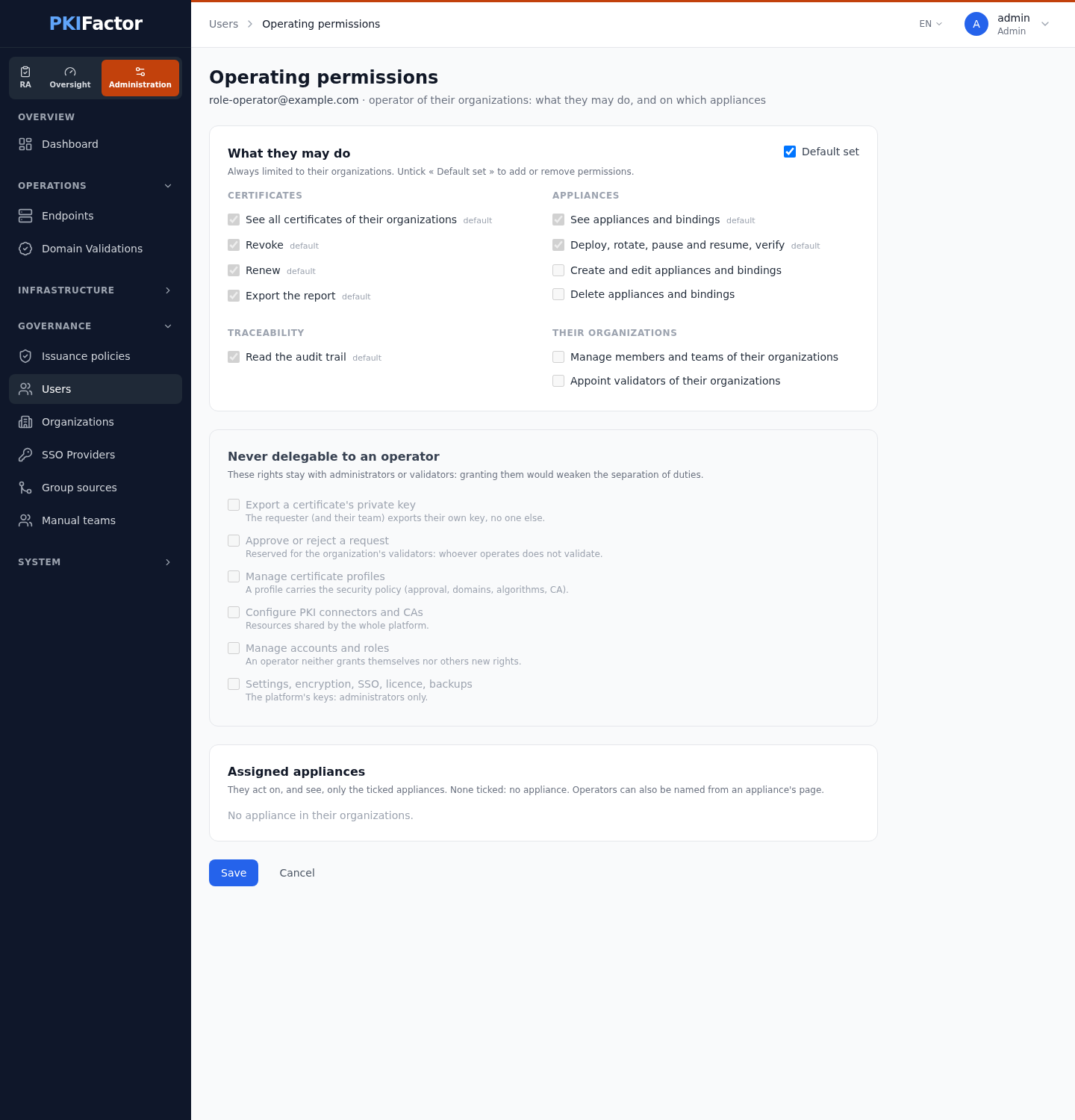
An operator is a delegated administrator bounded to their organizations. Each operator starts with the Default set of permissions; an administrator adjusts it account by account: open Governance > Users, open the operator's action menu and choose Operating permissions, untick Default set, then tick or untick the permissions. The operator sees and operates only the appliances entrusted to them, even within their organizations (none ticked = no appliance). The same page lists the appliances of the operator's organizations under Assigned appliances; an administrator can also name operators from an appliance's page (panel Operators of this appliance), and an operator who creates an appliance becomes its operator. Changes are recorded in the audit trail (OPERATOR_ACCESS_UPDATED).
| Permission | Default | Allows |
|---|---|---|
cert.view_all |
yes | See every certificate of their organizations |
cert.renew, cert.revoke |
yes | Renew and revoke those certificates |
cert.export |
yes | Export reports (PDF, CSV, JSON, XML) |
target.view |
yes | See devices and bindings |
target.deploy |
yes | Deploy, rotate, pause, resume and verify |
target.edit, target.delete |
no | Create, change or delete a device or a binding |
audit.read |
yes | Read the audit trail of their organizations |
org.teams |
no | Manage members and manual teams of their organizations |
org.validators |
no | Appoint or remove the validators of their organizations (never the last one) |
The page also lists what is never delegable to an operator: approving or rejecting a request, managing certificate profiles, configuring PKI connectors and CAs, managing accounts and roles, settings (encryption, SSO, license, backups), and exporting a certificate's private key.
Private keys stay with their owner
Exporting a private key (PKCS#12) is reserved to the certificate's requester and their team. No role delegates it: neither an operator nor an administrator can export someone else's key, and binding someone else's certificate to a device (which pushes or signs its key there) follows the same rule.
Manage users
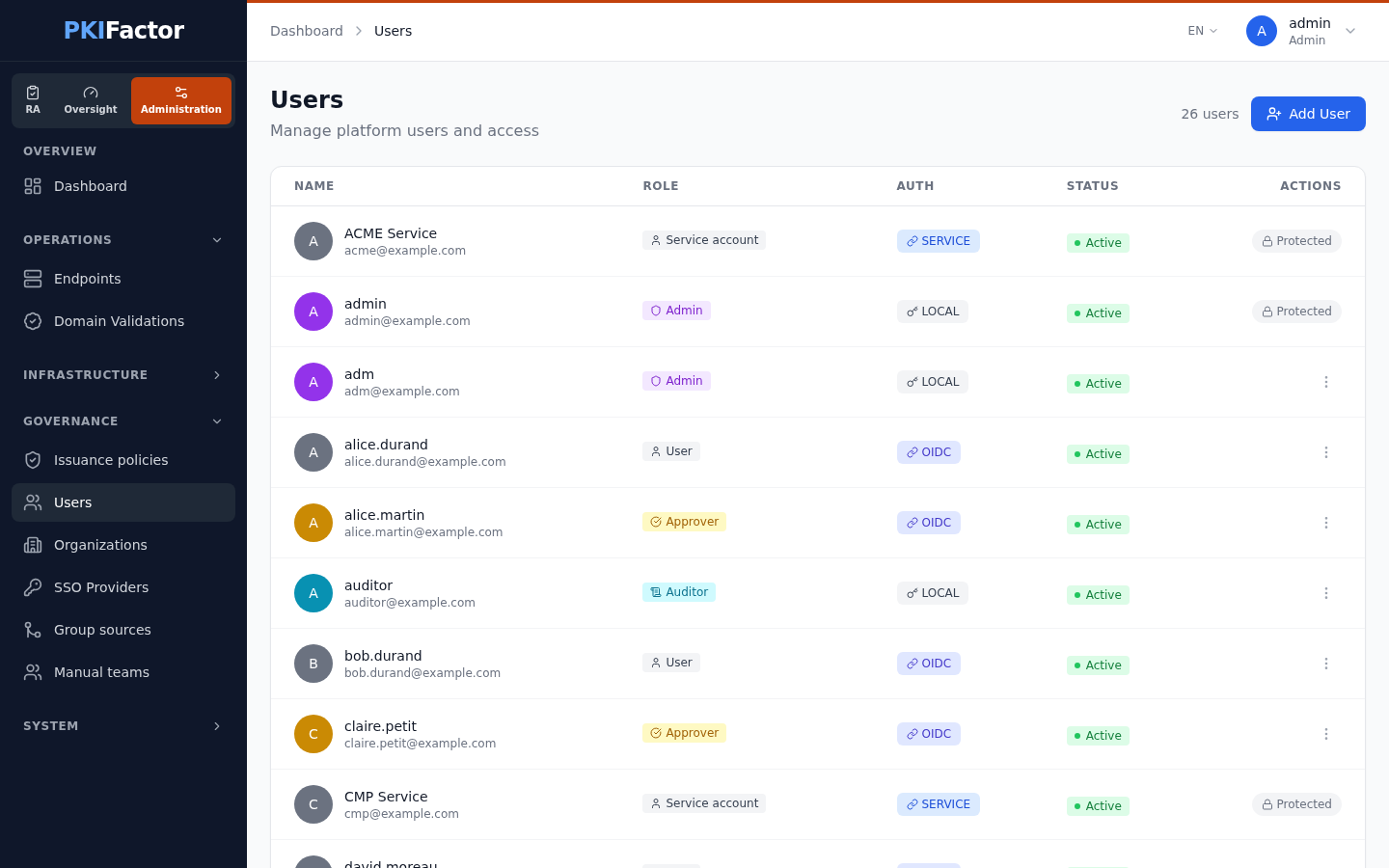
Open Governance > Users (Administration workspace). The list shows each person's name and e-mail, role (with any additional roles), authentication origin (Auth: LOCAL, OIDC) and status. The counter at the top counts accounts excluding service accounts.
| Action | Notes |
|---|---|
| Add User | Creates a local account: Email, optional Username (the e-mail prefix when empty), Password and its confirmation (see the policy below), Role. Transmit the password through a separate channel. Organization memberships prepared in advance for this address become active |
| Set as … / Additional roles | Change the main role or the additional roles. An administrator cannot change their own role, nor bring the number of active administrators below two |
| Audit scope | Auditors only, see Audit scope |
| Operating permissions | Operators only, see Operator permissions |
| Role history | The role changes of this account, read from the audit trail (ADMIN_UPDATE_ROLE) |
| Certificate Bindings | Client certificates (mTLS) allowed to sign in as this user: Add Binding with a label, the Common Name, the serial number and the issuer DN, or Import from Current Certificate to fill them from the browser's client certificate. Several certificates can be bound per user; removing a binding neither revokes nor deletes the certificate |
| Reset password | Local accounts only; SSO passwords are managed by the identity provider. Ends the user's open sessions |
| Link to SSO | Local accounts, when an SSO provider exists: see Single sign-on |
| Disable Account / Enable Account | A disabled account cannot sign in; its certificates stay. You cannot disable your own account |
| Delete Account | Not possible for your own account or for protected accounts |
Protected accounts: the service accounts of the gateways and the initial administrator cannot be deleted, deactivated or have their role changed; the list shows Protected instead of the action menu.
Password policy
| Rule | Requirement |
|---|---|
| Length | 12 to 128 characters |
| Characters | At least one upper-case letter, one lower-case letter, one digit and one special character |
| Storage | bcrypt-SHA256 hash |
Sign-in protection
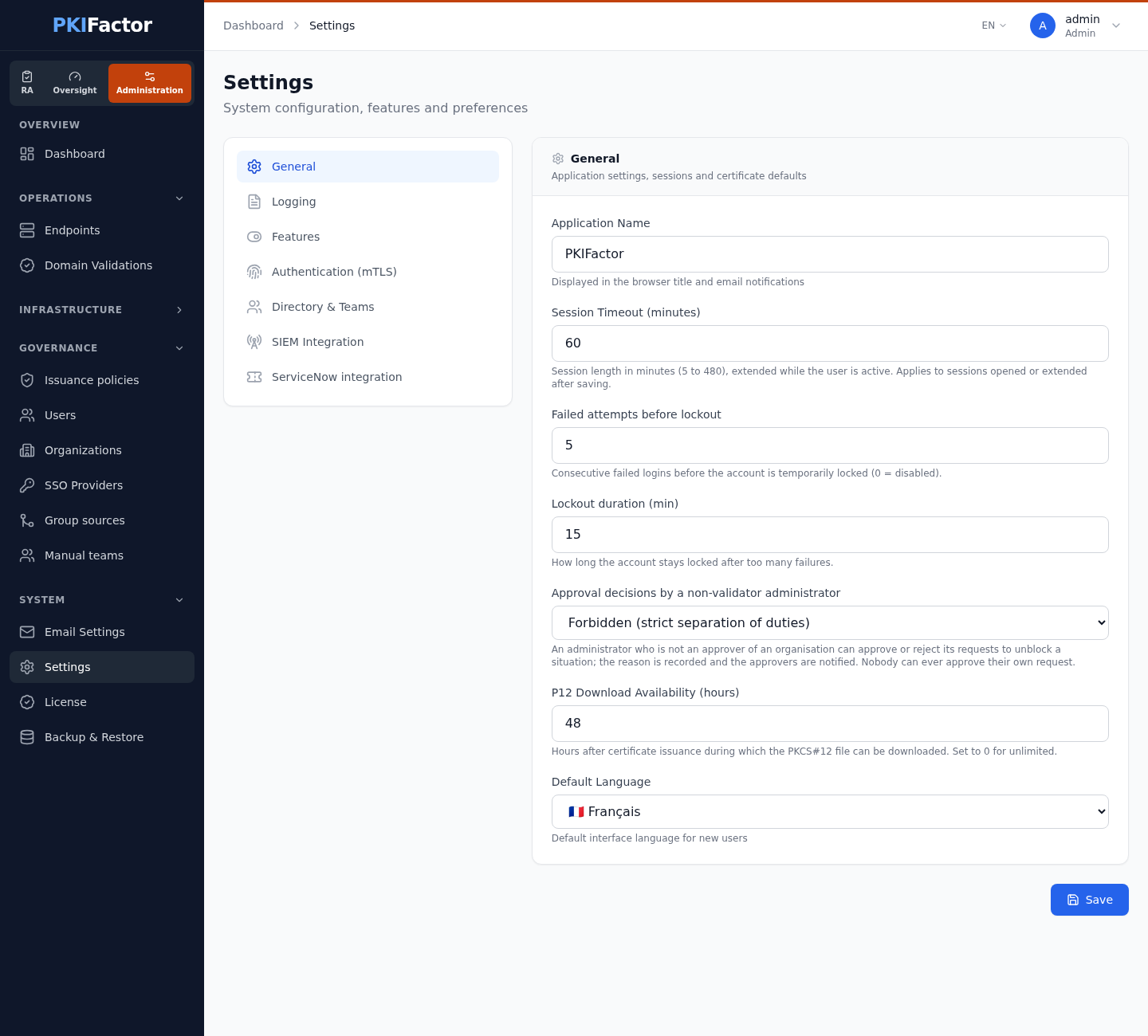
- After 5 consecutive failures from the same address (Failed attempts before lockout), further attempts on that account from that address are delayed progressively: 10 seconds, then 20, 40 and so on, up to the Lockout duration (min) (15 minutes by default). The person signing in from another computer is not blocked. The account itself is locked for the lockout duration only after ten times the threshold of failures in total, which stops a distributed attack. 0 attempts disables the mechanism. Both settings are in System > Settings, section General.
- Sign-in is limited to 10 attempts per minute per address, independently of the lockout.
- The answer to a failed sign-in never says whether the e-mail exists, and takes the same time either way.
- Each failure is recorded in the audit trail and forwarded to the SIEM (a lockout shows as the series of failures that caused it).
Sessions
Sessions last 30 minutes of inactivity by default (System > Settings, Session Timeout (minutes), from 5 to 480; a change applies to the next sign-in or renewal, without restart). The deployment variable JWT_EXPIRE_SECONDS is only used when the setting cannot be read. Changing a password ends the user's other sessions, and so does a reset by an administrator.
The initial administrator
At the first start PKIFactor creates admin@zetacert.com (or DEFAULT_ADMIN_EMAIL) with a random password printed once in the backend log, and forces a new password at the first sign-in. The appliance setup wizard removes any initial password from the configuration once the account exists. See Quick start.
Via the API
curl -s -b jar https://clm.example.com/api/users                      # list (administrators)
curl -s -b jar https://clm.example.com/api/users/me                   # current user
curl -s -b jar -X POST https://clm.example.com/api/users \
  --data-urlencode "email=bob@example.com" --data-urlencode "role=user" \
  --data-urlencode "password=$NEW_PASSWORD"                         # create (form fields)
curl -s -b jar -X PUT https://clm.example.com/api/users/42/status \
  --data-urlencode "is_active=false"                                # deactivate
curl -s -b jar -X PUT https://clm.example.com/api/users/42/role \
  --data-urlencode "role=auditor" --data-urlencode "extra_roles=validator"   # main and additional roles
curl -s -b jar -X PUT https://clm.example.com/api/users/42/audit-scope \
  --data-urlencode "scope=org"                                      # auditor: own organizations only
curl -s -b jar https://clm.example.com/api/users/42/operator-access   # operator permissions and appliances
/api/v1/docs, tag users.