License
Version 1.9
The suspension of issuance at the licensed volume and at the end of the license, described on this page, applies from PKIFactor 1.9 (to be released). Earlier versions alert but never suspend issuance.
PKIFactor has a single edition: every function is included, from post-quantum and crypto-agile certificates to all authority and device connectors, the ACME, EST, CMP and SCEP gateways, SSO, KMS and HSM, SIEM forwarding, the crypto inventory and high availability.
A license is a signed key (ZETA-...) issued by ZetaCert for one installation. It states how many managed certificates your contract covers, optional alert thresholds and, if any, an end date. PKIFactor verifies the signature offline: no connection to ZetaCert is ever needed.
The license suspends issuance at its limits
PKIFactor warns the administrators first (see Alerts). Then, with no tolerance, it refuses certificate issuance as described in When issuance is refused. Revocation, CRL and OCSP publication, the appliance's own service certificates, activating a new license, discovery and the deployment of a certificate already issued are never suspended. There is no quota of users, organizations or connectors.
What counts as a managed certificate
The count is the number of distinct common names among the active certificates that PKIFactor issued or renewed:
| Case | Counted |
|---|---|
| Certificate issued or renewed by PKIFactor, active | yes |
| Successive renewals of the same name | once |
| Members of a crypto-agile family with the same name (classical, ML-DSA, SLH-DSA) | once |
| Expired or revoked certificate | no |
| Request awaiting approval or domain validation | reserves a place for refusals, not for alerts |
| Certificate only discovered: network scan, Certificate Transparency, import from an authority, device inventory | no |
| Certificates that secure PKIFactor's own services | no |
The comparison ignores case and surrounding spaces. A certificate without a common name is counted by its first subject alternative name (SPIFFE URI, then DNS name, then IP address).
Alerts
| When | What happens |
|---|---|
| A usage threshold is crossed (80, 90 and 100 % by default; your license may set others) | Audit event LICENSE_QUOTA_THRESHOLD, e-mail to the administrators and to the contract contact |
| Usage stays above 100 % | A weekly reminder |
| The end date is 60, 30 and 7 days away | Audit event LICENSE_EXPIRY_ALERT and e-mail |
| The end date has passed | A weekly reminder; issuance and renewal refused |
| An issuance is refused by the license | Audit event LICENSE_ISSUANCE_REFUSED, with the reason |
For administrators, every page shows a banner while something needs attention: orange for a threshold below 100 %, an end date within 60 days or a rebinding to do; red at 100 % or more, after the end date, without a license once the evaluation is over, or when the key belongs to another installation. The banner links to System > License and says when issuance is suspended.
When issuance is refused
PKIFactor counts the distinct names it manages, including the requests that wait for an approval or a domain validation, and compares this count with the volume of the license at the moment of each request.
| Situation | New name | Renewal of a name already counted |
|---|---|---|
| Below the volume | accepted | accepted |
| Volume reached | refused | accepted |
| Above the volume (license reduced, certificates imported…) | refused | refused |
| License past its end date | refused | refused |
| No license once the 30-day evaluation is over | refused | refused |
A renewal that changes the name is a new name. A license without a volume limit (older unlimited licenses) has no volume refusal, but its end date applies.
The refusal applies to every channel, before any request reaches the certificate authority, and leaves nothing half done:
| Channel | Refusal |
|---|---|
| Interface and REST API | HTTP 403 with the reason |
| ACME | problem urn:ietf:params:acme:error:unauthorized with the reason |
| EST | HTTP 403 with the reason |
| SCEP | failInfo (badRequest) |
| CMP | rejection, with the reason in the status text |
Each refusal is recorded with the audit event LICENSE_ISSUANCE_REFUSED and its reason: volume_atteint (volume reached), volume_depasse (volume exceeded), expiree (license expired) or sans_licence (no license). The message tells the requester to extend or renew the license. Automatic renewals refused for this reason are reported like any other failed renewal. Two requests sent at the same time cannot both take the last place: the count and the issuance are serialized in the database.
The License page
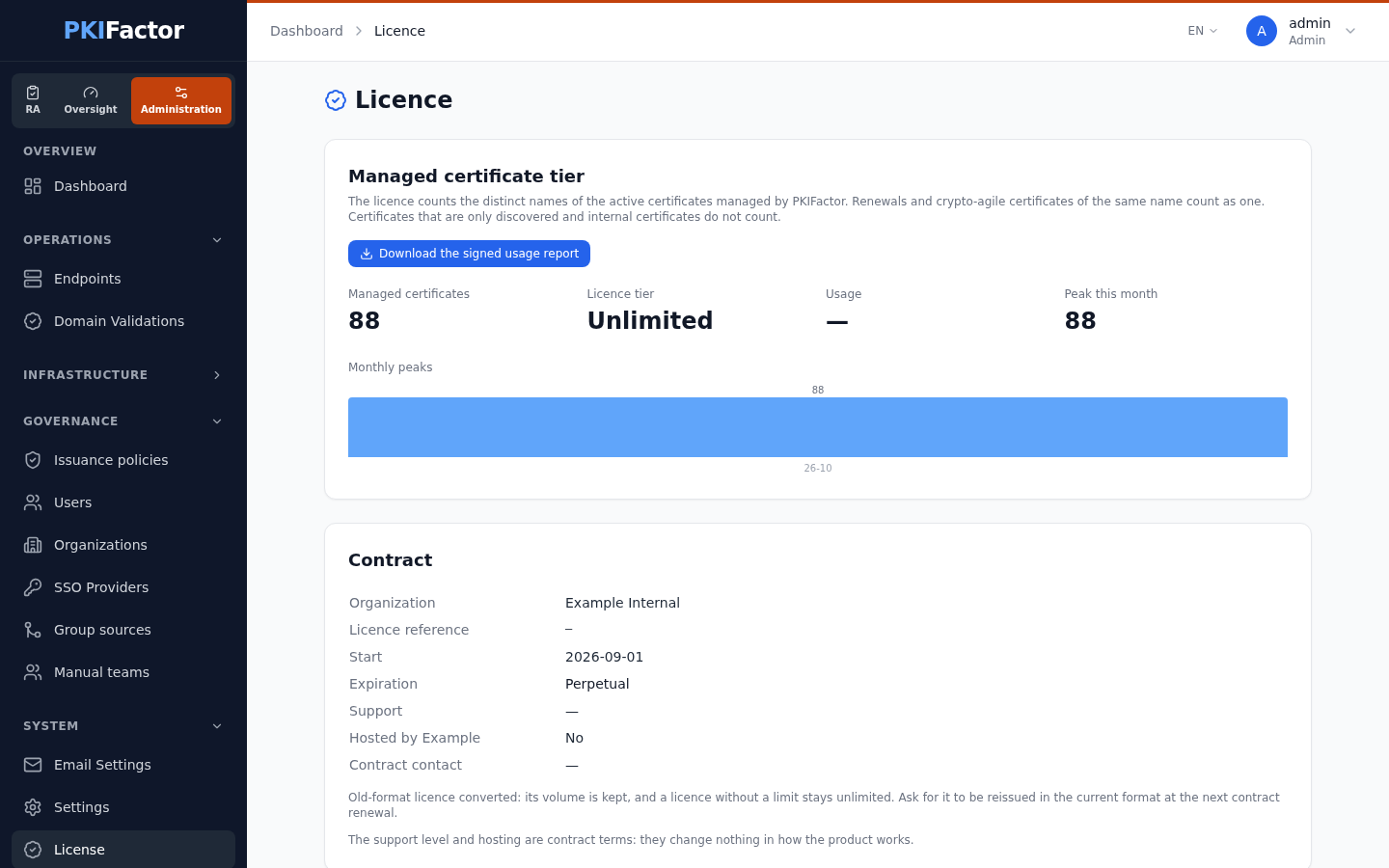
In the Administration workspace, System > License (page Licence, reserved for administrators) shows, from top to bottom:
- a status message when needed: evaluation days left, end date approaching or passed, no active licence, rebinding required, or key refused because it was issued for another installation;
- Managed certificate tier: Managed certificates (the count), Licence tier (the volume covered by the contract, or Unlimited), Usage (percentage), Peak this month, Alert thresholds, and the Monthly peaks over the last 12 months. The number of active certificates visible in the inventory is shown alongside, for comparison;
- Contract: Organization, Licence reference, Start, Expiration (or Perpetual), Support, Hosted by ZetaCert and Contract contact. Support level and hosting are contract terms: they change nothing in how the product works;
- This instance: Instance id, Node fingerprint, Created on, whether the licence is bound to this instance, and the nodes covered;
- the Licence request (to send to ZetaCert), with Copy request;
- Activate a license, with the License Key field;
- Database — schema: the state of the database migrations (current and expected revision), which run automatically at start-up.
PKIFactor records the monthly peak of the count. It is kept in two places, each protected by an integrity code, so deleting or editing one copy does not lower a peak.
The usage report (Download the signed usage report on the License page) exports the installation, the license, the count, the monthly peaks and the integrity of their records. It is signed by a key that belongs to the installation; ZetaCert checks it against the public key received with your license request.
Activate a license
From the interface
Open System > License:
- If you do not have a key yet, click Copy request under Licence request and send the block to ZetaCert. It contains the installation identifier, its fingerprint and the public key of the usage reports, nothing else. Nothing is sent automatically.
- Paste the key you receive (
ZETA-...) in License Key and click Activate.
Activation is recorded in the audit trail.
From the appliance command line
sudo pkifactor-ctl license request          # prints the request block, also saved to /opt/pkifactor/LICENSE-REQUEST.json
sudo pkifactor-ctl license activate ZETA-....
sudo pkifactor-ctl license import /tmp/license.key
sudo pkifactor-ctl license show
Via the API
# Sign in (session cookie kept in a file)
curl -s -c jar -X POST https://clm.example.com/api/auth/login \
  --data-urlencode "email=admin@example.com" --data-urlencode "password=$PKF_PASSWORD"

curl -s -b jar https://clm.example.com/api/admin/license                # status, volume, thresholds, end date
curl -s -b jar https://clm.example.com/api/admin/license/usage          # count, percentage, monthly peaks
curl -s -b jar https://clm.example.com/api/admin/license/usage-report   # signed usage report
curl -s -b jar https://clm.example.com/api/admin/license/request        # request block for ZetaCert
curl -s -b jar -X POST https://clm.example.com/api/admin/license/activate \
  -H "Content-Type: application/json" -d '{"license_key": "ZETA-..."}'
curl -s -b jar -X POST https://clm.example.com/api/admin/license/reload     # re-read the licence file
Evaluation, binding and recovery
- Evaluation: a new installation runs for 30 days without a license, with every function. The period starts when the installation is created and cannot be restarted; after it, without a license, issuance is refused.
- One license per installation: a key is bound to the installation that requested it. In high availability, one license covers the whole cluster.
- Restore or migration: on a new host, PKIFactor keeps working and asks for a rebinding within 15 days; ZetaCert reissues the key for the new installation at no cost.
- Clock protection: PKIFactor never trusts a system clock set back in time, so an expired license does not become valid again by changing the date, and issuance stays refused.
Licenses issued before October 2026
Older keys keep working: PKIFactor converts them when it loads them. A key that was not limited in volume stays unlimited (the page shows Unlimited, without percentage, alert or volume refusal); its end date still applies. Ask ZetaCert to reissue it in the current format at your next contract renewal.