Windows IIS
PKIFactor deploys server certificates to Windows servers running IIS without installing an agent. It connects over WinRM (PowerShell Remoting), imports the certificate into the machine store and binds it to an IIS site. The model is the same as for the other devices: a declared target, one binding per site, the same automation levels, D-X, daily digest and veto. Read How deployment works first.
Tested
Tested on Windows Server 2019 with IIS 10, NTLM over WinRM HTTPS with the WinRM certificate pinned, in both modes:
- JEA, with a domain account member of no group: the standard PowerShell session is refused to that account; connection test, list of sites, deployment, rotation (the site served the new serial number and the previous certificate left the store), discovery; deletion of a certificate still bound, or not imported by PKIFactor, refused by the server;
- administrator account: the same operations, and removal.
With PowerShell script block logging enabled on the server, no event contained the PKCS#12 file or its password.
How it works on the server
| Windows object | Role |
|---|---|
Machine store LocalMachine\My |
Holds the certificate and its private key, identified by its thumbprint |
| IIS site, HTTPS binding | Points at a certificate by thumbprint, on a port and optionally a host name (SNI) |
- Deploying builds a PKCS#12 file (certificate, key and chain) protected by a one-time password, sends it through PowerShell, imports it into
LocalMachine\My(the temporary file is deleted at once), then binds its thumbprint to the site's HTTPS binding. If the site has no HTTPS binding on that port, one is created. The file travels as a parameter and the password as a SecureString encrypted by the session, never in the text of a script: the server's PowerShell logs do not record them. The certificate's friendly name starts withPKIFactor. - Renewing imports the new certificate, rebinds the site, then deletes the previous certificate from the store, in that order: the site never stops serving. If the old certificate cannot be deleted, the renewal still succeeds and a warning is logged.
- Removing deletes the certificate from the store. In administrator mode the site's HTTPS binding stays, pointing at nothing: repoint it or remove it in IIS. In JEA mode the server refuses to delete a certificate still bound to a site.
Key custody: IIS needs the private key in the machine store, so PKIFactor generates the key and delivers it with the certificate (push_both). Key on the device is not available on this target: the binding form offers only Key generated by PKIFactor and pushed to the appliance.
Post-quantum certificates: Schannel, the Windows TLS stack, does not negotiate ML-DSA. In a crypto-agile group bound to an IIS site, the post-quantum member is reported as deferred, never as served.
Prerequisites
1. WinRM over HTTPS
Enable PowerShell Remoting with an HTTPS listener (port 5986) on the server. Give the listener a certificate whose name matches the host name PKIFactor will use, ideally issued by your internal CA:
# On the Windows server, as an administrator
Enable-PSRemoting -Force
$cert = Get-ChildItem Cert:\LocalMachine\My | Where-Object { $_.Subject -eq "CN=iis01.example.com" }
New-Item -Path WSMan:\localhost\Listener -Transport HTTPS -Address * -CertificateThumbPrint $cert.Thumbprint -Force
New-NetFirewallRule -DisplayName "WinRM HTTPS from PKIFactor" -Direction Inbound -Protocol TCP -LocalPort 5986 -RemoteAddress <PKIFactor address> -Action Allow
Check the authentication methods enabled on the WinRM service (Get-Item WSMan:\localhost\Service\Auth\*). PKIFactor supports ntlm, kerberos, credssp and basic; ntlm works with any account and is the simplest choice. Do not enable basic.
2. A deployment account: JEA (recommended) or administrator
Writing to the machine store and changing IIS bindings requires administrator rights on the server. Two ways to give them to PKIFactor:
| Mode | The PKIFactor account | What it can do on the server |
|---|---|---|
| JEA (Just Enough Administration, recommended) | A domain account with no administrator rights | Open one restricted endpoint that exposes seven PKIFactor functions, and nothing else: no script, no other command |
| Administrator | A domain account member of the local Administrators group | Anything an administrator can do over PowerShell Remoting |
JEA mode
The endpoint runs the functions under a local virtual account (administrator of that machine only, no password) or under a group managed service account (gMSA). The functions validate their parameters, import only into LocalMachine\My, and refuse to delete a certificate that PKIFactor did not import or that a site still uses.
- Create the domain account (or group) that PKIFactor will use, with no administrator rights.
-
On each server, as an administrator, put PKIFactorIIS.psm1 and Install-PKIFactorJEA.ps1 in the same folder, then run:
.\Install-PKIFactorJEA.ps1 -AllowedPrincipal 'EXAMPLE\svc-pkifactor-iis'
# or, to run the functions under a gMSA installed on the server:
.\Install-PKIFactorJEA.ps1 -AllowedPrincipal 'EXAMPLE\svc-pkifactor-iis' -GroupManagedServiceAccount 'EXAMPLE\gmsa-pkifactor$'
The script installs the
PKIFactorIISmodule and registers the endpointPKIFactor.IIS(this restarts the WinRM service).-Uninstallremoves both. 3. In PKIFactor, fill in JEA endpoint =PKIFactor.IISon the target.
The endpoint records no transcript, on purpose: a transcript would store the parameters, including the PKCS#12 file. Every call is still in the server's Windows event logs (who connected, which function), and in the PKIFactor audit trail.
The virtual account mode was tested; the gMSA option is a standard JEA setting that was not tested in our laboratory.
Administrator mode
Use a dedicated domain account, added to the local Administrators group of the servers PKIFactor manages:
Add-LocalGroupMember -Group Administrators -Member "EXAMPLE\svc-pkifactor-iis"
Local accounts are refused by default
With the default Windows settings, a local administrator account connecting over WinRM receives a filtered token without administrator rights (remote UAC filtering), and the connection is refused. Use a domain account. Turning off remote UAC filtering (LocalAccountTokenFilterPolicy) would make a local account work, but it weakens the server for every remote administration tool, and is not recommended.
An account with fewer rights (for example the account PKIFactor uses to request certificates from AD CS) is refused on the import into the machine store.
Declare the server
Administration > Operations > Endpoints, Add a target, connector type Windows server (IIS):
| Field | Value |
|---|---|
| Host | The server's name as it appears in its WinRM certificate |
| Service account, password | The deployment account, written DOMAIN\user |
| Active Directory domain | Optional when the account is written DOMAIN\user |
| WinRM authentication | ntlm (or the method enabled on the server); the form proposes credssp by default |
| WinRM port, WinRM over HTTPS | 5986, on |
| Verify the WinRM TLS certificate | On |
| WinRM certificate CA (PEM) | The CA that issued the WinRM listener's certificate, or that certificate itself to pin it. Better than turning verification off |
| IIS HTTPS port | The port of the binding to manage, 443 by default |
| Host name (SNI) | Optional: the host name of an SNI binding. Empty: the binding by port on all addresses |
| JEA endpoint | PKIFactor.IIS in JEA mode; empty in administrator mode |
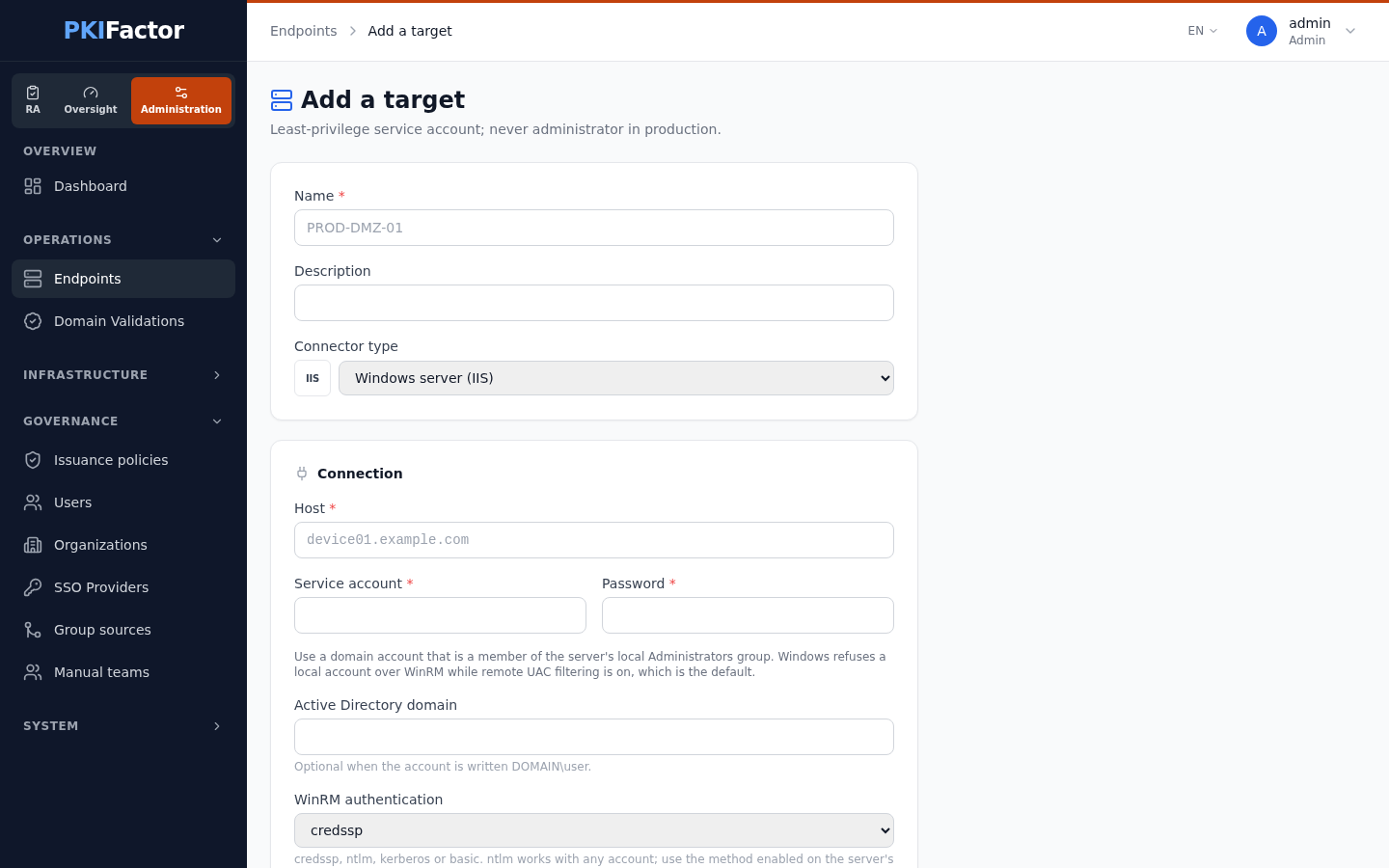
Test the connection opens a WinRM session and answers with the Windows version and the number of IIS sites. Connector messages are in French in this version, for example Windows joignable (Microsoft Windows Server 2019 Standard) — IIS présent (2 site(s)) — point de terminaison JEA PKIFactor.IIS. In JEA mode, an endpoint that does not answer like PKIFactor's is reported as an error. module IIS (WebAdministration) absent means that IIS or its management scripts are not installed.
The HTTPS port and the host name belong to the target: to manage bindings on two ports of the same server, declare two targets.
Deploy a certificate
From the target page, Add a binding:
| Field | Purpose |
|---|---|
| Certificate source | Issue from a template (PKIFactor generates the key), or an Existing certificate whose key PKIFactor holds |
| IIS site | The site whose HTTPS binding receives the certificate, chosen in the list of sites read from the server (or typed in, as shown in IIS Manager) |
| Key custody | Key generated by PKIFactor and pushed to the appliance (the only choice) |
| Automation | Full auto, Install, Provide only (ACME is listed too, for a server that renews itself with its own client, see below) |
| Renew (days before expiry), Intervention date (UTC, optional) | Renewal threshold and one-shot date |
Since version 1.8.49 the form has this single field, IIS site, instead of the F5 terms virtual server and profile. The HTTPS port and the host name come from the target, not from the binding.
Take over an existing server
Discover estate lists each HTTPS binding of each site with the certificate it serves (subject, issuer, expiry, thumbprint). Create a binding on each site to hand over its renewal to PKIFactor.
Verification
PKIFactor periodically reads the certificate bound to each managed site and compares it with the expected one. A certificate changed in IIS Manager, outside PKIFactor, is reported as drift and is not overwritten automatically.
Alternative: an ACME client on the server
When an organization prefers that servers fetch their own certificates, an ACME client for Windows (win-acme, Posh-ACME, Certify The Web) can use the PKIFactor ACME server instead of this connector. The certificate is then requested and renewed from the server, and PKIFactor sees it through the ACME profile. See ACME.
Troubleshooting
| Symptom | Cause and fix |
|---|---|
CERTIFICATE_VERIFY_FAILED |
The WinRM listener's certificate is not trusted: paste its CA, or the certificate itself, in WinRM certificate CA |
| authentification WinRM refusée : Failed to authenticate the user ... with ntlm | Wrong password, or a local account (see the warning above): use a domain account member of the local Administrators |
| Access denied on import | Administrator mode: the account is not a local administrator of the server |
| Accès refusé / Access denied (WSManFault, code 5) at the connection test | The account is not an administrator and no JEA endpoint is set, or it is not allowed on the endpoint: check JEA endpoint and the -AllowedPrincipal given at installation |
| le point de terminaison ... ne répond pas comme celui de PKIFactor | Wrong endpoint name, or another endpoint: run Get-PSSessionConfiguration on the server |
| Refusé : ... n'a pas été importé par PKIFactor or ... est encore lié à un site | JEA mode safety: delete or unbind that certificate by hand if it really must go |
| transport WinRM en échec, injoignable, timeout | Port 5986 closed between PKIFactor and the server, or no HTTPS listener |
| module IIS (WebAdministration) absent | Install IIS and its management scripts (Install-WindowsFeature Web-Server, Web-Scripting-Tools) |
| Site IIS introuvable (JEA) or objet introuvable on binding | The site name does not exist on the server: copy it from IIS Manager |
| The site serves the previous certificate | Another binding (other port, other host name) serves the site: check the target's IIS HTTPS port and host name |
Via the API
# Declare the server (JSON); the response gives the target id
curl -s -b jar -X POST https://clm.example.com/api/deployment-targets \
  -H "Content-Type: application/json" -d @- <<EOF
{"name": "iis01", "target_type": "windows_iis",
 "config": {"host": "iis01.example.com", "username": "EXAMPLE\\\\svc-pkifactor-iis",
            "password": "$IIS_PASSWORD", "auth": "ntlm", "port": 5986,
            "use_ssl": true, "verify_cert": true,
            "ca_cert": $(jq -Rs . < winrm-ca.pem), "https_port": 443,
            "jea_endpoint": "PKIFactor.IIS"}}
EOF
curl -s -b jar -X POST https://clm.example.com/api/deployment-targets/12/test
curl -s -b jar https://clm.example.com/api/deployment-targets/12/discover
# Bind: issue from profile 1 for the site "Default Web Site"
curl -s -b jar -X POST https://clm.example.com/api/deployment-targets/12/bindings \
  -H "Content-Type: application/json" \
  -d '{"template_id": 1, "common_name": "iis01.example.com",
       "client_ssl_profile": "Default Web Site", "virtual_server": "Default Web Site",
       "custody_mode": "push_both",
       "automation": "full_auto"}'
/api/v1/docs, tag deployment.