Audit trail
PKIFactor keeps two complementary records:
| Record | What it holds | Stored in | Integrity |
|---|---|---|---|
| Approval records | One record per certificate request, renewal or revocation that went through the approval logic, decided by a person or automatically, with a frozen copy of the request | The database | Each record carries the SHA-256 hash of its snapshot, which can be re-verified at any time |
| Security events | Every audited event: sign-ins, administrative changes, issuances, revocations, approvals, policy decisions, deployments, backups, key management, license | A JSON Lines file (audit.log), forwarded in real time to the SIEM when configured |
None of its own: rely on the SIEM for retention and tamper resistance |
Both are shown on one page. The audit trail is always available, with or without a license.
Who can see it
| Role | Access |
|---|---|
| Administrator | The page and both records, for all organizations |
| Auditor with the audit scope Whole estate (default) | The page and both records, for all organizations |
| Auditor with the audit scope Own organisations only | Approval records of their own organizations; no access to the security events, which cover the whole platform |
| Operator holding the Read the audit trail permission (granted by default) | The page, with the approval records of their own organizations; no access to the security events |
| Approver, user | None |
An administrator sets an auditor's scope on the Users page (Audit scope in the user's menu), and an operator's permissions on their Operating permissions page; see Users and roles.
Approval records
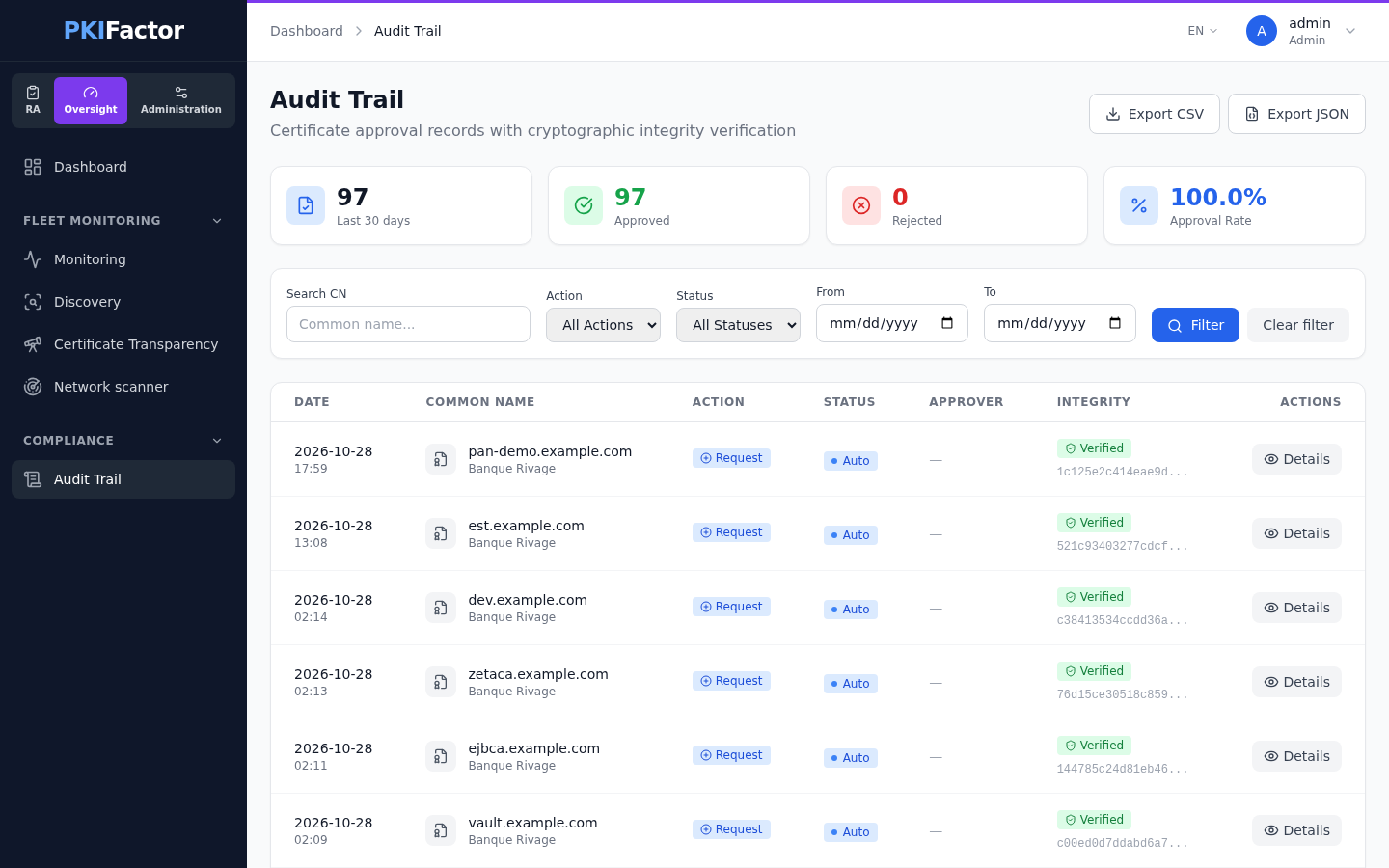
Administrators and auditors open the Oversight workspace, Compliance > Audit Trail. Operators find it in their Operations menu, Audit Trail.
The top cards give, for the last 30 days, the number of records, approved, rejected and the Approval Rate. The list shows 25 records per page.
| Filter | Content |
|---|---|
| Search CN | Part of the common name |
| Action | Request, Renew, Revoke |
| Status | Pending, Approved, Rejected |
| From / To | Date range |
Each row shows the date, common name and organization, action, status (Auto when no human decision was needed), the approver who decided, and the integrity state (Verified or Warning) with the beginning of the hash. Details opens the Audit Record Detail: metadata (requester, profile, PKI, names, protocol flow, policy rule when one applied), the Immutable Snapshot of the request and Verify Integrity.
Verify a record
Verify Integrity recomputes the SHA-256 hash of the stored snapshot and compares it with the stored hash.
- Integrity VERIFIED: the request data is the one recorded at submission.
- Integrity WARNING! "The hashes do not match. This record may have been tampered with.": the data was changed after the record was created. Treat it as a security incident: export the record, check the database access logs and the SIEM.
The same check runs automatically before any approval: a request whose snapshot no longer matches cannot be approved.
Export
Export CSV and Export JSON export the records matching the Action, Status and date filters (the CN search is not applied to the export).
| Format | Content |
|---|---|
| CSV | One line per record: approval_id, certificate_id, common_name, action, status, organization, created_at, decided_at, snapshot_hash, integrity_verified |
| JSON | The same records, plus exported_at, exported_by and total_records |
The export does not include the approver: open the record's details, or use the API, for that.
Security events
The Security events panel of the same page reads the security event log, most recent first (200 events at most). It is shown only to administrators and to auditors whose scope is Whole estate; for the others it reads "Failed to load.".
| Filter | Content |
|---|---|
| Type (e.g. POLICY_) | Part of the event name |
| Search… | Free text: names, actor, message |
| Incident reference | The full request identifier (trace_id), the same as in the operations logs |
| From (date) / To (date) | Date range (UTC) |
The log rotates every day at midnight and keeps 7 days by default (PKIFACTOR_LOG_RETENTION_DAYS). For longer retention and correlation, forward it to your SIEM (SIEM and syslog). An event that cannot be delivered to the SIEM is written to a dead-letter file and sent again later, never silently lost.
Format of an event
Each line is a JSON object. The event and its data are under context:
{"timestamp": "2026-10-26T09:14:02.512Z", "level": "INFO", "logger": "PKIFactor.AUDIT",
 "message": "[AUDIT] ADMIN_UPDATE_ROLE",
 "context": {"trace_id": "3f2a9c1e...", "event": "ADMIN_UPDATE_ROLE", "admin_id": 1, "target_id": 42,
             "actor": "admin@example.com"}}
actoris the person who acted (e-mail when known,systemfor background tasks).- Values whose name suggests a secret (password, secret, token, API key, private key, passphrase, credential) are replaced by
***REDACTED***, and so is any value that looks like a private key, whatever its name. - Line breaks in values are escaped, so an event cannot forge another line.
Main events
| Area | Events |
|---|---|
| Sign-in | LOGIN_SUCCESS, LOGIN_FAILED, LOGOUT, PASSWORD_CHANGED, PASSWORD_CHANGE_FAILED |
| Single sign-on providers | IDP_CREATED, IDP_UPDATED, IDP_TOGGLED |
| Users | ADMIN_CREATE_USER, ADMIN_UPDATE_ROLE, ADMIN_UPDATE_STATUS, ADMIN_RESET_PASSWORD, ADMIN_DELETE_USER, ADMIN_LINK_SSO |
| Organizations and teams | ADMIN_CREATE_ORG, ADMIN_UPDATE_ORG, ADMIN_DELETE_ORG, ADMIN_REMOVE_VALIDATOR, ORG_MEMBER_ADDED, ORG_MEMBER_REMOVED, ORG_MEMBER_PENDING_ADDED, ORG_GROUP_LINK_CREATED, ORG_GROUP_LINK_REMOVED, ORG_SYNC_FORCED, GROUP_SOURCE_CREATED, GROUP_SOURCE_UPDATED, GROUP_SOURCE_DELETED, TEAM_MANUAL_UPSERT |
| Profiles and authorities | ADMIN_CREATE_CLM_TEMPLATE, ADMIN_UPDATE_CLM_TEMPLATE, ADMIN_DELETE_CLM_TEMPLATE, ADMIN_SWITCH_CA, PKI_TEMPLATE_CREATED_MANUAL, PKI_TEMPLATE_UPDATED, PKI_TEMPLATE_DELETED |
| Certificates | CERTIFICATE_ISSUED, CERTIFICATE_REQUEST_PENDING, CERTIFICATE_APPROVED_ISSUED, CERTIFICATE_REJECTED, CERTIFICATE_REVOKED, CERTIFICATE_TRANSFERRED, CERT_PRIVATE_KEY_EXPORTED |
| Approvals | APPROVAL_CLAIMED, APPROVAL_RELEASED, APPROVAL_OVERRIDE (decision by an administrator who is not an approver of the organization), VALIDATOR_DELEGATION_CREATED, VALIDATOR_DELEGATION_REVOKED |
| Issuance policies | POLICY_BLOCK, POLICY_REQUIRE_APPROVAL, POLICY_AUTO_ALLOWED, POLICY_EVAL_ERROR |
| Platform | SETTINGS_UPDATED, LICENSE_ACTIVATED, LICENSE_RELOADED, BACKUP_CREATED, BACKUP_FAILED, RESTORE_COMPLETED, RESTORE_FAILED, KMS_CONFIG_UPDATED, KMS_DEK_ROTATED, BACKEND_RESTART, LOGS_PURGED |
| Deployment | DEPLOY_REFUSED, DEPLOY_HELD_DRIFT, DEPLOY_FAILED, RENEWAL_STUCK_REAPED and the other DEPLOY_ events |
| Integrations | SERVICENOW_INBOUND_REQUEST, SERVICENOW_INBOUND_REQUEST_REFUSED, SERVICENOW_INBOUND_AUTH_FAILED, SCEP_UNAUTHENTICATED_BLOCKED |
A failed local sign-in is recorded as LOGIN_FAILED (reason invalid_credentials); the account lockout itself is written to the authentication log of the backend.
Changes to the e-mail settings are not recorded in the audit trail in this version.
Via the API
# Approval records (filters: action, status, organization_id, validator_user_id,
# date_from, date_to as YYYY-MM-DD, search, limit up to 500, offset)
curl -s -b jar "https://clm.example.com/api/audit/approvals?status=REJECTED&date_from=2026-10-01"
curl -s -b jar https://clm.example.com/api/audit/approvals/88            # detail with snapshot
curl -s -b jar https://clm.example.com/api/audit/approvals/88/verify     # integrity check
curl -s -b jar -o audit.csv "https://clm.example.com/api/audit/approvals/export?format=csv&action=REVOKE"
curl -s -b jar "https://clm.example.com/api/audit/stats?days=90"         # 1 to 365 days

# Security events (administrators and auditors with the Whole estate scope)
# filters: event, q (free text), outcome (success or failure), actor, trace_id,
# date_from, date_to, limit up to 500
curl -s -b jar "https://clm.example.com/api/audit/events?event=LOGIN_FAILED&date_from=2026-10-25&limit=500"
verified, stored_hash, computed_hash, algorithm (SHA-256) and checked_by.
Troubleshooting
| Symptom | Cause and fix |
|---|---|
| The Security events panel is empty | The log file does not exist yet (fresh install) or no event matches the filters. Events older than the retention period (7 days by default) are only in the SIEM |
| An operator cannot open the Audit Trail page | The operator does not hold the Read the audit trail permission ("Permission d'exploitation manquante : audit.read"). An administrator grants it on the operator's Operating permissions page |
| The Security events panel reads "Failed to load." | Expected for operators and for auditors limited to their own organizations: the security events cover the whole platform |
| An export contains fewer records than the screen | The CN search is not applied to the export, but the other filters are: check Action, Status and dates |
| Integrity WARNING! on a record | The snapshot was modified in the database after submission. Investigate as an incident |
| Events are missing in the SIEM | Check the SIEM configuration and its counters; undelivered events wait in the dead-letter file and are replayed (SIEM and syslog) |