Directory sources
A directory source connects PKIFactor, in read-only mode, to your directory or identity provider. It is used to:
- link directory groups to organizations, so that group members become organization members;
- resolve a team address (distribution list) into its members;
- search people when an administrator or an organization manager attaches someone.
PKIFactor never writes to the directory. Users still sign in through single sign-on or a local account: a directory source does not authenticate anyone.
Source types
| Type | What PKIFactor reads | Required fields | Prerequisites on the directory side |
|---|---|---|---|
| LDAP / Active Directory | Groups, members, people search, a person's groups | Server, Service account (DN or UPN), Password, Search base | A read-only account that can read groups, users and their mail attribute. In Active Directory, a plain member of Domain Users is enough; never use a Domain Admin account |
| Microsoft Entra ID (Graph) | Same, through Microsoft Graph | Tenant ID, Application / client ID, Application / client secret | An app registration with the application permissions Group.Read.All, GroupMember.Read.All and User.Read.All, and administrator consent. Outbound HTTPS to login.microsoftonline.com and graph.microsoft.com |
| Keycloak | Same, through the administration API | URL, Users realm, Application / client ID, Application / client secret | A confidential client with a service account and the view-users and query-groups roles (client realm-management). Users need an e-mail address |
| Okta | Groups and users | Okta organisation URL, API token | An API token (SSWS) of a read-only account |
| Google Workspace | Groups and users, through the Directory API | Delegated administrator, Service account key (JSON) | A service account with domain-wide delegation (scopes admin.directory.group.readonly and admin.directory.user.readonly). A personal Gmail account does not work |
| SCIM 2.0 | Users and Groups | URL, Access token | Any identity provider exposing SCIM 2.0 for reading |
| Token groups (OIDC) | Nothing: the groups come from the sign-in token | None | The identity provider puts the groups in the token |
| Manual | Nothing: members are managed in PKIFactor | None | None |
Optional fields sit under Advanced options: certificate verification (Verify the server certificate, on by default, to disable only in a lab), a Trusted authority file for an internal CA, timeouts, page size. For LDAP they also include object classes, attribute names and search filters; for Keycloak, the realm of the administration client (often master) and a path prefix (/auth before Keycloak 17); for Entra ID, the API URL for a sovereign cloud.
Resolve nested groups is on by default for LDAP, Entra ID and Keycloak: members of sub-groups count as members of the linked parent group. For Okta it is off by default.
Add a source
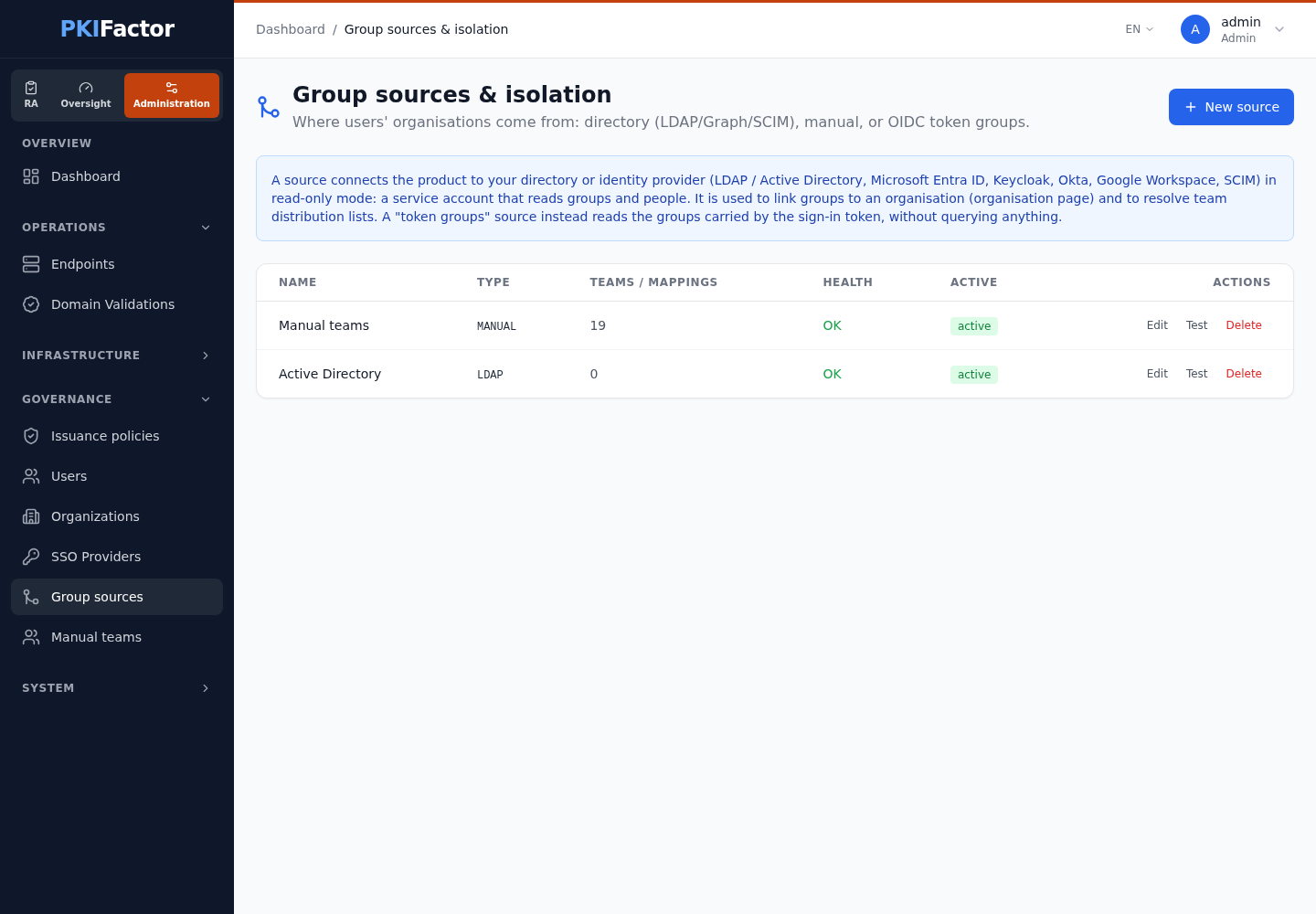
- Open Governance > Group sources (Administration workspace) and click New source. The list shows each source with its type, the number of teams or mappings, its Health (result of the last test: OK or KO) and whether it is active.
- Choose the type: the form shows the fields of that type; secrets are masked fields.
- Give the source a name and fill in the fields. A missing required field is named in the error message and nothing is created.
- Click Create, then Test on the source's row. The result reads OK: followed by the provider's message (with the number of readable groups when known) or Failed: with the reason. The secret is never shown.
When you edit a source, secret fields are empty with "(unchanged if left empty)": leave them empty to keep the stored value. Secrets are encrypted at rest and returned as *** by the API.
Sources are queried in priority order (default 100, lower first) when a team address is resolved. The priority is set under System > Settings, section Directory & Teams (field Priority, lower = higher priority), or through the API.
Example: Active Directory over LDAPS
A read-only service account is enough: any authenticated domain account can read groups and their members. In the laboratory used for these screenshots the source is set as follows:
| Field | Value |
|---|---|
| Server, Port | The domain controller by its name, dc01.example.com, port 636 (LDAPS; 389 for clear or StartTLS). Use the name that appears in the controller's certificate, not its address |
| LDAPS (or StartTLS) | On. Under Advanced options, Verify the server certificate on and Trusted authority file: a PEM file of the CA that issued the controller's certificate, readable by the backend (for example /app/data/ca/lab-root.pem, mounted read-only) |
| Service account (DN or UPN), Password | The service account, for example svc-pkf-ro@example.com |
| Search base | The branch that holds the groups, for example OU=pkifactor,DC=example,DC=com |
| Schema | AD (or OPENLDAP); Resolve nested groups on, so that members of a sub-group are found |
Test answers Connected to dc01.example.com, groups accessible.
Token groups (OIDC)
A token-group source reads the groups present in the OIDC token at each sign-in. To use it, link group values to organizations on the organization page: type the value exactly as it appears in the token. The membership is granted at sign-in and withdrawn at the next sign-in once the value is gone.
The groups are read from the groups claim of the token. The Claim name field of the source (default groups) and its Prefix to remove apply only to the older Mappings below; for the links on the organization page they are not used: to read another claim (for example realm_access.roles with Keycloak), set "groups" in the identity provider's claim mapping, which is done through the API (Single sign-on).
The Mappings button of a token-group source manages an older form of the same mechanism (group value to organization). Prefer the links on the organization page.
Link groups to organizations
Groups are linked on each organization's page, panel Linked directory groups: see Organizations and teams. The group search works on groups with or without an e-mail address.
Members are resolved by e-mail address. Are not attached:
- a directory member without an e-mail address;
- a disabled or suspended account (Active Directory, Entra ID, Keycloak, Okta, Google Workspace; the SCIM connector does not check the
activeattribute, so deactivate such accounts in PKIFactor too); - a person who has no account in PKIFactor yet: they are attached automatically at their first sign-in.
Delete a source
Deletion is refused while teams or mappings were resolved from the source. Deleting a source also deletes the organization links that use it: check the organization pages first.
Tested
On 25 October 2026, sources were run against real directories by script: Keycloak 26 (18 checks), Active Directory on Windows Server 2016 (26 checks: LDAPS and StartTLS, groups with and without e-mail, nested groups, people search with special characters, unreachable directory) and Microsoft Entra ID on a real tenant (18 checks, then the full path through the screens). Defects found were fixed in 1.8.15 (Active Directory nested groups) and 1.8.17 (Entra ID disabled accounts were attached).
Not tested against a real directory: Okta, Google Workspace and SCIM 2.0 (connectors tested with a simulated transport only), and the Token groups source. Behavior on directories of tens of thousands of people has not been measured.
Via the API
curl -s -b jar https://clm.example.com/api/admin/teams/source-types   # types and their fields
curl -s -b jar https://clm.example.com/api/admin/teams/sources        # list

# Create: config is a JSON object passed as a string
curl -s -b jar -X POST https://clm.example.com/api/admin/teams/sources \
  -H 'Content-Type: application/json' \
  -d '{"name": "Corporate AD", "type": "LDAP", "priority": 100,
       "config": "{\"host\": \"dc1.corp.example\", \"port\": 636, \"use_ssl\": true, \"bind_dn\": \"svc-pkifactor@corp.example\", \"bind_password\": \"...\", \"base_dn\": \"DC=corp,DC=example\", \"schema\": \"AD\"}"}'

curl -s -b jar -X POST https://clm.example.com/api/admin/teams/sources/2/test
curl -s -b jar "https://clm.example.com/api/admin/group-sources/2/groups?q=fin"   # group search
LDAP, MS_GRAPH, KEYCLOAK, OKTA, GOOGLE_DIRECTORY, SCIM, OIDC_CLAIM, MANUAL.
Creating, changing and deleting a source are audited (GROUP_SOURCE_CREATED, GROUP_SOURCE_UPDATED, GROUP_SOURCE_DELETED).
Troubleshooting
| Symptom | Cause and fix |
|---|---|
| Test fails on Entra ID with HTTP 403 | Permissions granted as Delegated instead of Application, or administrator consent missing. Grant the three application permissions and consent |
| Test fails on LDAPS | The domain controller's certificate is signed by an internal CA: provide the Trusted authority file. Disable verification only in a lab |
| Test fails on Keycloak 16 or earlier | Set the path prefix /auth under Advanced options |
| A group member does not appear in the organization | The person has no e-mail address in the directory, the account is disabled, or the person has never signed in to PKIFactor |
| Members of a sub-group are missing | Resolve nested groups is off for this source. For LDAP, upgrade to 1.8.15 or later |
| A group link shows "error" after a password change | The service account secret changed. Edit the source, enter the new secret, Test, then Resync the organization. Nobody was removed in the meantime |
| Token groups give no membership | The value linked on the organization page does not match the token exactly, or the groups are in another claim than groups (set the claim mapping of the identity provider) |
| Deleting a source is refused | Teams or mappings were resolved from it. They must be removed first |