Monitoring and health
This page lists what to watch on a running PKIFactor platform: the health endpoints for your load balancer and monitoring tool, the Monitoring page of the interface, the logs and the pkifactor-ctl commands.
PKIFactor does not expose a metrics endpoint (no Prometheus /metrics). Monitor it with the health endpoints, the container health, the logs and the audit trail forwarded to your SIEM.
Health endpoints
Every service answers two unauthenticated probes. Through nginx, on the CLM name:
curl -sk https://clm.example.com/health/live
curl -sk https://clm.example.com/health/ready
| Endpoint | Checks | Answers |
|---|---|---|
/health/live |
The process is running | HTTP 200 {"status": "alive"} |
/health/ready |
The database answers and the database schema is in place, then the state of the key management service | HTTP 200 {"status": "ready", ...} when everything is fine |
| KMS unavailable | HTTP 200 {"status": "degraded", ...} (read-only mode) |
|
| Database unreachable | HTTP 503 {"status": "not_ready", ...} |
|
| Schema migration failed at start-up | HTTP 503 {"status": "not_ready", "reason": "schema_error", ...} |
Use /health/ready for load balancer health checks: a node whose database or schema is not usable answers 503 and leaves the pool. Do not use /health/ (no such route). The detail of a schema error is not published on this anonymous endpoint: administrators see it on System > License (Administration workspace) and in the backend log.
Degraded is not down
A KMS outage returns HTTP 200 with "status": "degraded", so that the load balancer keeps the node (reading and signing in still work). Have your monitoring tool alert on the content of the answer, not only on the status code. In degraded mode, operations that need new secrets (issuance, revocation) are refused until the KMS returns (KMS and HSM).
The protocol gateways have their own probes, reachable on their names when they are enabled:
| Gateway | Probes | What /health/ready checks |
|---|---|---|
ACME (https://acme.example.com) |
/health/live, /health/ready |
Its database and its schema |
EST (https://est.example.com) |
/health/live, /health/ready |
Its database |
CMP (https://cmp.example.com) |
/health/live, /health/ready |
The process only |
SCEP (https://scep.example.com) |
/health/live, /health/ready |
The process only |
Container health
Each container has a Docker health check; restart: always restarts a container that stops.
| Container | Health check |
|---|---|
pkifactor_db (single node) |
pg_isready |
pkifactor_backend, pkifactor_backend_worker |
/health/ready on port 8000 |
pkifactor_frontend |
/health/live on port 8080 |
pkifactor_acme, pkifactor_est, pkifactor_cmp, pkifactor_scep |
/health/ready on their port (8001 to 8004) |
pkifactor_nginx |
nginx -t (configuration valid) |
sudo pkifactor-ctl status
prints the version, every container with its state and health (healthy, starting, unhealthy), the disk usage (images, volumes, data directory) and the license. Every service must be healthy.
sudo pkifactor-ctl check
runs system checks: Docker running, configuration file present, images loaded, TLS certificate of the platform present (with its expiry date), free disk space on /opt/pkifactor (warning under 5 GB, error under 1 GB), firewall and SELinux state. It returns a non-zero exit code when a check fails, so it can be called from a monitoring agent.
In high availability, add:
sudo pkifactor-ctl ha-status
which shows the Patroni members (leader, synchronous replica, lag), the health of every etcd member and the database PgBouncer points to (High availability).
The Monitoring page
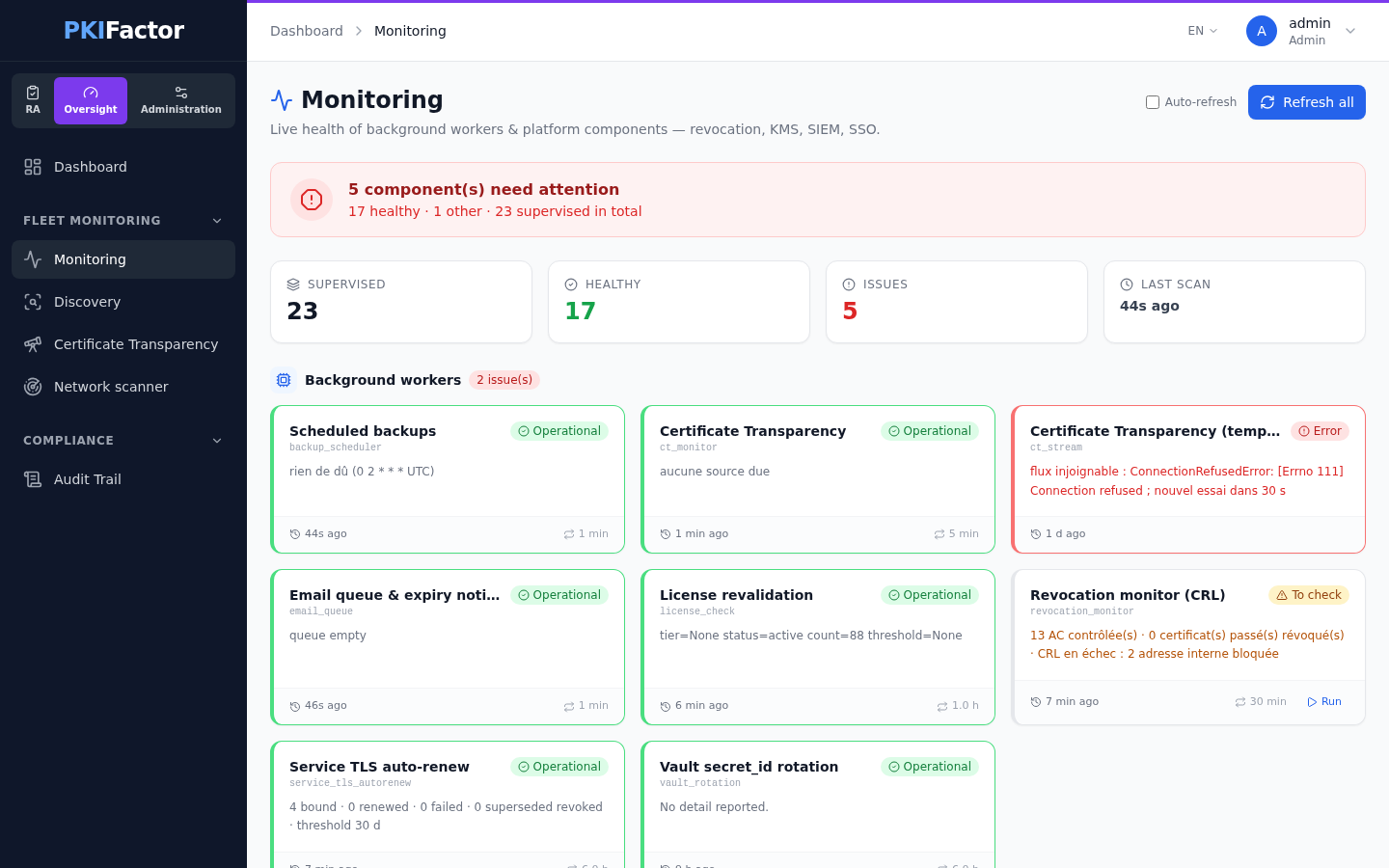
Fleet monitoring > Monitoring, in the Oversight workspace (administrators only; auditors do not see it), shows the live state of the background jobs and of the components PKIFactor depends on. Refresh all probes them now; otherwise they are refreshed by the revocation monitor, every 30 minutes by default. Ticking Auto-refresh reloads the page every 30 seconds.
| Section | Content |
|---|---|
| Background workers | Each job with its interval, last run, last status and detail: e-mail queue and expiry notices, revocation monitor, service certificate renewal, scheduled backups, license revalidation, Certificate Transparency monitoring, Vault secret rotation. Some jobs (service certificate renewal, revocation monitor) can be run on demand |
| Revocation, CRL | For each authority that publishes a CRL: reachable, signature valid (or the reason of the failure), number of revoked certificates, next update, stale CRL |
| Revocation, OCSP | For each authority: OCSP responder answer and signature |
| KMS / Encryption | Reachability of the active key management provider |
| SIEM / Syslog | State of the forwarding connection |
| SMTP / Email | State of the mail server |
| SSO / OIDC | Reachability of each identity provider |
In high availability a single worker runs the background jobs, elected among the nodes through a lock in the database; if its node stops, another node takes over.
What to monitor
| Item | How | Alert when |
|---|---|---|
| Platform availability | GET /health/ready on the CLM name (or each node) |
Not HTTP 200 |
| KMS reachability | Content of /health/ready, KMS / Encryption section of the Monitoring page |
"status": "degraded" |
| Containers | pkifactor-ctl status, or docker ps with health |
A container unhealthy or restarting |
| Database (high availability) | pkifactor-ctl ha-status |
No leader, no synchronous replica, growing lag, an etcd member unhealthy |
| Background jobs | Background workers section of the Monitoring page | A job in error, or a last run older than its interval |
| Disk | pkifactor-ctl check, your usual host monitoring |
Less than 5 GB free on /opt/pkifactor |
| Managed certificates | Dashboard, expiry notices by e-mail (E-mail and notifications) | Certificates entering their expiry window without renewal |
| Deployments | Bindings in Failed or Drift state, deployment alerts (How deployment works) | Any failed binding |
| Platform TLS certificate | pkifactor-ctl tls show or check |
Expiry approaching (Service certificates) |
| License | System > License (License) | End date approaching, contracted volume reached; refused issuances (LICENSE_ISSUANCE_REFUSED) once the volume is exceeded or the license has expired |
| Backups | The Scheduled backups job of the Monitoring page, files in /opt/pkifactor/data/backups/ |
Last backup failed or too old (Backup and restore) |
| Security events | Audit trail forwarded to your SIEM (SIEM) | According to your rules (sign-in failures, lockouts, private key exports...) |
Logs
Container output
Every service writes its log to its standard output, read with:
sudo pkifactor-ctl logs                   # all services, followed
sudo pkifactor-ctl logs backend           # one service
sudo pkifactor-ctl logs backend_worker    # background jobs (backend-worker on a high-availability node)
docker logs --since 1h pkifactor_backend  # a time window
Service names: db (single node), backend, backend_worker, frontend, nginx, acme, est, cmp, scep; in high availability also etcd, patroni, pgbouncer.
Log files of the backend
The backend and the worker also write files into the Docker volume pkifactor_audit_logs, mounted at /app/backend/logs in both containers:
| File | Content |
|---|---|
audit.log |
Audit trail, always JSON Lines |
auth.log |
Sign-in and authentication |
api.log |
API activity |
pki.log |
Authority operations |
credential.log |
Credential handling |
db.log |
Database |
server.log |
Server events |
access.log |
HTTP access (health probes excluded) |
error.log |
Errors of every component |
Files rotate at midnight and are kept 7 days (PKIFACTOR_LOG_RETENTION_DAYS). For longer retention, forward the audit trail to your SIEM.
docker exec pkifactor_backend tail -n 50 /app/backend/logs/error.log
Format
The backend logs are JSON, one object per line, with timestamp (UTC), level, logger, message and, when known, a context with the request trace_id, the user and the client_ip. Warnings and errors also carry src (source file, line and function) and, for an exception, exception:
{"timestamp": "2026-10-26T09:14:02.511Z", "level": "INFO", "logger": "PKIFactor.API", "message": "...", "context": {"trace_id": "...", "user": "alice@example.com", "client_ip": "203.0.113.25"}}
Before they are written, private keys, certificate requests, tokens and values of fields such as password, secret or api_key are replaced by [REDACTED] markers. The same message repeated more than 10 times in a minute is written once with the number of omitted occurrences (errors are never omitted, and the audit trail is never shortened).
The log level is set in System > Settings, Logging section (Administration workspace), and applies immediately, without a restart. The same section chooses the Log Format (JSON, the default of the platform, or text), which takes effect after a restart of the backend (Restart Backend in the same page), and offers Purge Now to delete the rotated files older than the retention period.
nginx
nginx writes access.log and error.log into the Docker volume pkifactor_nginx_logs (/var/log/nginx in the container). Requests to the health probes are not logged.