Single sign-on (OIDC)
PKIFactor accepts sign-in through any OpenID Connect identity provider (Keycloak, Microsoft Entra ID, Okta, Google and others). Providers are configured in PKIFactor's database, with the client secret encrypted at rest. Several providers can be active at the same time; each one gets a button on the sign-in page.
SAML is not supported.
What single sign-on decides, and what it does not
| Decided by the identity provider | Decided by PKIFactor |
|---|---|
Who the person is (the sub claim, plus e-mail and name) |
The role: every new SSO account starts as User; an administrator changes it (Users and roles) |
| The groups carried by the token, if you use them | Whether the account is active: a deactivated account cannot sign in, even with a valid token |
| Organization membership, from linked directory groups, token groups or manual attachment (Organizations and teams) |
1. Create the client in the identity provider
Create a confidential OIDC client (authorization code flow) and register this redirect URI:
https://clm.example.com/sso/callback/<slug>
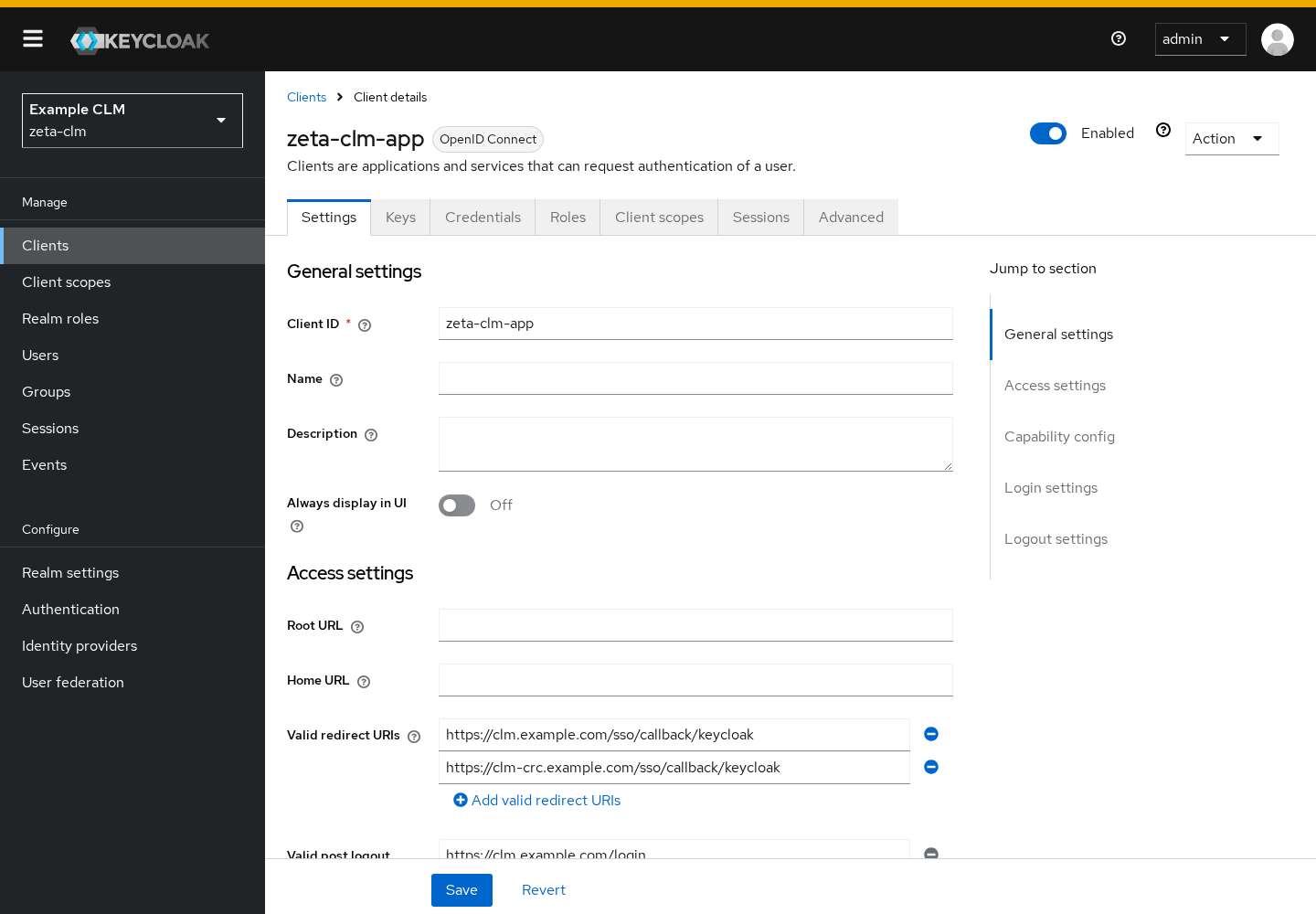
<slug> is the short identifier you will give the provider in PKIFactor (for example keycloak-prod). For single logout, also allow https://clm.example.com/login as post-logout redirect URI.
Example with Keycloak: realm zeta-clm, client zeta-clm-app, client authentication on, standard flow on, valid redirect URI https://clm.example.com/sso/callback/keycloak-prod.
2. Declare the provider in PKIFactor
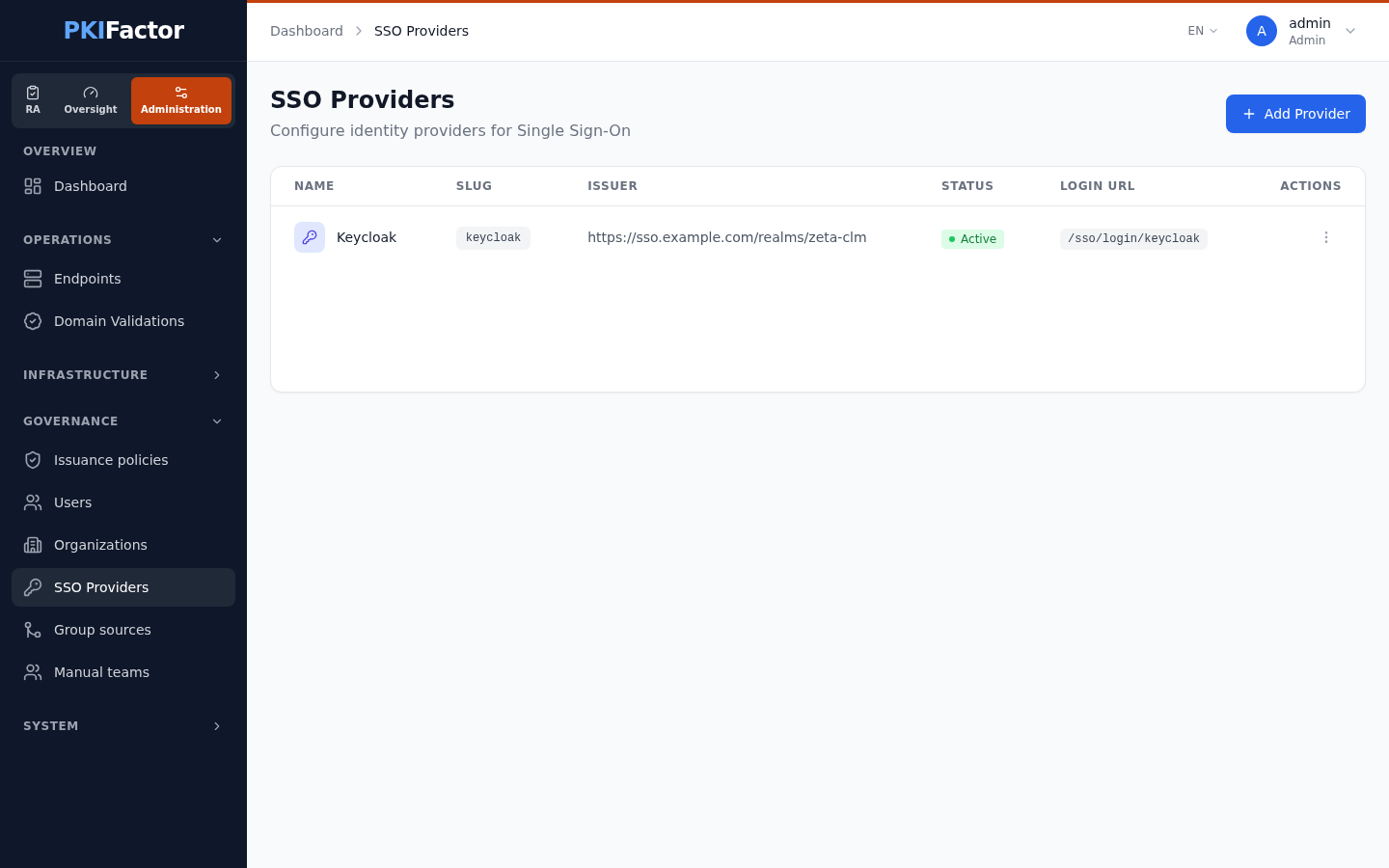
Open Governance > SSO Providers (Administration workspace) and click Add Provider. The form shows the redirect URI to register in the provider and, once the slug is set, the Login URL to share with users.
| Field | Content |
|---|---|
| Provider Name | Label of the button on the sign-in page |
| Slug | Short identifier used in the URLs (/sso/login/<slug>, /sso/callback/<slug>) |
| Issuer URL | Must equal the iss claim of the tokens, for example https://sso.example.com/realms/zeta-clm |
| Client ID / Client Secret | From step 1. The secret is encrypted at rest and never displayed again; when editing, leave it empty to keep it |
| Authorization Endpoint, Token Endpoint, UserInfo Endpoint, JWKS URI | From the provider's .well-known/openid-configuration document |
| End Session Endpoint | Optional; enables single logout |
| Scopes | Space-separated; default openid profile email |
| Token Auth Method | client_secret_post (default) or client_secret_basic |
| Emails from this IdP are proof of identity | No (only emails the IdP marks as verified count) or Yes (corporate directory, addresses cannot be chosen by users). See E-mail address as proof of identity |
| Email domains allowed for this IdP | Optional, comma-separated. An address outside these domains is never proof of identity. Empty: no restriction |
The provider's endpoints must use HTTPS. Plain HTTP is accepted only for a loopback address, or when the operator sets SSO_ALLOW_HTTP=1 (lab only).
TLS / mTLS, back channel to the IdP: PKIFactor calls the token, JWKS and userinfo endpoints directly. Fill this section only if the provider uses a private CA (paste the full chain, root and intermediates, in CA chain to trust (PEM)) or requires a client certificate (mTLS client certificate and mTLS private key). Keep Verify the IdP certificate on Yes (recommended); No (lab only) disables verification.
Save. The list shows the provider with its issuer, status and login URL. Disable removes its button from the sign-in page without deleting it.
3. Sign in
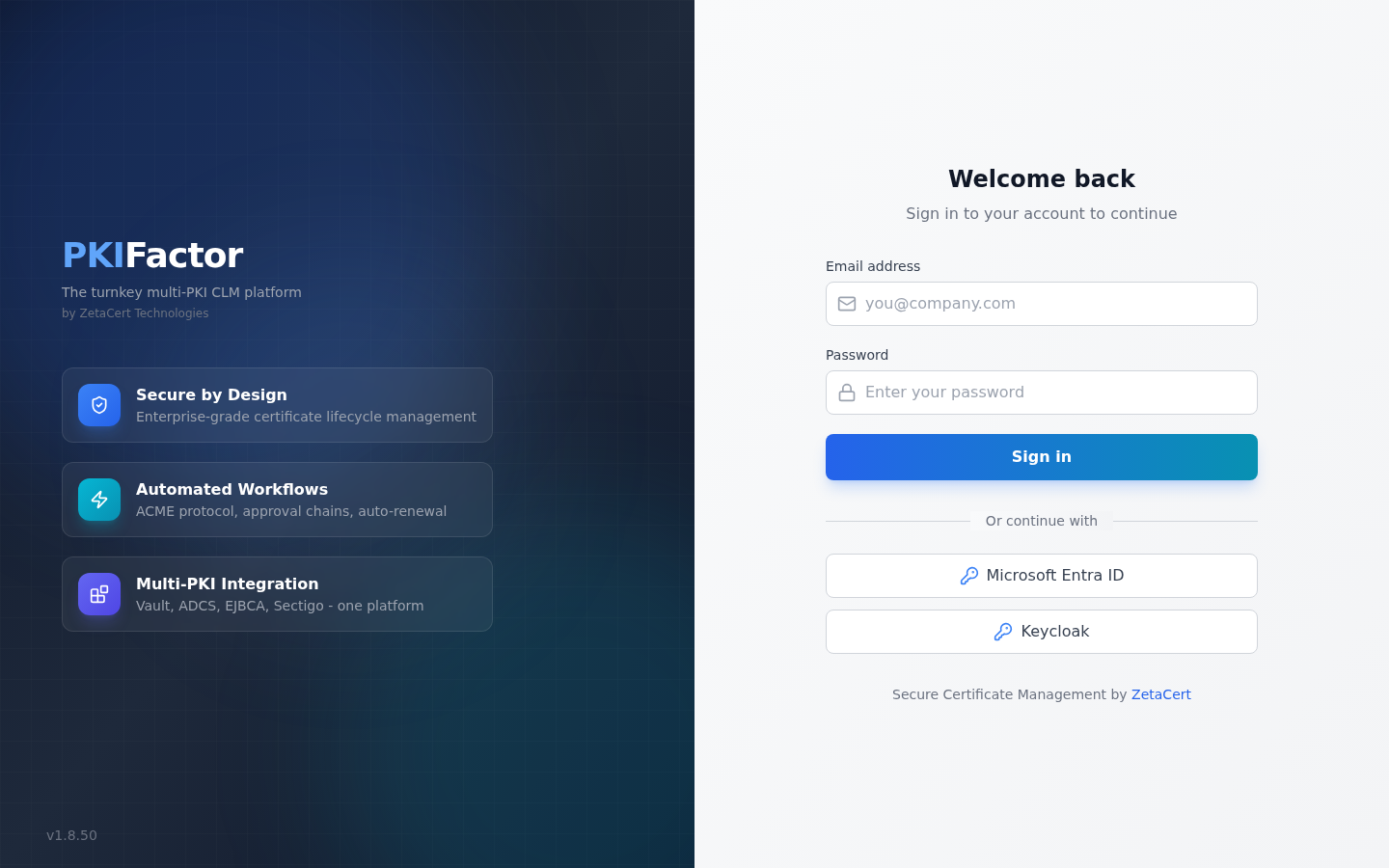
On the sign-in page, the user clicks the provider's button (or opens https://clm.example.com/sso/login/<slug>).
At the first sign-in, PKIFactor creates the account with the User role and links it to the provider by its sub. Then, if the e-mail address is proof of identity (see below):
- the organization memberships prepared for this e-mail address while the person had never signed in are activated;
- memberships from linked directory groups and token groups are recomputed;
- the person is attached to directory teams they belong to.
Token groups are applied in every case; the steps that rely on the e-mail address are skipped when the address is not proof of identity.
E-mail address as proof of identity
An e-mail address carried by the token counts as proof of identity only when it is within the provider's Email domains allowed for this IdP (if set) and either the token carries email_verified = true or the provider is declared with Emails from this IdP are proof of identity: Yes. Otherwise the address does not become the account's address (the account is created with an internal identifier instead), and it opens no automatic attachment: pending organization memberships stay pending and directory lookups by address are not made. This prevents a provider where users choose their own address from claiming someone else's memberships. Declare Yes only for a provider backed by a corporate directory.
The same membership check runs at every sign-in. A directory that cannot be reached never blocks the sign-in.
Existing local accounts
PKIFactor never links an SSO identity to an existing account by e-mail. If the token's e-mail is proof of identity and matches an existing account (a local account, or an account of another provider), the sign-in is refused with the generic message "Authentication failed. Please check your credentials." and the reason is written in the backend log.
To move an existing local account to single sign-on, open Governance > Users, use Link to SSO in the account's action menu, choose the provider and enter its SSO identifier (sub). The initial administrator and the service accounts cannot be linked: they stay local as emergency access.
Sign-out
When an End Session Endpoint is set, signing out through /sso/logout/<slug> revokes the PKIFactor session and redirects to the provider's logout, then back to the PKIFactor sign-in page.
Claim mapping
By default PKIFactor reads sub (identity), preferred_username then username, upn or email (display name), email, and groups. A provider can override these keys with a JSON claim mapping, set through the API only:
{"external_id": "sub", "username": "preferred_username", "email": "email", "groups": "realm_access.roles"}
The groups key decides which claim feeds the token groups.
Security of the flow
| Control | Detail |
|---|---|
| PKCE | S256 challenge on every authorization request |
| State and nonce | Random, kept 5 minutes in HttpOnly, Secure, SameSite=Lax cookies; the nonce must match the ID token |
| ID token signature | Verified with the provider's JWKS keys (cached one hour); RS256, RS384, RS512, ES256, ES384, ES512 |
| Audience and issuer | aud must contain the client ID; iss must equal the configured issuer |
at_hash |
Checked when present |
| Final gate | The PKIFactor account must be active |
Creating, changing, enabling and disabling a provider are recorded (IDP_CREATED, IDP_UPDATED, IDP_TOGGLED). Successful and failed SSO sign-ins are recorded in the audit trail (LOGIN_SUCCESS, LOGIN_FAILED with auth_method sso) and forwarded to the SIEM.
Tested
Sign-in through Keycloak (realm and confidential client, provider declared in the database, secret encrypted) was tested end to end on the OpenShift deployment.
Not tested in real conditions: sign-in through Microsoft Entra ID, Okta or Google, and single logout.
Via the API
curl -s -b jar https://clm.example.com/api/admin/identity-providers        # list
curl -s -b jar -X POST https://clm.example.com/api/admin/identity-providers \
  -H 'Content-Type: application/json' \
  -d '{"name": "Corporate SSO", "slug": "keycloak-prod",
       "issuer": "https://sso.example.com/realms/zeta-clm",
       "client_id": "zeta-clm-app", "client_secret": "...",
       "authorization_endpoint": "https://sso.example.com/realms/zeta-clm/protocol/openid-connect/auth",
       "token_endpoint": "https://sso.example.com/realms/zeta-clm/protocol/openid-connect/token",
       "userinfo_endpoint": "https://sso.example.com/realms/zeta-clm/protocol/openid-connect/userinfo",
       "jwks_uri": "https://sso.example.com/realms/zeta-clm/protocol/openid-connect/certs",
       "end_session_endpoint": "https://sso.example.com/realms/zeta-clm/protocol/openid-connect/logout",
       "scopes": "openid profile email",
       "email_trusted": false, "allowed_email_domains": "example.com",
       "claim_mapping": "{\"groups\": \"realm_access.roles\"}"}'
curl -s -b jar -X PATCH "https://clm.example.com/api/admin/identity-providers/1/toggle?is_active=false"
curl -s https://clm.example.com/api/sso/providers                          # public: active providers
claim_mapping is a JSON object passed as a string. Link a local account (form fields): POST /api/users/{id}/link-sso with identity_provider_id and external_id.
Troubleshooting
| Symptom | Cause and fix |
|---|---|
| The provider rejects the redirect | The redirect URI registered in the provider does not match https://clm.example.com/sso/callback/<slug> exactly (scheme, host, slug) |
| "Authentication failed" after returning from the provider, for a new person | The token's e-mail belongs to an existing account. Use Link to SSO on that account, or remove the duplicate. The backend log shows link_refused |
| "Authentication failed" for everyone | Usually the issuer (must equal iss exactly, including the trailing part), the client ID (audience), the JWKS URI, or the client secret. The backend log names the failed check (issuer_mismatch, audience_mismatch, id_token_verification_failed, token_response_error) |
| "Account Disabled" | The PKIFactor account is deactivated. Reactivate it under Governance > Users |
| The provider cannot be saved: HTTPS required | An endpoint uses http://. Use HTTPS; SSO_ALLOW_HTTP=1 is for a lab only |
| Token or JWKS calls fail with a TLS error | The provider uses a private CA: paste the full chain in CA chain to trust (PEM) |
| No SSO button on the sign-in page | The provider is disabled: Enable it in the list |
| A new SSO user does not get the organizations prepared for their address | The token's e-mail is not proof of identity: the provider does not send email_verified = true, the address is outside Email domains allowed for this IdP, or the provider is not declared as a source of trusted addresses. Fix the provider setting, or attach the person by hand |
| A new SSO user sees no profile | Expected until the person belongs to an organization: link a directory or token group, or attach the person |