Issuance policies
Issuance policies are rules evaluated on every certificate request, across all profiles, that can require approval or block a request according to its context: names, wildcard, environment, key algorithm, profile, organization. They complement the rules of each certificate profile.
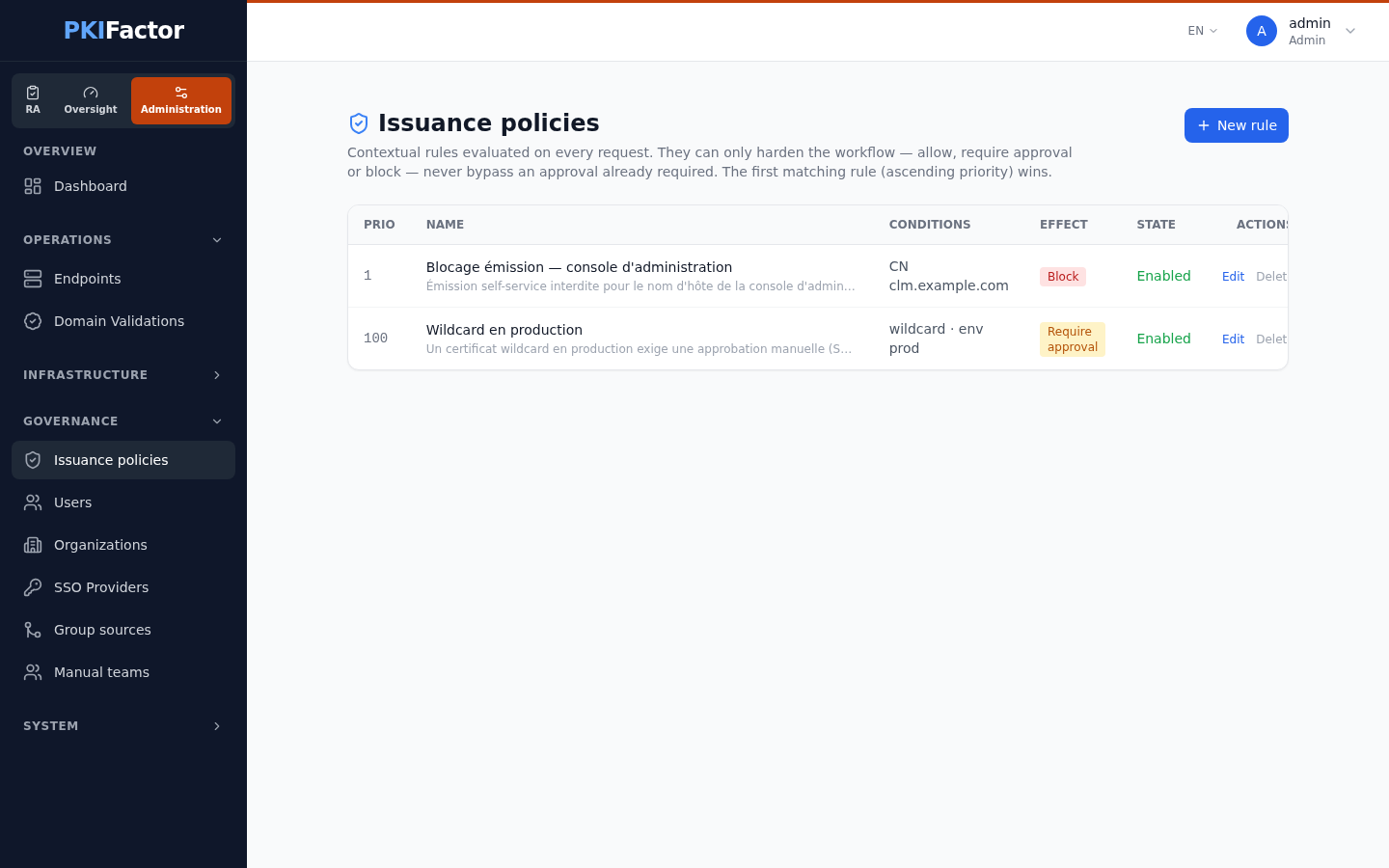
Manage them in the Administration workspace, Governance > Issuance policies. The page and its API are reserved to administrators.
Principles
- The first matching rule wins. Enabled rules are evaluated by ascending Priority (then by creation order). If no rule matches, the request is allowed.
- A rule can only harden. Effects are Require approval, Block and Allow (exempt). None of them removes an approval that the profile already requires. Allow only stops the evaluation, so that later rules do not apply to the requests it matches.
- Block applies everywhere: web interface, API, and requests arriving through ACME, EST, SCEP and CMP, at issuance and at renewal.
- Require approval applies to interactive requests only. A request counts as a protocol request when it actually arrives through the ACME, EST, SCEP or CMP gateway (not merely because the profile accepts one of these protocols). On a protocol request there is nobody to approve: the request goes through and the audit trail records
POLICY_AUTO_ALLOWEDwith the outcomefailure, so that a skipped human check stands out in the SIEM. - Renewal. Blocking rules always apply at renewal, so a name that has become forbidden stops renewing. Require approval rules apply at renewal only when the renewal changes the identity of the certificate (a different CN, or a SAN that the previous certificate did not have): such a renewal is treated like a new request for those names. A renewal with the same names stays automatic.
- Fail-closed at issuance. If the rules cannot be evaluated (database error, for example),
POLICY_EVAL_ERRORis recorded; an interactive request is sent to approval, and a protocol request (ACME, EST, SCEP, CMP) is refused, since nobody could approve it. The client can retry later. - Bounded tolerance at renewal. If the rules cannot be evaluated during a renewal, the renewal goes through only when the certificate is close to its expiry (7 days by default, set by the
POLICY_RENEW_FAILOPEN_DAYSenvironment variable of the backend; an already expired certificate counts as close). Other renewals are refused and retried later. The error is recorded in both cases.
Rule conditions
All the conditions you fill in must match (logical AND); an empty condition matches everything.
| Field | Matches when | Example |
|---|---|---|
| CN pattern (glob) — empty = all | The CN or any SAN matches the pattern (case-insensitive). The names are those of the request and those of the CSR | *.prod.example.com |
| Wildcard | Yes (wildcard only): a name starts with *.. No (non-wildcard only): none does. Any |
Yes |
| Environment (comma list or 'any') | The environment deduced from the names is in the list | prod,preprod |
| Algorithm (prefix) — empty = all | The key algorithm starts with the value (case-insensitive). ECC, ECDSA and EC all match any elliptic-curve key. When the request carries a CSR, the algorithm of the actual key in the CSR is evaluated, not the algorithm declared in the request |
RSA matches RSA-2048; ML-DSA matches ML-DSA-65 |
| Profile ID (optional) | The request uses that profile (numeric identifier; the list shows the profile name) | 4 |
| Organization ID (optional) | The certificate belongs to that organization (numeric identifier; the list shows the organization name) | 2 |
Each rule also has a Name (required), a Priority (100 by default; lower numbers are evaluated first), an Effect and an Enabled check box.
The Message (shown in audit / to the approver) explains the decision: it is shown to the requester when the rule blocks, and to the approver when it requires approval.
How the environment is deduced
The environment comes from markers in the names (CN, SANs), with the same classifier as the crypto posture. A name with no marker is not assumed to be production.
| Environment value | Markers in the name (examples) |
|---|---|
dev |
dev-, -dev, dev., .dev, develop, feature- |
test |
test, -qa, qa-, .qa, recette, .rec, integration, -int, e2e |
lab |
.lab., .lab, lab., -lab, lab- |
preprod |
preprod, pre-prod, staging, -stage, stage-, uat |
prod |
prod, -prd, prd-, .prd |
Names marked as ephemeral (sandbox, tmp-, temp-, and similar) get their own class, éphémère. The markers are matched as substrings: product.example.com is classified prod, latest.example.com is classified test. Check the class of your naming conventions before writing environment rules. When several markers are present, the first class in the order above wins (an ephemeral marker first, then dev, test, lab, preprod, prod): app.test.prod.example.com is classified test.
Safeguards
- A Block rule must have at least one condition: a block rule without conditions would stop every issuance, and is refused when saved.
- The list flags a rule that can never match because an earlier enabled rule covers all its requests: shadowed by "rule name".
- A rule that cannot be read during evaluation is fail-closed: requests reaching it are refused with a message naming the rule ("…illisible : émission refusée jusqu'à sa correction.") until an administrator fixes it.
- A Block rule that depends only on the algorithm (optionally restricted to a profile), with no name, wildcard, environment or organization condition, also removes that algorithm from the choices offered when PKIFactor generates the key, so the interface never proposes an algorithm that the policy would then refuse.
- Every creation, change and deletion of a rule is recorded in the audit trail (
POLICY_RULE_CREATED,POLICY_RULE_UPDATED,POLICY_RULE_DELETED), and so is every decision (POLICY_BLOCK,POLICY_REQUIRE_APPROVAL,POLICY_AUTO_ALLOWED), with the rule name and all the names evaluated.
The default rule
A new installation has one rule: Wildcard en production (priority 100, wildcard = yes, environment = prod, effect = require approval), with the message "Un certificat wildcard en production exige une approbation manuelle (SecOps)." Change it, disable it or delete it as needed.
Examples
| Goal | Conditions | Effect |
|---|---|---|
| No wildcard in production at all | Wildcard = yes, environment = prod |
Block |
| Review every RSA request on a profile meant for EC keys | Algorithm = RSA, profile = that profile |
Require approval |
| Forbid a sensitive host name (for example the PKIFactor console itself) | CN pattern = clm.example.com |
Block |
| Exempt a laboratory domain from later rules | CN pattern = *.lab.example.com, low priority number |
Allow (exempt) |
Via the API
curl -s -b jar https://clm.example.com/api/issuance-policies
curl -s -b jar -X POST https://clm.example.com/api/issuance-policies \
  -H "Content-Type: application/json" \
  -d '{"name":"No wildcard in production","priority":10,"is_wildcard":true,
       "environment":"prod","effect":"block",
       "message":"Wildcard certificates are not allowed in production."}'
curl -s -b jar -X PUT https://clm.example.com/api/issuance-policies/3 \
  -H "Content-Type: application/json" -d '{"name":"No wildcard in production","enabled":false,"effect":"block","is_wildcard":true,"environment":"prod"}'
curl -s -b jar -X DELETE https://clm.example.com/api/issuance-policies/3
effect is allow, require_approval or block. PUT replaces the whole rule: send every field. The listing returns shadowed_by for unreachable rules.
Other controls on a request
Issuance policies are one of several checks. In order of scope:
| Control | Where | Effect |
|---|---|---|
| Allowed algorithms of the profile | Certificate profile | Refuses a key algorithm not listed, on every channel |
| Allowed names of the profile (CN Domain Filter) | Certificate profile | Refuses a CN or SAN outside the list |
| Subject fields of the profile | Certificate profile | Imposes or forbids subject values |
| Issuance policies | This page | Cross-profile rules: approval or block by context |
| CA template | The CA (Vault role, AD CS template, EJBCA profile) | The CA's own limits, applied last |
Troubleshooting
| Symptom | Cause and fix |
|---|---|
| Request refused with "Demande refusée par une politique d'émission." | A block rule without a message matched; the audit trail (POLICY_BLOCK) names the rule and the names evaluated |
| Every request reaching a rule is refused with "Règle de politique d'émission « … » illisible" | That rule cannot be evaluated; edit or delete it |
| A rule never applies | It is shadowed by an earlier rule (see the list), disabled, or its environment does not match the names (an unmarked name is not prod) |
| An ACME or EST request went through despite an approval rule | Expected: approval cannot apply to protocol requests. Use a block rule, or recorded POLICY_AUTO_ALLOWED events, to control them |
| Saving a block rule is refused | It has no condition |