Certificate Transparency monitoring
Every publicly trusted certificate is recorded in the Certificate Transparency (CT) logs: public, append-only registers that browsers require certification authorities to feed. PKIFactor watches your domains in these logs. It adds the certificates it finds to the Discovery workspace, and raises an alert when an issuance looks suspicious: an authority you did not approve, a certificate nobody requested, weak cryptography, or a third party's certificate for a name that imitates yours.
Open the page from the Oversight workspace, Fleet monitoring > Certificate Transparency.
| Role | Can |
|---|---|
| Administrator | Everything: sources, domains, rules and their tests, Run now, assessment of alerts |
| Auditor | Read only. An auditor limited to some organizations sees only the domains and alerts of those organizations (a domain or alert without organization is visible only with a global perimeter) |
The top of the page shows four counters: Open alerts, High or critical, Watched domains, Active sources. Run now starts a round on all active sources at once, whatever their interval, in the background; the page shows Reading the sources, this can take a few minutes… and then the result. The Oversight dashboard has a card with the number of open alerts (Dashboards).
Available from version 1.8.31
How it works
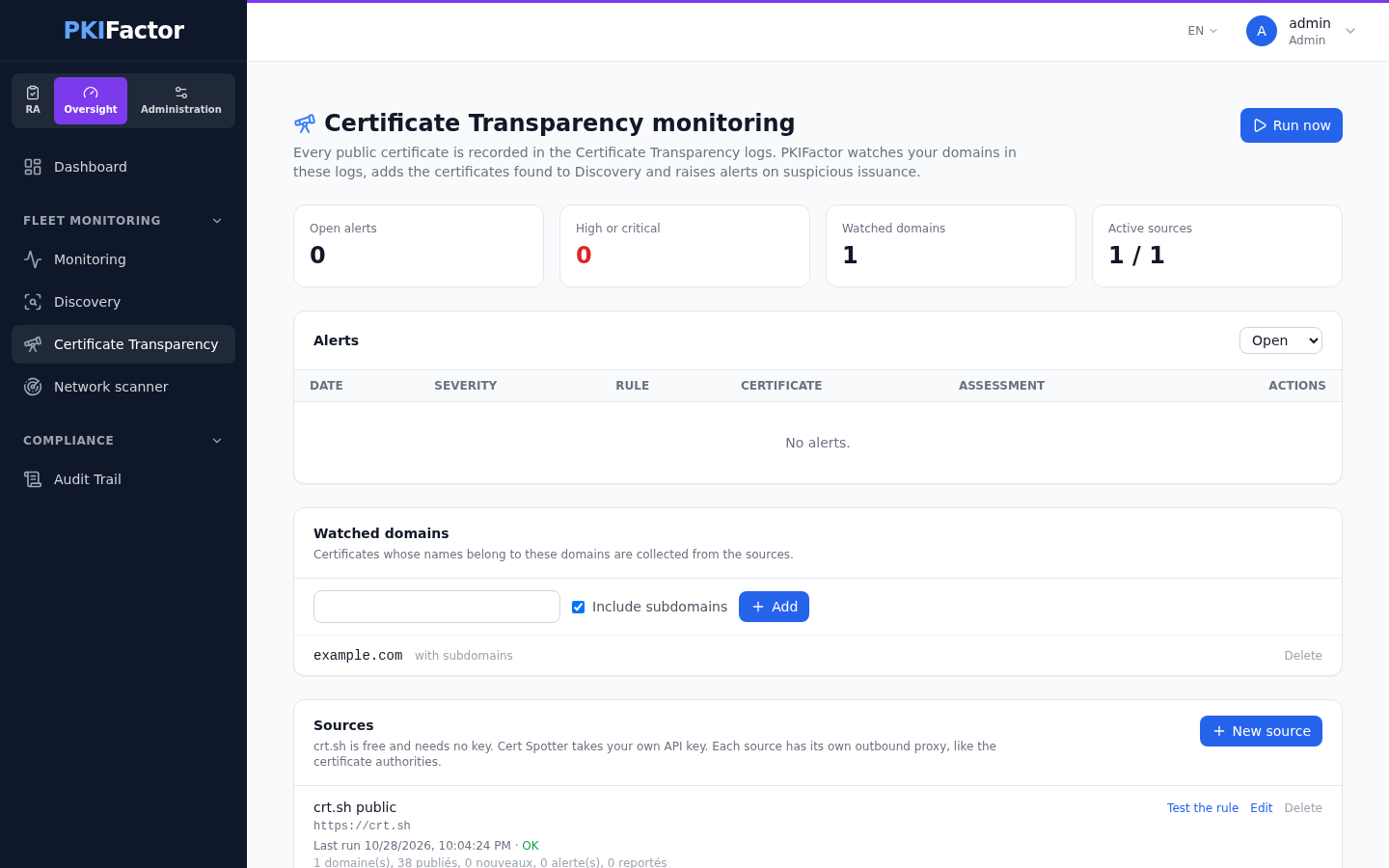
- You declare the domains to watch (Watched domains, Add), for example
example.comwith Include subdomains, or the exact name only. A leading*.is removed. Through the API a domain can be attached to an organization (organization_id); the same domain can be watched once per organization. - You configure one or more sources (New source). Each source is queried at its own interval, except the real-time feed, which is read continuously.
- For each new certificate published for a watched domain, PKIFactor downloads the full certificate, analyses it with the same parser as the rest of the product, and records it in Discovery with the source Certificate Transparency.
- The detection rules run on that certificate. Each alert is written to the audit trail (and therefore forwarded to the SIEM), and optionally sent by email or opened as a ServiceNow incident.
Two details matter for reading the results:
- One issuance, one record. An authority first logs a precertificate, then sometimes the final certificate. Both have the same issuer and serial number but different fingerprints. PKIFactor keeps one record per issuance: the final certificate when the source has it, otherwise the precertificate. Many authorities only log the precertificate.
- The first reading is a baseline. When a domain is read for the first time, rules that would trigger on everything that already exists (certificate outside the inventory, burst of issuance) stay silent. Security rules (unapproved authority, weak cryptography) still apply. If the first reading is cut by the download limit of a round, the baseline continues at the next round.
Sources
| Type | Use | Key |
|---|---|---|
| crt.sh (free) | Search indexed by domain, free | None |
| Cert Spotter (SSLMate) | Issuances per domain, certificate included, cursor to read only new entries | Your own API key (a limited free tier exists) |
| CertStream real-time feed | A CertStream server that you host (for example certstream-server-go) or subscribe to pushes every certificate as soon as it is logged. PKIFactor filters the feed on the fly: a certificate for a watched domain follows the same path as in a round, within seconds; a name that looks like one of your brands raises a look-alike alert |
Depends on your server |
Each source has:
| Field | Notes |
|---|---|
| URL | Pre-filled for crt.sh and Cert Spotter; change it to use a private instance. For the real-time feed, the ws:// or wss:// address of the server's full feed (/full-stream on certstream-server-go), which carries the certificate; the simple feed gives only the names and is reported as a warning |
| API key | Optional, encrypted at rest, never displayed again. Leave empty to keep it, enter - to erase it |
| Outbound proxy | Specific to the source, like the proxy of a PKI connector: host:port or URL; empty = system setting; direct = no proxy |
| Proxy user, proxy password | Optional; the password is encrypted at rest |
| Proxy CA certificate | PEM of the proxy's authority, needed when the proxy inspects outbound TLS |
| Verify TLS certificates | On by default |
| Interval (minutes) | Minutes between two readings (5 minutes to 7 days, 60 by default); does not apply to the real-time feed |
| Enabled | A disabled source is not read |
Test queries the source for the first watched domain without recording anything: it checks the URL, the proxy, the proxy CA and the key, and shows the number of certificates found and the time taken. For the real-time feed it connects and shows how many certificates were received, for example Connected: 250 certificates received in 5 s.
The real-time feed is read by one node at a time (a lease in the database, renewed every minute): if that node stops, another one takes over within three minutes. A feed that stays silent for two minutes, or is cut, puts the source in error (on this page and on the Monitoring page), and PKIFactor reconnects with increasing delays.
The source list shows, for each source, its status (OK, Partial, Error), its last run and whether an API key is set or a proxy is used.
crt.sh is a free service without commitment
It is slow (around 15 seconds per search) and regularly answers with temporary errors. PKIFactor retries twice on temporary errors and resumes the next round where it stopped. For a contractual service level, use Cert Spotter with your own subscription.
Detection rules
| Rule | Triggers when | Settings | Default severity |
|---|---|---|---|
| Unapproved certificate authority | The issuer name contains none of the approved values | approved_issuers: list of issuer name fragments, for example ["DigiCert"]. Empty list: rule inactive |
High |
| Certificate outside the inventory | A certificate is published for a watched domain but PKIFactor does not manage it | None | Medium |
| Unexpected wildcard | A wildcard name is not in the allowed list | allowed: for example ["*.example.com"] |
Medium |
| Non-compliant cryptography | The key is shorter than the minimum, or the signature hash is not allowed | min_rsa_bits (2048), min_ec_bits (256), allowed_signature_hashes (sha256, sha384, sha512) |
High |
| Validity too long | The validity exceeds the maximum | max_days (398) |
Low |
| Burst of issuance | At least threshold certificates for the same name within window_hours |
threshold (10), window_hours (24) |
Medium |
| Look-alike domain | A third party's certificate whose name imitates one of your brands: typing error, misleading characters (Cyrillic or Greek letters, 0 for o, rn for m, xn-- names), the brand joined to a sensitive word (brand-login), the brand under another extension, or the brand as a subdomain of another domain |
brands: names to protect (empty: taken from the watched domains); keywords: sensitive words (empty: a default list such as login, secure, pay, vpn); allowed: variants you own; max_distance: number of typing errors tolerated |
High |
The settings of a built-in rule are edited in the Settings (JSON) box of the rule.
About Look-alike domain:
- Typing errors and misleading characters are found only by the real-time feed: no text search in crt.sh finds them. With crt.sh, PKIFactor also searches each brand by name at most every 6 hours, which finds the brand joined to a word, under another extension or as a subdomain.
- A look-alike certificate belongs to someone else: it does not enter Discovery. The full certificate is kept in the alert, and Certificate on the alert downloads it (PEM), as evidence for a report to the issuing authority.
- The rule has no Test button.
For each rule you set whether it is enabled, its severity (Low, Medium, High, Critical), and its outputs:
- the audit trail and SIEM receive every alert (
CT_ALERTevent); - email: to the recipients you list (Email recipients (comma-separated); at least one is required when email is ticked);
- ServiceNow incident: through the ServiceNow integration, deduplicated by rule and certificate.
An alert is raised only once per rule and per certificate. A rule whose settings are malformed is skipped; it never prevents the other rules from running.
Test applies a rule to the certificates already observed in the logs and shows how many would have triggered it, with examples. Nothing is recorded. Tests are run by administrators.
Custom rules
Administrators write their own rules in the screen, without code: New rule, then a name and one or more conditions. Each condition is a field, an operator and a value. The rule triggers when all the conditions are met, or when at least one is.
| Field | Operators |
|---|---|
| Issuer, Common name, Key type, Signature hash | equals, differs from, contains, does not contain, starts with, ends with, matches the pattern (* and ?), matches the regular expression, is one of, is none of |
| Certificate names (SAN) | one name equals, contains, ends with, matches the pattern or the regular expression; no name ends with, no name matches the pattern |
| Key size, Validity (days), Issuance for the name in 24 h | =, ≠, <, ≤, >, ≥ |
| Wildcard, Precertificate only, Outside the inventory | is yes / no |
Comparisons ignore case. Before saving, Test the rule shows which certificates already observed would have triggered it.
Examples:
- Look-alike domain: names match the pattern
*example*and no name ends withexample.com. The built-in Look-alike domain rule already covers most cases; a custom rule only sees the certificates the sources return, so watch the look-alike domain itself (for exampleexample-login.com) or use the real-time feed. - Issuer outside the contract: issuer does not contain
DigiCertand issuer does not containSectigo. (Is one of compares the whole value, here the full issuer name such asCN=R11,O=Let's Encrypt,C=US.) - Short RSA key on a sensitive name: key type equals
RSAand key size <3072and names one name ends withpay.example.com.
Custom rules follow the same baseline logic as the built-in ones. A rule that uses Outside the inventory or Issuance for the name in 24 h stays silent during the first reading of a domain; any other rule alerts immediately.
Safeguards: at most 10 conditions per rule; regular expressions are limited to 200 characters, and patterns with nested repetition (such as (a+)+) are refused because they can take very long to evaluate. Rules are checked when saved, so an invalid rule never reaches a round. Built-in rules can be disabled but not deleted; custom rules can be edited and deleted. Creating, changing and deleting a rule is recorded in the audit trail (CT_RULE_CREATED, CT_RULE_UPDATED, CT_RULE_DELETED).
Handling alerts
The Alerts list is filtered on Open, Closed or All. Each alert shows the date, the severity, the rule, the names, the issuer, a link to the History on crt.sh to investigate, and Certificate to download the certificate (PEM) when it is kept. An administrator can assess it (Legitimate, To watch, Malicious), Close it and Reopen it; the assessment, its author and its date are recorded in the audit trail.
For your own domains the certificate itself is in Discovery, where it can be taken under management like any discovered certificate.
Via the API
curl -s -b jar -X POST https://clm.example.com/api/ct/domains \
  -H "Content-Type: application/json" -d '{"domain":"example.com","include_subdomains":true}'
curl -s -b jar -X POST https://clm.example.com/api/ct/sources \
  -H "Content-Type: application/json" \
  -d '{"name":"crt.sh","source_type":"crtsh","proxy_url":"proxy.example.com:3128","interval_minutes":60}'
curl -s -b jar -X POST https://clm.example.com/api/ct/sources/1/test
curl -s -b jar -X PUT https://clm.example.com/api/ct/rules/unapproved_issuer \
  -H "Content-Type: application/json" \
  -d '{"enabled":true,"severity":"high","params":{"approved_issuers":["DigiCert"]},"actions":["email"],"email_recipients":"secops@example.com"}'
# Custom rule, tested before saving, then created
curl -s -b jar -X POST https://clm.example.com/api/ct/rules/preview \
  -H "Content-Type: application/json" \
  -d '{"params":{"name":"Outside contract","match":"all","conditions":[{"field":"issuer","op":"not_contains","value":"DigiCert"}]}}'
curl -s -b jar -X POST https://clm.example.com/api/ct/rules \
  -H "Content-Type: application/json" \
  -d '{"severity":"high","params":{"name":"Outside contract","match":"all","conditions":[{"field":"issuer","op":"not_contains","value":"DigiCert"}]}}'
curl -s -b jar -X POST https://clm.example.com/api/ct/run            # round now, all sources
curl -s -b jar https://clm.example.com/api/ct/run                    # state of the round
curl -s -b jar "https://clm.example.com/api/ct/alerts?status=open&severity=high"
curl -s -b jar https://clm.example.com/api/ct/alerts/12/certificate  # PEM kept with the alert
curl -s -b jar -X PUT https://clm.example.com/api/ct/alerts/12 \
  -H "Content-Type: application/json" -d '{"status":"closed","qualification":"legitimate"}'
CT_SOURCE_CREATED, CT_SOURCE_UPDATED, CT_SOURCE_DELETED, CT_DOMAIN_ADDED, CT_DOMAIN_UPDATED, CT_DOMAIN_REMOVED, CT_RULE_UPDATED, CT_ALERT_QUALIFIED, CT_RUN).
Background task
The task Certificate Transparency (ct_monitor) checks every 5 minutes which sources are due (CT_MONITOR_TICK changes this tick). Its state is shown on the Monitoring page (Oversight workspace, Fleet monitoring > Monitoring), where it can also be run on demand. Each round downloads at most 200 certificates per source; the rest is read at the next round. The real-time feed is not part of the rounds: it is read continuously.
Troubleshooting
| Symptom | Cause and fix |
|---|---|
Source status Error, crt.sh : HTTP 502 |
Temporary unavailability of crt.sh, already retried twice; the next round resumes |
Cert Spotter : clé d'API refusée |
Wrong or expired API key |
Cert Spotter : limite de requêtes atteinte |
Free tier exhausted; increase the interval or take a subscription |
URL de source refusée |
The URL points to a forbidden target (loopback, cloud metadata) or is not http(s) |
| Test fails behind the corporate proxy with a certificate error | The proxy inspects TLS: paste its CA certificate in Proxy CA certificate |
| No alert after the first reading | Expected: the first reading is a baseline (see above) |
| Flux temps réel : indiquez l'URL ws:// ou wss://... when saving | A real-time feed needs the ws:// or wss:// address of the full feed |
| Real-time source in Error | The feed is silent or cut: check the CertStream server; PKIFactor reconnects by itself |
| Indiquez au moins un destinataire pour l'action courriel | Email is ticked on a rule without any recipient |
| Les règles livrées se désactivent, elles ne se suppriment pas | Built-in rules cannot be deleted; untick Enabled |