Linux servers over SSH
The Linux server (SSH) target deploys certificates to any TLS service of a Linux host over SSH, without an agent: nginx, Apache httpd, HAProxy, OpenLDAP, Apache Tomcat, WildFly / JBoss EAP, or any service with files and a reload command. A typical use is one certificate (often a wildcard) on a fleet of servers. Read How deployment works first.
Tested
Tested on Debian and RHEL-family hosts with nginx, Tomcat (PKCS#12 keystore), WildFly (JKS keystore, 29 October 2026) and OpenLDAP: detection of the sites, deployment, reload, probe, restoration on failure, key generated on the host, helper script, fleet view.
Sites
A target is a host; a site says where and how the certificate is installed on it:
| Site setting | Meaning |
|---|---|
| Key path, certificate path | Where the files go (full chain in the certificate file by default, as nginx, Apache and HAProxy expect) |
| Bundle mode | One file with key, certificate and chain (HAProxy) |
| Reload command | Run after installation (systemctl reload nginx, systemctl restart tomcat...) |
| Probe host and port, SNI | The TLS endpoint PKIFactor checks after the reload |
| Owner, group, modes | Of the installed files |
| Format | PEM (separate files), PKCS12 (Tomcat/WildFly keystore) or JKS (keystore, keytool required), with the Keystore password for the last two |
| Health check (optional) | Health URL (after deployment) (an HTTPS GET that must answer 2xx or 3xx) or Health command (no sudo) (run by the service account, exit code 0 expected) |
Presets fill everything in for the usual servers:
| Preset | Files | Reload |
|---|---|---|
| nginx | PEM key and full chain | systemctl reload nginx |
| Apache httpd | PEM key, certificate and separate chain file | systemctl reload apache2 (adapt on RHEL: httpd) |
| HAProxy | One bundle file | systemctl reload haproxy |
| OpenLDAP | PEM key, certificate and chain for slapd | systemctl restart slapd |
| Apache Tomcat | PKCS#12 keystore, group tomcat, mode 0640 |
systemctl restart tomcat |
| WildFly / JBoss EAP | JKS keystore (converted with keytool on the host), group wildfly, mode 0640 |
systemctl restart wildfly |
PKIFactor can read the server's configuration over SSH (read only) and pre-fill the sites it finds; you correct what it proposes before saving:
- in the creation form, choosing the Apache Tomcat, WildFly / JBoss EAP or OpenLDAP preset on a site row, once the host and the credentials are filled in, reads the Tomcat keystores, the WildFly key stores or the slapd TLS paths, and adds one row per site found;
- in Edit, Suggest sites from the server configuration reads the nginx, Apache and HAProxy configuration and adds the sites it finds (operators need the deploy permission).
Safe deployment
- Files are uploaded by SFTP to a transit directory of the service account (emptied before and after: the key never lingers).
- The files in place are backed up.
- The new files are installed atomically (written next to the target, then renamed).
- The reload command runs.
- PKIFactor probes the TLS port and checks that the expected certificate is served.
If the reload fails, or the probe still sees the previous certificate, PKIFactor restores the previous files (removing files that did not exist), reloads again, marks the binding Failed and alerts the owner team. A reload that returns an error while the probe sees the expected certificate is accepted: some service wrappers report errors on a successful restart.
Java keystores need a restart (no hot reload); the probe after the restart confirms the new certificate, otherwise the previous keystore is restored.
Key custody
- Key pushed (
push_both): PKIFactor generates the key and installs it with the certificate. - Key generated on the host (
csr_on_device): the key is created on the server (openssl reqin the transit directory), only the CSR goes to PKIFactor, and the key never leaves the server. Not available for Java keystores.
Least-privilege service account
PKIFactor never needs root. Create a dedicated account that signs in with an SSH key, and give it, through sudo, only what deployment requires. Two options:
| Option | What sudo allows |
|---|---|
| Helper script (narrowest) | One binary, /usr/local/sbin/pkifactor-deploy, generated by PKIFactor from the target's sites. It accepts only the declared sites and carries a fingerprint of that list; Test connection reports a missing or outdated script. Regenerate it after any change of sites |
| Command list | install, cp, mv, rm, test, cat, true and the reload commands; plus nginx -T or apachectl -S for site detection |
The helper script does not handle keystores (PKCS#12, JKS): for Tomcat and WildFly, use the command list. Step-by-step guides for WildFly, Tomcat and OpenLDAP: Java servers and OpenLDAP.
The target page shows the exact sudoers lines and installation steps for the chosen option (Sudo helper script: the script, the sudoers file, Download the script and the installation commands).
Host key
PKIFactor never authenticates to a host whose key it has not validated. The first connection test reads the host key fingerprint without signing in and stops there. Then:
- in the creation form, Use this fingerprint copies it into Host key fingerprint (or paste the
SHA256:...value you checked on the server); - on the target page, an administrator clicks Approve this fingerprint after Test connection, and runs the test again to connect. The approved value must be exactly the one the server presented; operators cannot approve it.
From then on any other host key is refused. Changing the host or the port erases the fingerprint.
Declare the target
Administration > Operations > Endpoints, Add a target, connector type Linux server (SSH): Host, SSH port, Service account, SSH private key (PEM / OpenSSH) (or a password), Host key fingerprint, the elevation mode (Write files and reload through sudo -n, Use the sudo helper script (recommended)), then the Sites (placements): Preset, Name, Certificate path (full chain), Private key path, Reload command, TLS port, and under Advanced the chain path, probe host, SNI, owner, group, format and health checks.
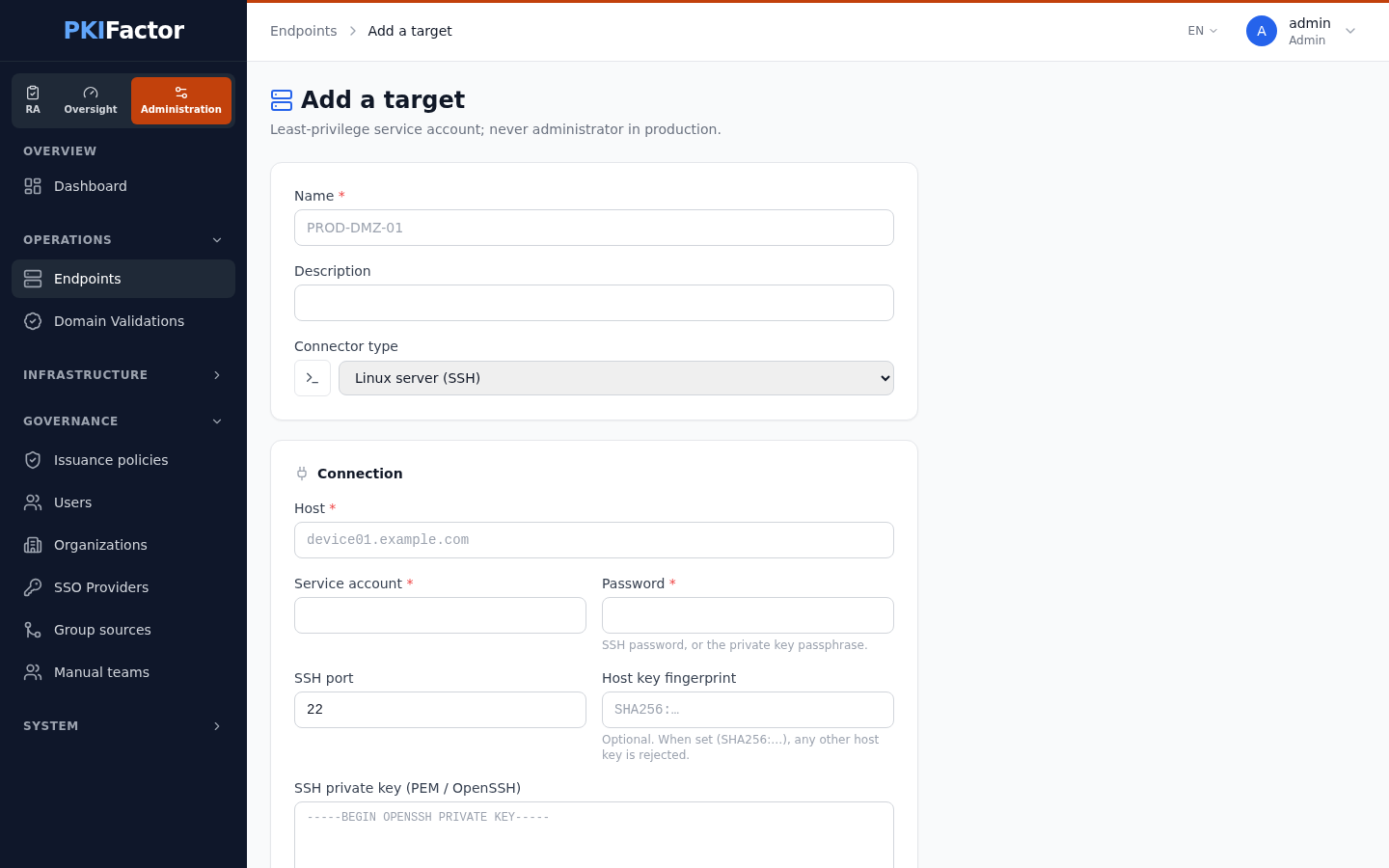
Test SSH connection (in the form) and Test connection (on the target page) check the host key, the SSH access, the sudo rights and, in helper mode, the script's fingerprint.
Deploy a certificate
Add a binding on the target page: certificate source, then Probed TLS endpoint (host:port) and Site (placement on the server) (the two fields of an SSH binding), Key custody (Key generated by PKIFactor and pushed to the appliance, the default, or Key born on the appliance / netHSM — it never leaves it, generated on the host by openssl), automation and D-X.
Fleet operations
| Feature | Purpose |
|---|---|
| Clone to another host (target page) | Create a new target with the same sites on another host: New target name, SSH host, Create the target |
| Fleet: points of presence (certificate page) | Every place where a certificate is deployed or seen by the scanner, with its state; Redeploy to the whole fleet |
| Bind to other servers (certificate page) | Attach a certificate to the same site on several targets at once: tick the servers, choose the Site and the Automation level, then Bind and deploy |
| Verify now (target page) | Run the verification immediately for one target |
When the wildcard is renewed, every binding is updated by the same engine, each with its own probe and rollback.
Troubleshooting
| Symptom | Cause and fix |
|---|---|
Permission denied on sudo |
The command is not in sudoers, or the helper script is outdated: copy the lines shown on the target page |
| helper script outdated | The sites changed: regenerate and reinstall the script |
| Probe sees the previous certificate | The service reads other files, or the reload did not take: check the site paths with Detect sites |
| Tomcat or WildFly port silent after deployment | The keystore is not readable by the service user: keep group and mode from the preset |
| Host key changed | The server was reinstalled: check the new fingerprint, then have an administrator approve it from the target page |
| The test stops after reading the fingerprint | Expected on a new target: approve the fingerprint (see Host key) |
| Policy violation on a renewal | The binding's key algorithm is not allowed by the profile |