Certificate authorities
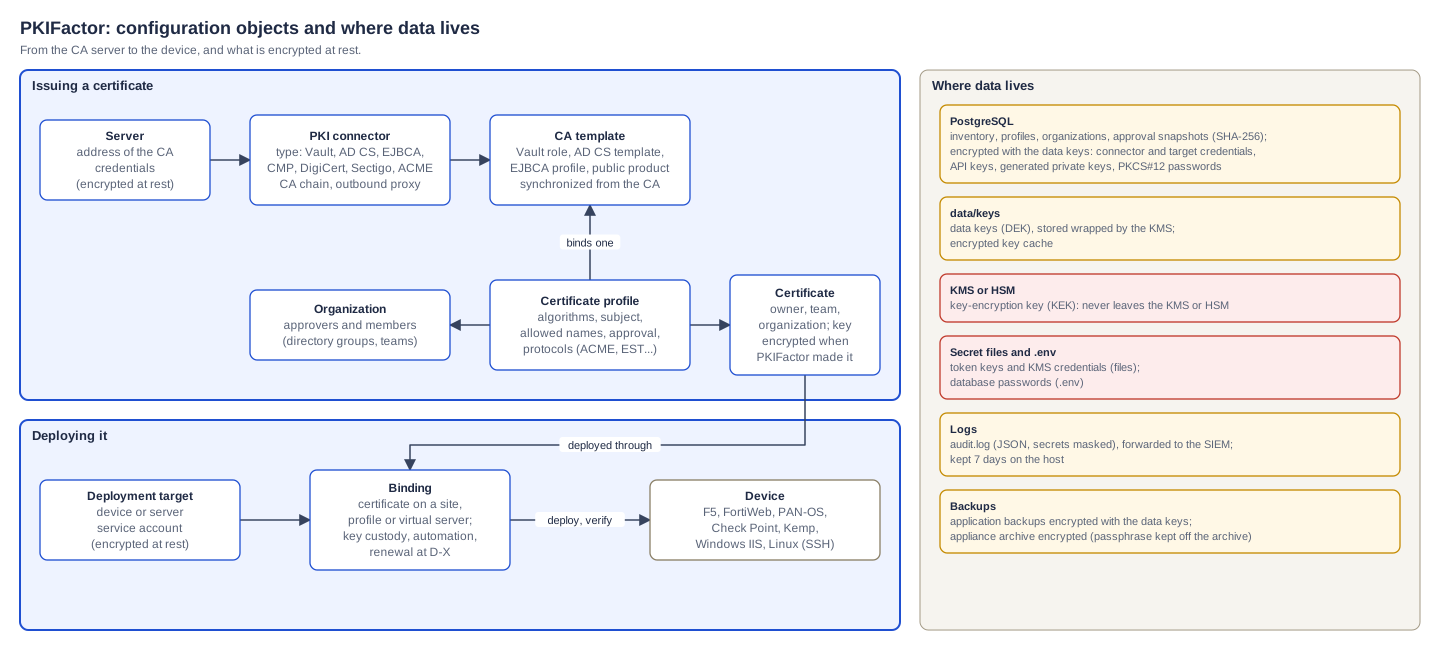
PKIFactor does not sign certificates itself: it acts as a registration authority in front of your certificate authorities (CAs). This page covers the private and enterprise CAs: HashiCorp Vault PKI, Microsoft AD CS, EJBCA and other REST CAs, and CAs reachable only through CMP. Public CAs (DigiCert, Sectigo, ACME CAs) are on Public CAs and domain validation.
Three objects
| Object | Menu | Holds |
|---|---|---|
| Server | Administration workspace, Infrastructure > Servers | Where the CA is (host, base URL) and how PKIFactor authenticates (credentials, encrypted at rest) |
| PKI connector | Infrastructure > PKI Connectors | The CA type, the server it uses, and the CA-specific settings |
| Certificate template | Connector menu Certificate Profiles (page Certificate Templates) | What the CA offers: Vault roles, AD CS templates, EJBCA certificate profiles. Synchronized from the CA, or created by hand |
A certificate profile then binds one connector and one of its templates, and adds PKIFactor's own rules (algorithms, subject, approval, protocols).
Supported CA types
The Type list of the connector form shows the raw type names:
| Type | Certificate authority | Server authentication method |
|---|---|---|
VAULT |
HashiCorp Vault PKI secrets engine | APPROLE or mTLS |
ADCS |
Microsoft AD CS, agentless over WinRM (PowerShell remoting) | WINRM |
GENERIC |
Any REST CA through a preset: ZetaCA, EJBCA, Step CA, Keyfactor Command, or Universal REST (your own definition) | Depends on the CA (mTLS for EJBCA) |
CMP_CA |
A CA reachable only through CMP (RFC 4210, RFC 9483) | CMP_SIGNATURE or CMP_PBM |
DIGICERT, DIGICERT_ONE, SECTIGO, SECTIGO_SCM, PUBLIC_ACME |
Public CAs | See Public CAs and domain validation |
Add a CA
1. Declare the server
Infrastructure > Servers > Add Server:
| Field | Value |
|---|---|
| Server Name | A name of your choice |
| Host / URL | Host name or address of the CA server |
| Base URL | Required for REST CAs (Vault, EJBCA and other GENERIC): the full URL, for example https://vault.example.com:8200. Not used by AD CS |
| Authentication Method | The method; the form then shows its fields (see each CA below) |
Secrets are encrypted before they are stored and are never displayed again. Change them under Manage Credentials. For a Vault AppRole credential, Rotate generates a new secret ID (this needs the AppRole Role Name (for rotation) field).
2. Create the connector
Infrastructure > PKI Connectors > Add PKI Connector: Connector Name, Server, Type, then the fields of that type (described below). Two optional fields exist for every type:
| Field | Use |
|---|---|
| Outbound proxy | Empty: inherit the proxy of the environment. direct: never use a proxy (typical for an internal CA). A URL such as http://proxy:3128: this CA only goes through that proxy |
| CA Chain (PEM) | Intermediate and root certificates, used as a fallback when the chain cannot be read from the CA |
The edit page adds Allowed internal networks (revocation): comma-separated internal CIDRs that PKIFactor may contact to check the CRL or OCSP of this internal CA. Empty means only public addresses are checked (protection against server-side request forgery); loopback and cloud metadata addresses stay blocked in all cases.
The edit page also holds the SCEP RA Keypair panel, used when a profile on this connector is enabled for SCEP: Generate self-signed, Rotate and Import… (a CA-issued RA certificate and its RSA key). See SCEP.
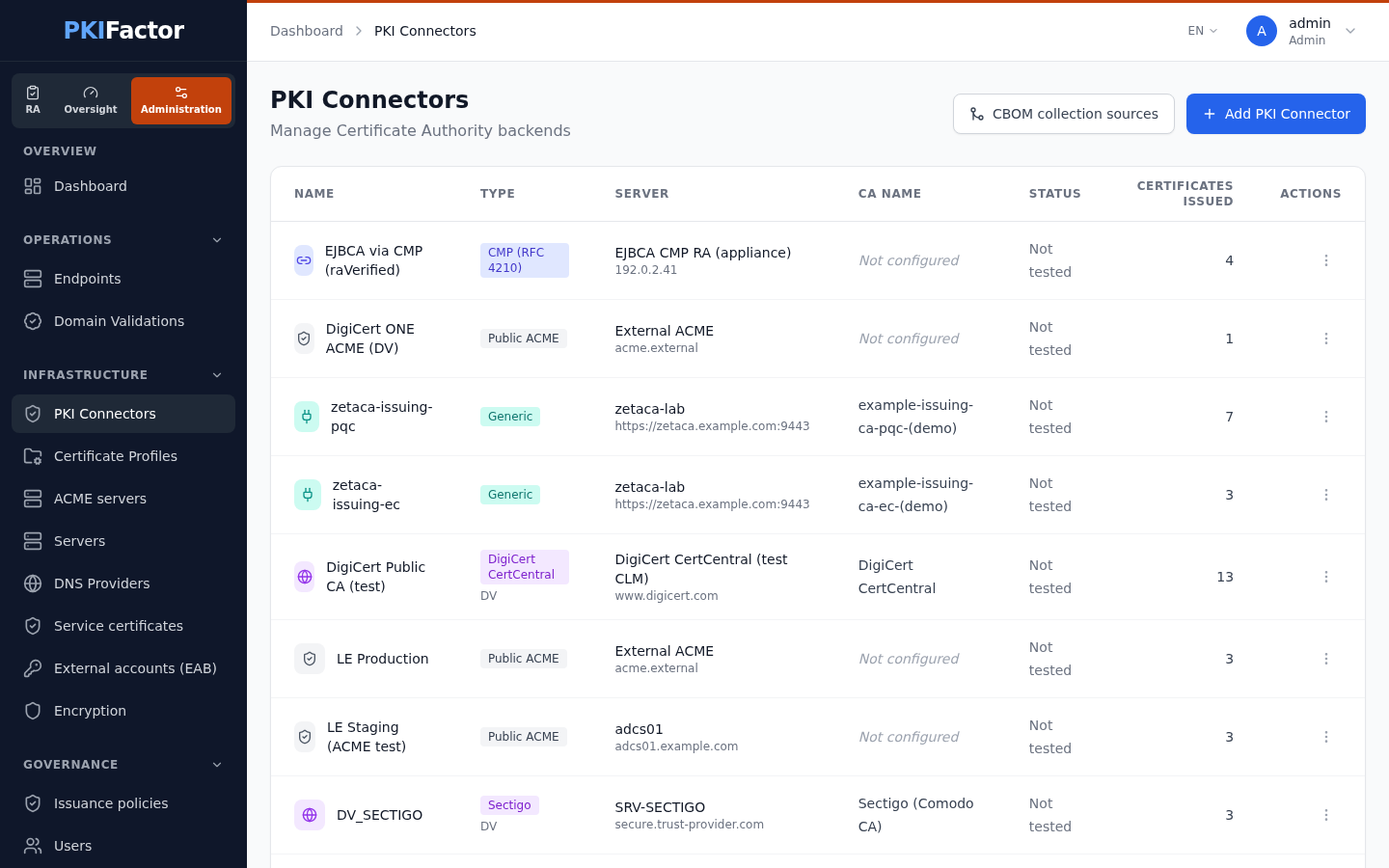
The connector list shows, for each connector, its Type, Server, CA Name, Status and Certificates issued. Deleting a connector asks for confirmation; the profiles that use it can no longer issue.
3. Get the templates
Open the connector menu (⋮) > Certificate Profiles. On the Certificate Templates page:
- CA profiles shows, read only and queried live, the profiles the CA declares and whether each one is already imported (In PKIFactor). Nothing is created or changed; it is a quick way to see what Sync From PKI would bring.
- Sync From PKI reads the templates from the CA and detects the CA name (shown in the CA Name column of the connector list). It is also the simplest way to prove that address, credentials and rights are correct.
- Create Manually adds a template the CA cannot list (for example when the EJBCA profile service is disabled). The Template Name must be the exact name on the CA; Display Name, Validity (days) (empty means 365 days) and Key Algorithms are optional.
- Edit corrects the display name and the validity requested from the CA. The technical name cannot be changed. Some CAs ignore the requested validity and apply their own (AD CS always applies its template; Vault caps at the role's
max_ttl). PKIFactor compares the validity obtained with the validity requested and logs a warning when they differ. - A template still used by a certificate profile cannot be deleted: rebind the profiles first.
4. Import what the CA already issued (optional)
From the connector details (⋮ > Details), Absorb Certificates imports the certificates the CA has already issued (Vault, AD CS, EJBCA and other CAs that can list certificates; not CMP, and not offered for DigiCert CertCentral and the Sectigo reseller connector). The dialog takes Max certificates to import, Issued after (optional), Skip revoked certificates and Skip certificates expired for more than (days) (0 keeps everything), and shows a Preview before you Confirm import.
Import from file imports PEM, DER, P7B or CRT files instead (up to 50 files, 10 MB each). Bundles are split into individual certificates, and duplicates (same SHA-256 fingerprint) are skipped. A bulk inventory import from a CSV file is available through the API (below).
Check that a connector works
The Status column of the connector list shows the result of the last connection test: Connected, Test failed (with its probable cause: product, third-party device or service, network, configuration, invalid input) or Not tested. Opening the list never contacts the CAs. To run a test, open the connector's action menu and choose Test connection (since version 1.8.50; before, the test was available through the API only): the list then shows the new status.
In this version the connection test is run through the API (below); in the interface, Sync From PKI exercises the same address, credentials and rights.
| Type | What the test does |
|---|---|
| Vault | Authenticates, then reads /v1/sys/health (degraded when Vault is sealed or on standby) |
| AD CS | Opens a WinRM session and runs a command on the CA host |
| EJBCA | GET /ejbca/ejbca-rest-api/v1/certificate/status with the client certificate |
| CMP | Sends an empty message; success means the endpoint answered HTTP 200 with the CMP media type (reachability only, not authentication) |
Other GENERIC |
The test_connection endpoint of the preset |
Via the API
curl -s -c jar -X POST https://clm.example.com/api/auth/login \
  --data-urlencode "email=admin@example.com" --data-urlencode "password=$PASSWORD"
curl -s -b jar https://clm.example.com/api/v1/inventory/pkis              # connectors
curl -s -b jar -X POST https://clm.example.com/api/v1/pkis/3/test-connection   # test, records the status (POST since 1.8.51)
curl -s -b jar -X POST https://clm.example.com/api/v1/pkis/3/sync-templates
curl -s -b jar https://clm.example.com/api/v1/pkis/3/templates            # what the CA offers

# Bulk inventory import from CSV (one line per certificate, common_name required)
curl -s -b jar -o template.csv https://clm.example.com/api/v1/pkis/import-inventory-csv/template
curl -s -b jar -X POST -F "file=@inventory.csv" https://clm.example.com/api/v1/pkis/3/import-inventory-csv
status (ok, degraded or error) and a message. Secrets in connector_config are always returned masked.
HashiCorp Vault PKI
Tested
Tested against a Vault PKI secrets engine. The automatic rotation of the AppRole secret ID is not covered by this statement.
One connector targets one issuer of one PKI mount. To use several issuers, create several connectors. Each Vault role becomes a template: the role remains the authority on allowed names, key types, usages and maximum lifetime; a profile can never exceed what its role allows.
Prepare Vault
vault secrets enable -path=pki-int pki
vault write pki-int/roles/srv-tls allowed_domains="example.com" allow_subdomains=true \
  key_type=rsa key_bits=2048 max_ttl="8760h"
A least-privilege policy for PKIFactor (adapt the mount name):
path "pki-int/issue/*"       { capabilities = ["create", "update"] }
path "pki-int/sign/*"        { capabilities = ["create", "update"] }
path "pki-int/revoke"        { capabilities = ["create", "update"] }
path "pki-int/roles"         { capabilities = ["list"] }
path "pki-int/roles/*"       { capabilities = ["read"] }
path "pki-int/issuer/*/json" { capabilities = ["read"] }
path "pki-int/certs"         { capabilities = ["list"] }
path "pki-int/cert/*"        { capabilities = ["read"] }
path "pki-root/ca/pem"       { capabilities = ["read"] }   # only if the root lives on another mount
path "auth/token/renew-self" { capabilities = ["update"] }
Attach it to an AppRole role, or to a cert auth role for mTLS:
# AppRole
vault auth enable approle
vault write auth/approle/role/pkifactor-pki token_policies="pkifactor-pki" token_ttl=1h token_max_ttl=4h
# or mTLS: PKIFactor presents a client certificate issued by the trusted CA
vault auth enable cert
vault write auth/cert/certs/pkifactor certificate=@trust-ca.pem \
  allowed_common_names="pkifactor-clm" token_policies="pkifactor-pki"
A role with no_store=true issues certificates that Vault does not keep: they cannot be absorbed.
Declare it in PKIFactor
Server: Base URL in HTTPS, then one of:
| Method | Fields |
|---|---|
APPROLE |
Role ID, Secret ID, PKI mount point (default pki), Issuer reference (issuer ID or name, or default), optionally AppRole Role Name (for rotation) and Auto-rotate Secret ID (every 6h) |
mTLS |
Client Certificate (PEM), Private key (PEM), optionally CA Chain (PEM) and Auth Role Name (the cert role, for example pkifactor) |
Then a connector of type VAULT on that server, and Sync From PKI.
The issuer reference is mandatory: without it the connector refuses to start ("Vault must target a single CA: 'issuer_ref' is required"). With mTLS, the credential form has no mount or issuer field and the connector form has no Vault section: set mount_point and issuer_ref in the connector configuration through the API.
Via the API: Vault connector with mTLS
curl -s -b jar -X POST https://clm.example.com/api/v1/inventory/pkis \
  -H "Content-Type: application/json" \
  -d '{"name":"Vault PKI","server_id":5,"pki_type":"VAULT",
       "connector_config":{"mount_point":"pki-int","issuer_ref":"default"}}'
Microsoft AD CS
Tested
Tested live over WinRM with a dedicated service account that has no administrative rights: template synchronization, CA detection, issuance, revocation and absorption, with CredSSP authentication. NTLM and Kerberos authentication were not tested.
The connector is agentless: it opens a PowerShell remoting session (WinRM, HTTPS port 5986, CredSSP by default) and uses the CA's COM interfaces for issuance, revocation and inventory.
Least-privilege service account
Never use a domain administrator or a local administrator of the CA, and do not grant Manage CA.
| Where | Right | Unlocks |
|---|---|---|
| CA host, local group Remote Management Users | Membership | WinRM session and COM activation |
| certsrv.msc > CA properties > Security | Request Certificates | Issuance |
| certsrv.msc > CA properties > Security | Issue and Manage Certificates | Revocation and inventory (without it: ACCESS_DENIED (0x5)) |
| certtmpl.msc > each template exposed to PKIFactor > Security | Read and Enroll | Synchronization and issuance on that template |
Restart the AD CS service after changing the CA security. A plain domain user (Domain Users) is enough otherwise.
Templates: "Supply in the request"
PKIFactor builds the request (subject and SANs validated by the profile), so each template must use Supply in the request on its Subject Name tab. With Build from Active Directory information, the CA ignores the request and issues the certificate in the name of the service account. Do not enable EDITF_ATTRIBUTESUBJECTALTNAME2 on the CA. A template that requires CA manager approval leaves the request pending on the CA side.
WinRM over HTTPS on the CA host
The WinRM listener needs a server certificate for the CA host name (Server Authentication usage), ideally issued by your internal CA and reserved for this listener. winrm quickconfig does not create one.
winrm create winrm/config/Listener?Address=*+Transport=HTTPS '@{Hostname="adcs.example.com";CertificateThumbprint="<thumbprint>"}'
Enable-WSManCredSSP -Role Server -Force
New-NetFirewallRule -Name "WinRM-HTTPS" -Direction Inbound -Protocol TCP -LocalPort 5986 -Action Allow
winrm enumerate winrm/config/listener
TLS verification of the WinRM listener
Since the security review of September 2026, PKIFactor verifies the listener certificate by default: with CredSSP, the service account password is delegated to the server, and an unverified channel would hand it to anyone able to intercept the connection. There is no CA field for AD CS: the listener certificate must chain to a CA trusted by the backend container. A laboratory with a self-signed listener must say so explicitly by setting verify_cert to the JSON boolean false in the connector configuration (API only).
Declare it in PKIFactor
Server: Host / URL = the CA host, method WINRM, Username (DOMAIN\svc-pkifactor) and Password; leave Base URL empty. Connector: type ADCS, then Sync From PKI: the CA name (HOST\CA name) is detected and the published templates appear. Issuance and revocation are refused as long as the CA name is unknown.
Optional settings, in the connector configuration (API): auth (credssp by default, or ntlm, kerberos), port (5986), use_ssl (true), domain (prefixed to the user name when it has none), verify_cert.
Via the API: connector configuration
curl -s -b jar -X PUT https://clm.example.com/api/v1/inventory/pkis/7 \
  -H "Content-Type: application/json" -d '{"connector_config":{"auth":"credssp","port":5986}}'
connector_config replaces the whole configuration of the connector: include every key you want to keep.
EJBCA
Tested
Tested against EJBCA Community (9.3.7) with mTLS and a least-privilege RA role: connection test, CA detection, issuance and revocation. EJBCA Enterprise was not tested. A revocation bug found in September 2026 (the default reason was sent as NOT_REVOKED, so EJBCA did not revoke) is fixed: the default reason is now UNSPECIFIED.
EJBCA uses a GENERIC connector with the EJBCA preset (REST API v1, client certificate authentication).
Prepare EJBCA
- Enable REST Certificate Management in System Configuration > Protocol Configuration.
- Create a dedicated client certificate for PKIFactor and bind it to a dedicated role (match on its CN or serial number). Rules proven sufficient to issue and revoke:
/administrator(mandatory, otherwise every REST call gets 403),/ca/<issuing CA>,/ca_functionality/create_certificate,/ra_functionality/create_end_entity,revoke_end_entity,view_end_entity, and/endentityprofilesrules/<end entity profile>/with the same three end-entity rights. Do not use the SuperAdmin certificate. - Use the issuing CA (not the management CA) and a certificate profile and end entity profile prepared for PKIFactor.
Declare it in PKIFactor
Server: Base URL (for example https://ejbca.example.com:8443), method mTLS with Client Certificate (PEM) and Private key (PEM). Connector: type GENERIC, Connector Preset EJBCA, then the four parameters:
| Parameter | Value |
|---|---|
| Certificate Authority Name | The issuing CA name in EJBCA |
| End Entity Profile | For example EMPTY or a dedicated profile |
| Issuer DN | The exact, complete DN of the issuing CA (used in the revocation path; an approximate value breaks revocation) |
| End Entity Password | The enrollment password (stored encrypted) |
Templates are EJBCA certificate profiles. Their list comes from /v2/certificate/profiles, a service many Community instances disable ("This service has been disabled"); then use Create Manually with the exact profile name (for example SERVER). Issuance and revocation do not depend on that service.
The EJBCA preset verifies the server certificate by default since September 2026. For a laboratory EJBCA with a self-signed certificate, tick Skip TLS verification explicitly; never in production.
Other REST CAs (generic connector)
Type GENERIC with a Connector Preset: ZetaCA, EJBCA, Step CA, Keyfactor Command, or Universal REST for your own definition. A preset fills in the endpoints and asks only for its parameters; Advanced: endpoint overrides lets you change an endpoint. A custom definition must at least define the signing endpoint (endpoints.sign_csr). Authentication material stays on the server, never in the connector.
TLS verification is on by default (tls.verify_ssl). Skip TLS verification is meant for laboratories only.
CA reachable only through CMP
Type CMP_CA: PKIFactor speaks CMP (RFC 4210, RFC 9483 profile) to the upstream CA, for CAs that expose nothing else (telecom, automotive, industry).
| Field | Value |
|---|---|
| Endpoint URL | The CMP endpoint of the CA (HTTP POST, application/pkixcmp) |
| Recipient DN | Subject DN of the upstream CA |
| Sender DN | Defaults to CN=PKIFactor |
| Protection Mode | Leave Auth defined on the server (recommended): the protection comes from the server credential, CMP_SIGNATURE (RA certificate and key trusted by the CA) or CMP_PBM (shared secret, at least 16 characters) |
| Trust Anchor (PEM) | The CA certificate used to verify the CA's responses and provide the chain |
| TLS verify, Timeout (s) | On by default; 30 seconds |
What to expect:
- PKIFactor sends an initialization request with raVerified proof of possession: it vouches for the key as an RA. The CA must accept this from PKIFactor. With EJBCA, this works only through a CMP alias in RA mode with
allowraverifypopo=true; that combination was proven against EJBCA. A CA that requires the end entity's own proof of possession refuses the request. - There is no template list: the CA decides the certificate profile and the validity from its own configuration (alias, recipient).
- Revocation is supported; absorption is not (CMP has no inventory operation).
TLS verification of the CA endpoints
| CA | Default | How to trust a private CA | How to turn verification off (laboratory) |
|---|---|---|---|
| Vault | Verified against the system CAs | ca_bundle (or vault_ca_cert) in the connector configuration: the CA of Vault's server certificate, in PEM or as a file path readable by the backend |
skip_verify in the connector configuration |
| AD CS (WinRM) | Verified (since September 2026) | The listener certificate must chain to a CA trusted by the backend container | verify_cert: false |
| EJBCA and generic REST | Verified (EJBCA preset since September 2026) | tls.ca_bundle: path of a CA file readable by the backend |
Skip TLS verification |
| CMP | Verified | tls_ca_bundle: path of a CA file readable by the backend |
Untick TLS verify |
Do not confuse the CA that signed the server certificate of the CA endpoint with the issuing CA that signs your certificates: they are often different.
Troubleshooting
| Symptom | Cause and fix |
|---|---|
| "Vault must target a single CA: 'issuer_ref' is required" | Set the issuer reference (AppRole credential field, or issuer_ref in the connector configuration) |
| Vault: 403 on every call | The policy does not cover the mount or the role; check the paths above |
| Vault: name refused at signing | The role's allowed_domains / allow_subdomains do not cover the requested name |
| AD CS: "Connexion WinRM echouee (transport ou authentification)" | Port 5986 closed, no HTTPS listener, CredSSP not enabled on the server, wrong credentials, or listener certificate not trusted |
| AD CS: certificate issued in the name of the service account | Template set to Build from Active Directory information; switch to Supply in the request |
| AD CS: request stays pending | The template requires CA manager approval |
AD CS: ACCESS_DENIED (0x5) on revocation or absorption |
Issue and Manage Certificates missing on the CA |
| EJBCA: 403 on every call | The client certificate's role lacks /administrator, or the certificate is not bound to a role |
| EJBCA: empty template list | The v2 profile service is disabled; use Create Manually |
| EJBCA: revocation fails | The Issuer DN is not the exact DN of the issuing CA |
| Status Test failed, cause network | The backend cannot reach the CA: firewall, DNS, or a proxy that should be bypassed (Outbound proxy = direct) |