High availability
A high-availability installation runs the complete platform on two or three appliances. The database is a Patroni cluster with synchronous replication, coordinated by etcd (three voting members) and reached through PgBouncer on every node. The application services are stateless: any node serves any request, and a single background worker is elected among the nodes.
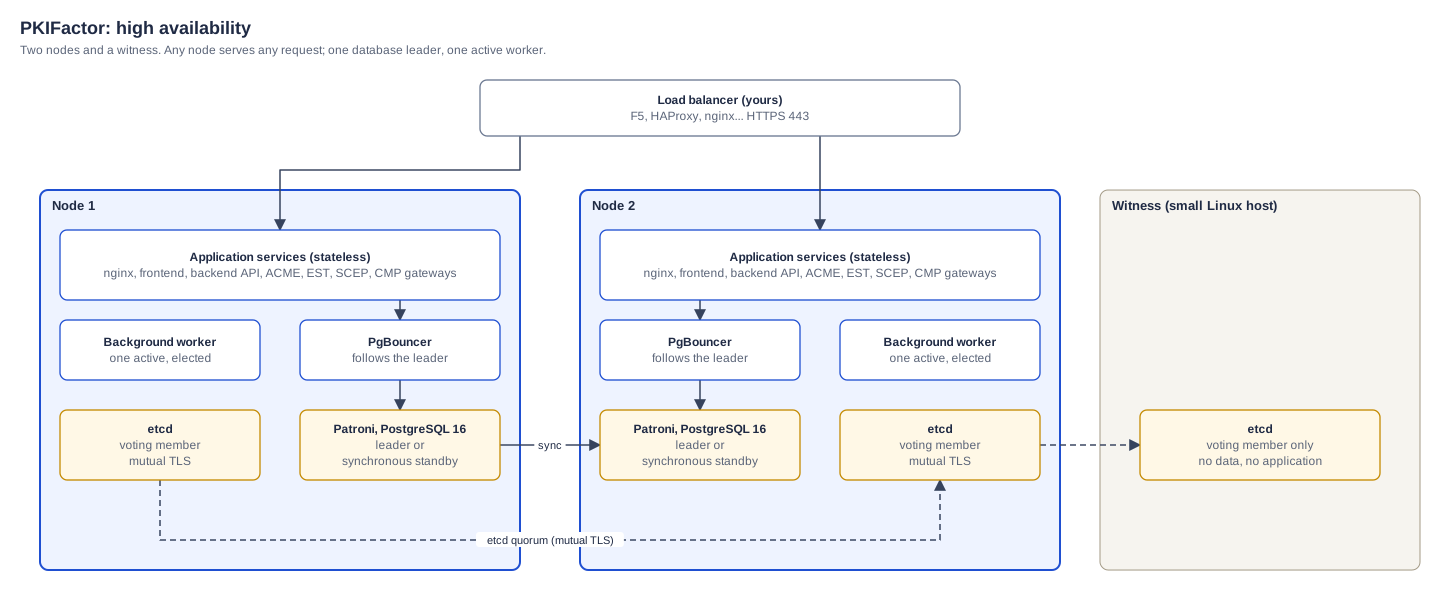
The source of this diagram is the High availability page of pkifactor-architecture.drawio, editable in draw.io.
Tested
The procedure on this page was run end to end on 26 October 2026 with version 1.8.25: two nodes and a witness installed from scratch, conversion of an existing single-node installation, replication, failover of the leader with writes continuing, return of the former leader as a synchronous replica.
Topologies
| Topology | etcd members | Use |
|---|---|---|
| Two nodes and a witness | node 1, node 2, witness | The usual choice: the witness is a small host (1 vCPU, 1 GB) that only runs etcd |
| Three nodes | one per node | When three full nodes are wanted |
Never run an even number of etcd members: it does not improve resilience and makes split-brain possible.
Prerequisites
- Each node: an appliance host as in Requirements, 4 vCPU, 8 GB, 100 GB SSD; the witness: any Linux host with Docker.
- Network between nodes and witness: 2379/TCP and 2380/TCP (etcd, mutual TLS), 5432/TCP (replication), 8008/TCP (Patroni API).
- A load balancer in front of the nodes, with a health check on
GET /health/ready(HTTPS); no sticky sessions are needed. TLS passthrough is recommended, so that client certificates (mTLS, EST) reach the nodes. - Synchronized clocks (NTP) on all hosts.
- In the configuration of every node,
FRONTEND_BASE_URLand the public names point to the load balancer's name, not to a node.
1. Install the first node
Install node 1 as a single-node appliance (Appliance installation), sign in, apply your license and TLS certificate. You can also convert an installation already in production: its data is carried over.
2. Initialize the cluster on node 1
sudo pkifactor-ctl ha-init --node-name node1 --node-ip 192.0.2.11 --peers 192.0.2.12 --witness 192.0.2.13
--peers takes the addresses of the other nodes, separated by commas. An option left out is asked interactively (the node address defaults to the address of the default route); with two nodes in total, the witness address is mandatory.
The command:
- saves the single-node database to
/opt/pkifactor/data/backups/ha-init-preserve-<date>.sql; - generates the etcd certificates (mutual TLS between members);
- stops the single-node services and switches to the high-availability services;
- opens the cluster ports (2379, 2380, 5432 and 8008/TCP) in
firewalldwhen it is present; with another firewall, open them yourself; - starts etcd, Patroni and PgBouncer as a one-member cluster, restores the saved data into it, then starts the application services;
- writes the join token
/opt/pkifactor/ha-join-token.json(mode 600).
If no writable database leader is ready in time for step 5, the command keeps the saved data and says so. Once all nodes have joined and a leader is elected, finish with sudo pkifactor-ctl restore-preserved /opt/pkifactor/data/backups/ha-init-preserve-<date>.sql (run without argument, it lists the saved files).
Since 1.8.30 ha-init also gives the PostgreSQL superuser (postgres) and the Patroni REST API their own random passwords (PATRONI_SUPERUSER_PASSWORD, PATRONI_RESTAPI_PASSWORD in .env). The application connects with an account that has no administration rights; its password no longer opens the superuser account.
The join token contains every secret of the platform
Database passwords, the data encryption key, the token keys, the KMS configuration and the etcd client certificates. Transfer it over SSH only, and delete it once the nodes have joined (ha-join deletes its copy itself).
3. Deploy the witness
On the witness host, copy the directory /opt/pkifactor/ha/etcd-witness/ from node 1, and only these five files of /opt/pkifactor/data/etcd-certs/ into its certs/ subdirectory: ca.crt, etcd.crt, etcd.key, client.crt, client.key (never ca.key). Then:
cd /opt/etcd-witness
sudo env INIT_NODE=192.0.2.11 WITNESS_IP=192.0.2.13 bash deploy.sh
The witness joins as a learner and is promoted to a voting member; the script prints the member list.
4. Join the second node
Install node 2 like node 1 (provisioner and setup wizard; ha-join then replaces its configuration with the cluster's), copy the token, then:
scp node1:/opt/pkifactor/ha-join-token.json /tmp/
sudo pkifactor-ctl ha-join /tmp/ha-join-token.json --node-name node2 --node-ip 192.0.2.12
An option left out is asked interactively. The node takes the configuration, the secrets, the TLS certificate and the license of the cluster from the token, opens the cluster ports in firewalld when it is present, joins etcd as a learner that is then promoted to a voting member, copies the database from the leader, waits until its replica is healthy (up to 15 minutes; past that it warns and starts the services anyway), then starts the application services. Once the node has joined, it deletes the token it was given.
5. Check
sudo pkifactor-ctl ha-status
── Patroni Cluster ──
  | Member | Host     | Role         | State     | TL | Lag |
  | node1  | 192.0.2.11 | Leader       | running   |  1 |     |
  | node2  | 192.0.2.12 | Sync Standby | streaming |  1 |   0 |
── etcd Cluster ──
  https://192.0.2.13:2379 is healthy
  https://192.0.2.12:2379 is healthy
  https://192.0.2.11:2379 is healthy
── PgBouncer ──
  Primary: 192.0.2.11
Then add both nodes to the load balancer pool.
What happens on failure
| Event | Effect | Recovery |
|---|---|---|
| The database leader stops | The synchronous replica is promoted (a few seconds for a clean stop, up to about 30 seconds for a crash); PgBouncer on every node follows the new leader; no committed transaction is lost | Automatic. The former leader rejoins as a replica when it comes back |
| A node stops entirely | The load balancer sends traffic to the other node; the worker role moves to the surviving node within about a minute | Automatic |
| The witness stops | No effect while both nodes run (2 of 3 etcd members) | Restart it |
| Two etcd members lost | No leader election possible; the database stays available read-only on its current leader | Restore one member |
Operations
| Task | Command |
|---|---|
| Cluster state | pkifactor-ctl ha-status |
| Planned switchover | docker exec pkifactor_patroni patronictl -c /etc/patroni/patroni.yml switchover |
| Backup | pkifactor-ctl backup on any node: it dumps from the current leader. Each node generates its own backup passphrase unless you give them the same one (Backup and restore) |
| Separate the database administration passwords (clusters created before 1.8.30) | pkifactor-ctl ha-db-passwords on the leader, then on each other node with the file it writes (below) |
| Upgrade | One node at a time, replicas first, leader last (Upgrade); the exception is described in the warning below |
| Help on every cluster command | pkifactor-ctl help (section HA Commands) |
Database administration passwords on older clusters
On a cluster initialized before 1.8.30, the PostgreSQL superuser and the Patroni REST API share the application's database password: whoever obtains that password can connect as superuser to port 5432 of each node. To give them their own passwords:
- On the leader (
pkifactor-ctl ha-status), runsudo pkifactor-ctl ha-db-passwords. It changes the superuser password (the change is replicated), updates.env(previous copy kept as.env.bak-ha-db-passwords), recreates Patroni and writes/opt/pkifactor/ha-db-passwords.json(mode 600). Recreating Patroni on the leader causes a switchover to the synchronous replica: writes pause for a few seconds. - Copy that file to every other database node over SSH and run
sudo pkifactor-ctl ha-db-passwords /path/to/ha-db-passwords.json. - Delete the file on every node.
Tested on a two-node cluster with a witness: after the change, the application password is refused for postgres, the cluster comes back with a synchronous replica and no lag, and the platform answers normally.
Before upgrading to 1.8.47 or later
From 1.8.47 the superuser password is mandatory: the cluster does not start without PATRONI_SUPERUSER_PASSWORD in .env. On a cluster that does not have it yet, run the procedure above before the upgrade; the usual order (replicas first, leader last) then applies.
If you upgrade without it, pkifactor-ctl upgrade sets the password itself: on the leader it changes the superuser password and writes /opt/pkifactor/ha-db-passwords.json; on a replica it uses that file if you copied it to the same path, and otherwise stops before changing anything, asking you to upgrade the leader first.
Inter-node TLS for administration actions
A rolling restart from the interface forwards the administrator's session to the other nodes. This channel is verified: set HA_PEER_CA (the CA of the nodes' certificates) in the configuration of every node, otherwise the operation is refused (HTTP 412). HA_PEER_INSECURE=1 disables the check and is meant for laboratories only.
Troubleshooting
| Symptom | Cause | Fix |
|---|---|---|
| etcd does not start | Clock skew between hosts | Synchronize NTP on all hosts |
| Patroni does not join | Port 5432 blocked between nodes, or etcd unhealthy | Open the ports, check ha-status |
A node's services stay Created after ha-join |
The replica took longer than expected to copy the database | sudo pkifactor-ctl start on that node once Patroni is healthy |
member has already been bootstrapped |
A member's etcd data was recreated | Remove the member from a healthy node (etcdctl member remove), wipe its etcd volume, join again |
| "server closed the connection unexpectedly" just after a failover | Pooled connections to the former leader | Clears by itself within seconds; restart PgBouncer if it persists |