Service certificates
PKIFactor presents its own TLS certificates: one for the web interface and API (CLM) and one for each protocol gateway (ACME, EST, CMP, SCEP). They are served by the platform's nginx reverse proxy. In the Administration workspace, Infrastructure > Service certificates (administrators only) lets you inspect, replace and renew them from the interface, without shell access.
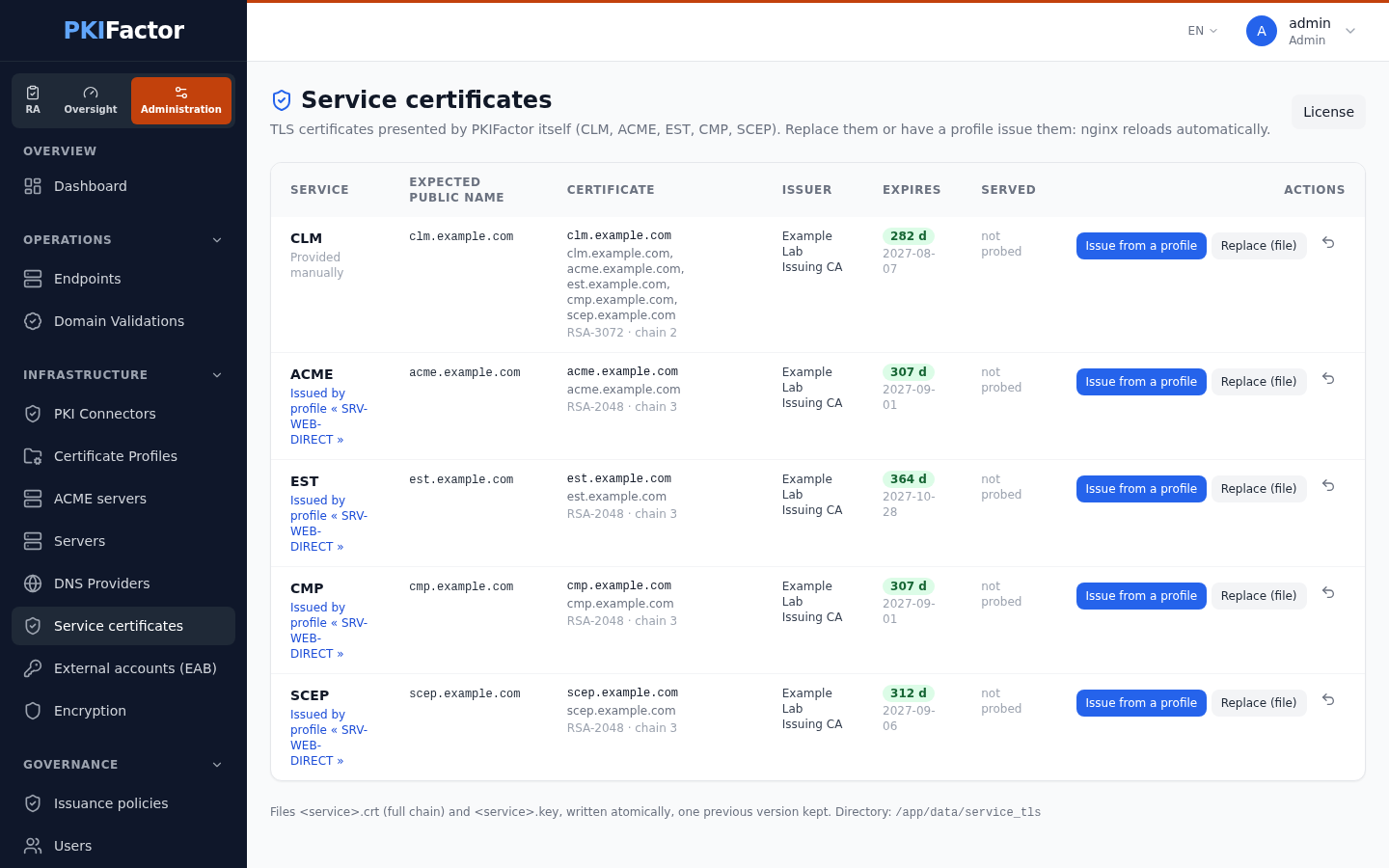
An expired certificate on the ACME or EST gateway stops renewal for every client at once. Issuing the service certificates from a profile puts them in the same inventory, alerts and renewal cycle as the rest of the estate.
What the page shows
One row per service:
| Column | Content |
|---|---|
| Service | The service, and the origin of its certificate: Issued by profile (with the profile and certificate) or Provided manually |
| Expected public name | The name clients use: for ACME the acme_public_url setting when set; otherwise the BASE_URL, PUBLIC_ACME_URL, EST_PUBLIC_URL, CMP_PUBLIC_URL, SCEP_PUBLIC_URL variables, otherwise <service>.<domain of the CLM name> (for example est.example.com next to clm.example.com). "The expected name is not covered by the certificate" when it is missing from the certificate |
| Certificate | Subject, names, key algorithm, chain length; self-signed, key missing, key ≠ certificate when relevant |
| Issuer, Expires | Issuing CA and remaining days |
| Served | Applied when the certificate actually presented by nginx (read by a real TLS handshake) is the one on disk; Reload pending otherwise; not probed when there is nothing to compare |
| State | Missing, Expired or Unreadable when applicable |
The files are <service>.crt (full chain, leaf first) and <service>.key in the directory shown at the bottom of the page (/app/data/service_tls by default, shared with nginx). nginx reloads by itself when a file changes, within seconds.
Issue from a profile (recommended)
Issue from a profile, then choose:
| Field | Value |
|---|---|
| CLM profile (direct issuance) | An active profile bound to a CA, without approval: issuance here is immediate. Profiles that require approval are marked approval required and refused |
| Host names (first = CN, all as SAN) | Defaults to the expected public name. Add the other names clients use |
PKIFactor generates the key and the CSR (with the first classical RSA or ECC algorithm usable on the profile, once the CA's capabilities and the issuance policies are taken into account; a profile that leaves no classical algorithm is refused), has the profile issue the certificate, checks that key and certificate match, installs them and remembers the binding between the service and the profile. The certificate appears in the inventory with its expiry alerts. A profile whose CA issues only after approval or domain validation is refused: the certificate would be pending and could not be installed.
Once the new certificate is proven served (handshake fingerprint equal to the file), the previous certificate is revoked (reason superseded). It is never revoked before that proof.
Automatic renewal
For services issued from a profile, a background task checks every 6 hours (SERVICE_TLS_RENEW_INTERVAL on the backend, in seconds): when the certificate expires in 30 days or less, it replays the same issuance (new key, same profile, same names) on behalf of the administrator who bound the service, installs, verifies, and revokes the previous certificate once the new one is served. That administrator receives an e-mail after each renewal (system template service_tls_renewed) or failure (service_tls_failed), in the default language of the platform. On failure, the current certificate stays in place and the next round tries again. A renewal through a profile whose CA requires domain validation cannot complete automatically, for the same reason as a first issuance. Certificates provided manually are never renewed: only expiry alerts apply to them.
| Setting | Default | Role |
|---|---|---|
service_tls.auto_renew |
true |
Automatic renewal of services bound to a profile |
service_tls.renew_days |
30 |
Renewal threshold, in days before expiry |
service_tls.revoke_previous |
true |
Revoke the replaced certificate once the new one is served |
These settings have no field in the interface in this version; change them through the API (below).
Certificates issued for PKIFactor's own services are marked as such in the inventory and are not counted as managed certificates by the license.
Replace with your own certificate
Replace (file): either a Certificate (PEM, full chain) and its Private key (PEM), or a PKCS#12 file (.p12 / .pfx), with the Password (PKCS#12 or encrypted key) if needed. PKIFactor refuses a key that does not match the certificate and an expired certificate. Files are written atomically.
Replacing by hand ends the binding with a profile: the service is no longer renewed automatically.
Revert
The icon next to the actions (Revert to previous version) restores the previous certificate and key. One previous version is kept per service. Reverting also ends the binding with a profile.
Before changing the issuing CA
ACME, EST, CMP and SCEP clients verify the gateway certificate. Before moving a gateway from a public CA to an internal one (or the reverse), distribute the new root to the clients; otherwise they stop trusting the gateway as soon as nginx reloads.
Via the API
curl -s -b jar https://clm.example.com/api/v1/admin/service-tls          # all services, eligible profiles
curl -s -b jar https://clm.example.com/api/v1/admin/service-tls/acme     # one service
curl -s -b jar -X POST https://clm.example.com/api/v1/admin/service-tls/acme/issue \
  -H "Content-Type: application/json" \
  -d '{"template_id":7,"hosts":["acme.example.com"]}'
curl -s -b jar -X POST https://clm.example.com/api/v1/admin/service-tls/est/upload \
  -F "cert=@est-fullchain.pem" -F "key=@est.key"                       # or -F "p12=@est.p12" -F "password=..."
curl -s -b jar -X POST https://clm.example.com/api/v1/admin/service-tls/est/rollback
curl -s -b jar -X POST https://clm.example.com/api/v1/system/workers/service_tls_autorenew/run   # renewal round now
curl -s -b jar -X PUT https://clm.example.com/api/v1/admin/settings \
  -H "Content-Type: application/json" -d '{"settings":{"service_tls.renew_days":"45"}}'
SERVICE_TLS_ISSUED, SERVICE_TLS_REPLACED, SERVICE_TLS_AUTORENEWED, SERVICE_TLS_ROLLBACK).
Troubleshooting
| Symptom | Cause and fix |
|---|---|
| "ce profil exige une approbation manuelle : choisissez un profil à émission directe" | Choose a profile without approval |
| "le profil n'émet pas immédiatement (approbation/DCV) : certificat #… en attente, non installé" | The CA did not issue at once (public CA with DCV, approval); use a profile on a CA that issues immediately, or complete the order and use Replace (file) |
| "aucun nom d'hôte : renseignez-le ou configurez l'URL publique du service" | Enter the host names, or set the service's public URL |
| "la clé privée ne correspond pas au certificat" | The key file is not the certificate's key |
| "le certificat est expiré (…)" | Provide a valid certificate |
| "la clé privée est chiffrée : mot de passe requis" | Enter the key password |
| Reload pending that does not clear | nginx did not pick up the files; check the reverse proxy container |
| "The expected name is not covered by the certificate" | Reissue with the expected public name among the host names |
| "aucune version précédente disponible" on revert | No earlier version is kept for that service |