Certificate profiles
A certificate profile is what a requester chooses when asking for a certificate, and what an ACME, EST, SCEP or CMP client is pointed at. It binds one certificate authority and one of its templates, and adds PKIFactor's rules: allowed algorithms, subject fields, allowed names, approval, organization, notifications, enrollment protocols. (In the API and the code, profiles are called CLM templates.)
Profiles are managed by administrators in the Administration workspace, Infrastructure > Certificate Profiles. The list shows, for each profile, its CA (PKI), its Certificate Template, the enabled Enrollment protocols and whether it is Hybrid or Standard, with Details, Edit and Delete.
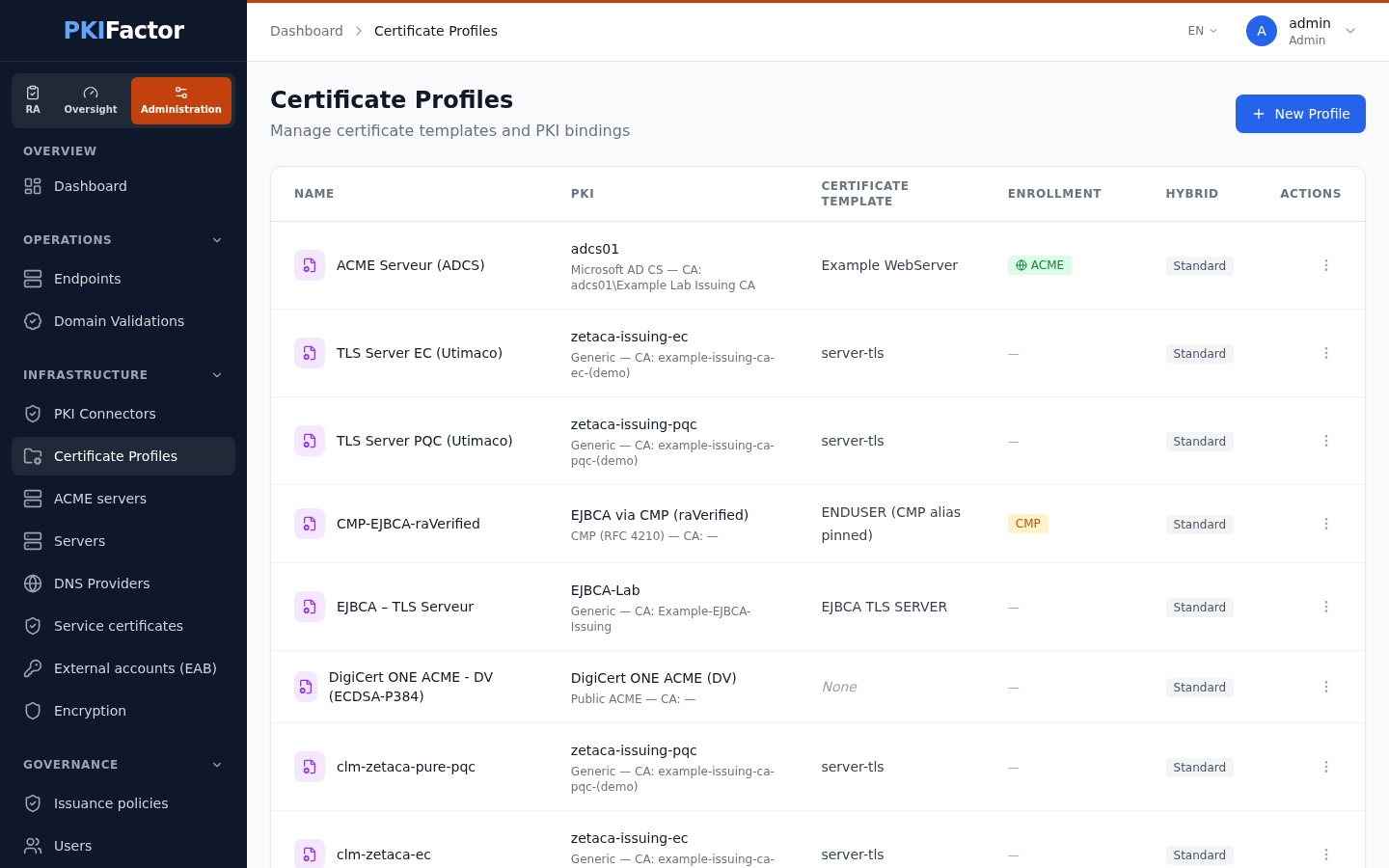
Profile and CA template: two levels
| Level | Where | Decides |
|---|---|---|
| CA template | On the CA (Vault role, AD CS template, EJBCA certificate profile, public CA product), synchronized or created on the connector's Certificate Templates page | What the CA accepts and puts in the certificate: usages, key constraints, maximum lifetime. The validity requested from the CA is set here (connector menu > Certificate Profiles > Edit) |
| Profile | Certificate Profiles | Who may request, which names and algorithms, which subject, approval, protocols |
A profile can never obtain more than its CA template allows: the CA has the last word. See Certificate authorities.
Create a profile
Certificate Profiles > New Profile. The form is the same for every CA; only the CA block changes.
CA binding
| Field | Notes |
|---|---|
| PKI Connector | The CA. The last entry of the list, Crypto-agility (several authorities), creates a profile that issues several independent certificates at once: see Crypto-agility and PQC |
| Certificate Template | One of the connector's templates. If the list is empty, synchronize the connector first. A template that belongs to another connector is refused |
| Public CA block | DigiCert: Product Type, DCV Method (DNS CNAME, DNS TXT, HTTP, Email). Sectigo: Product ID, DCV Method (CNAME, HTTP, EMAIL). Plus Validation type (Domain Validated, Organization Validated, Extended Validation), Domain validation (Automatic — DCV via DNS provider or Manual — I validate the domain myself) and the DNS provider (optional; by default deduced from the domain zone). A DNS-based DCV method needs a DNS provider. See Public CAs and domain validation |
Basic information and organization
| Field | Notes |
|---|---|
| Internal Name | Unique identifier, lowercase, no spaces. It is also the basis of the protocol paths |
| Display Name, Description | What requesters see |
| Owning organization | One organization, Several organizations or All organizations. Every certificate issued from the profile belongs to an organization; it decides who approves it and which operators may act on it. With several or all organizations, the certificate goes to the requester's organization (chosen by the requester when there is more than one). See Organizations and teams |
A profile enabled for ACME, EST, SCEP or CMP must belong to one organization: a gateway cannot choose ("Un profil activé pour ACME, EST, SCEP ou CMP doit être rattaché à une seule organisation : une passerelle ne peut pas choisir.").
Allowed algorithms
Tick the key algorithms the profile accepts; the list comes from the CA template. The rule is enforced on every channel, protocols included, at issuance and at renewal, and the CSR is authoritative: the algorithm of the actual key in the CSR is checked, whatever the request declares. A CSR whose key is not allowed is refused ("Algorithme de clé « … » non autorisé pour ce profil (autorisés : …)").
The algorithms actually usable are those of the profile, minus those the CA cannot sign and those removed by a blocking issuance policy that depends only on the algorithm. The first usable algorithm is the default when PKIFactor generates the key; at renewal, the algorithm of the previous certificate is kept as long as it is still allowed.
An empty list does not mean "anything": it allows the classical algorithms only, RSA-2048, RSA-3072, RSA-4096, ECC-P256, ECC-P384, ECC-P521. Every other key type (Ed25519, other curves, RSA below 2048 bits, post-quantum, composite) must be ticked explicitly. Post-quantum (ML-DSA-*) and composite (COMP-*) algorithms appear only when the CA template offers them, and a composite algorithm only on a CA that can sign composite requests. See Crypto-agility and PQC.
Hybrid / Post-Quantum
Shown when the CA template offers post-quantum algorithms. Enable Hybrid/PQC Mode, then choose a Hybrid Strategy (Dual Certificate (RFC 9763), Hybrid (AltSignatureValue), PQC Only) and the Post-Quantum Algorithms. The effect of each strategy, and why Dual Certificate is replaced by crypto-agile profiles, is described in Crypto-agility and PQC.
Key generation mode
Generate key pair (PKIFactor generates the key and delivers it in a PKCS#12) and/or Provide CSR (the requester keeps the key); Recommended mode is the one pre-selected in the request form.
X.509 subject fields
For each field (CN, SAN, O, OU, C, ST, L, E): Editable, Required, and a Value.
| Editable | Required | Behaviour |
|---|---|---|
| Yes | Yes | The requester must fill it in; the value pre-fills the form |
| Yes | No | The requester may fill it in; the value is the default |
| No | (a value is set) | Fixed value imposed by the profile |
| No | (no value) | The field must stay empty: a request or CSR that carries it is refused |
With a CSR, the subject cannot be rewritten: PKIFactor checks it instead. A CSR whose fixed field differs from the profile, or that lacks a required field, is refused. SAN entries are required only when the SAN field is marked required.
Allowed names (CN Domain Filter)
Enable CN domain validation and list the Allowed domains, comma-separated. When enabled, the CN and every SAN, including the names found in a CSR, must match; this applies to the web interface, the API and all protocols, at issuance and at renewal.
| Entry | Matches |
|---|---|
example.com |
Exactly example.com |
*.example.com |
www.example.com (one level only) and example.com; not a.b.example.com |
Contextual rules across profiles (block wildcards in production, for example) belong to Issuance policies.
Approval
Require validation before issuance sends interactive requests to the approval queue of the certificate's organization. The box is cleared and disabled as soon as ACME, EST, CMP or SCEP is enabled on the profile, and the server refuses a profile that combines manual approval with one of these protocols (for example "ACME enabled is incompatible with manual approval (challenge replaces human validation)"): the protocol's own proof (challenge, client authentication, protected message, single-use challenge) replaces the human check. That exemption applies only to requests that actually arrive through the protocol. Issuance policies can still require approval for interactive requests. Details in Approvals.
E-mail notifications
| Field | Notes |
|---|---|
| Team address for automated certificates (ACME, EST, SCEP, CMP) | Used only for certificates issued through a protocol, with no human requester, and as a last resort for alerts. For a request made in the portal, the requester's team is notified: the address is entered on the request, prefilled with the requester's team |
| Notification Language | English, Français, Español, Português |
| Send notifications when: | New certificate request, Certificate is issued, Certificate is about to expire, Certificate is revoked (all ticked by default). The edit form shows the last three only |
Custom fields
Add Custom Field adds request fields (for example a business unit), each Editable and/or Required.
Automatic enrollment (ACME, EST, CMP, SCEP)
Each protocol is enabled per profile; PKIFactor then generates a unique path from the internal name and shows it (Current ACME Path, and so on). Disabling a protocol clears its path.
| Protocol | Settings |
|---|---|
| ACME | Challenge Types (HTTP-01, DNS-01, TLS-ALPN-01), Require External Account Binding (EAB) |
| EST | Authentication Method: TLS client certificate (recommended), HTTP Basic, or both |
| CMP | Protection modes (signature, shared secret), Allowed deployment modes (end entity direct, local RA, trusted RA), Transports (HTTP, CoAP), PBM shared secret (MAC): stored encrypted; leave it blank when editing to keep the current secret |
| SCEP | Require challenge (strongly recommended), Challenge TTL (seconds): 900 by default, between 60 and 86400; each challenge is single-use |
ACME needs at least one challenge type: a profile with ACME enabled and no challenge is refused.
Profile details and enrollment kits
Details opens the read-only view of the profile: CA mapping, key algorithms, subject and business fields, CN filter, hybrid settings, and for each enabled protocol its path and endpoint. From there an administrator can generate ready-to-use material:
| Button | Result |
|---|---|
| Enroll a server (ACME kit) | Ready-to-paste commands (certbot, acme.sh, win-acme) for a chosen Platform (nginx, Apache, HAProxy, IIS, other Linux server), with the Server contact (alerts), the Domain names and the Challenge; optionally an EAB credential (required when the profile requires EAB). The EAB HMAC key is shown only once |
| Enroll (EST) | An enrollment credential scoped to this profile (username and secret, shown only once) and the simpleenroll command; the existing credentials are listed |
| Enroll (SCEP) | A single-use challengePassword (shown only once) and an sscep command |
Client-side configuration is in ACME server, EST, SCEP and CMP.
Via the API
curl -s -b jar https://clm.example.com/api/v1/clm/templates            # all profiles (administrators)
curl -s -b jar https://clm.example.com/api/v1/clm/templates/available  # what the current user may request
curl -s -b jar -X POST https://clm.example.com/api/v1/clm/templates \
  -H "Content-Type: application/json" \
  -d '{"name":"srv-tls","display_name":"Server TLS","organization_id":2,
       "pki_id":3,"pki_template_id":12,"mapped_pki_template_id":12,
       "allowed_key_algorithms":["RSA-2048","ECC-P256"],
       "cn_filter_enabled":true,"cn_allowed_domains":"*.example.com",
       "requires_approval":true}'
pki_template_id is the identifier of the CA template (from GET /api/v1/templates/pki/{pki_id}). Creation, change and deletion are recorded in the audit trail (ADMIN_CREATE_CLM_TEMPLATE, ADMIN_UPDATE_CLM_TEMPLATE, ADMIN_DELETE_CLM_TEMPLATE).
Edit a profile
Open the profile and Edit. Every rule can be changed; changes apply to new requests only, never to certificates already issued. Each protocol section shows its current path (Current ACME Path, Current EST Path, Current CMP Path, Current SCEP Path).
The CA binding (connector and CA template) is read-only in the interface. To move one or more profiles to another CA, use the CA switch of the API: the preview lists the live certificates that depend on the profiles, those deployed on a device, and when each one will actually change CA (at its next renewal, since an issued certificate keeps its chain). Distribute the new CA's root to the relying parties before that date.
Via the API: change of CA
curl -s -b jar -X POST https://clm.example.com/api/v1/clm/templates/ca-switch/preview \
  -H "Content-Type: application/json" -d '{"template_ids":[4,5],"new_pki_id":8,"new_pki_template_id":31}'
curl -s -b jar -X POST https://clm.example.com/api/v1/clm/templates/ca-switch \
  -H "Content-Type: application/json" -d '{"template_ids":[4,5],"new_pki_id":8,"new_pki_template_id":31}'
Deactivate or delete a profile
Prefer deactivation. An inactive profile disappears from the request form and blocks new requests; existing certificates keep their link to the profile. The edit page shows the Status (Active or Inactive) but does not change it: deactivate through the API, with PUT /api/v1/clm/templates/{id} and {"is_active": false}.
Delete Profile is permanent and is not blocked when certificates still refer to the profile:
- certificates issued from it stay in the inventory but lose their profile, and can no longer be renewed (renewal answers "CLM template not found");
- EST enrollment credentials of the profile are deleted;
- protocol clients pointed at its paths stop working.
The CA template has its own protection: it cannot be deleted while a profile uses it (this used to unlink profiles silently; fixed in 1.6.31, which also added template editing).
Troubleshooting
| Symptom | Cause and fix |
|---|---|
| Certificate Template list empty | The connector has no templates: Sync From PKI, or Create Manually on the connector's Certificate Templates page |
| Profile saved, but issuance fails with a CA error about the template name | The template name differs from the name on the CA (manual templates must match exactly) |
| "Algorithme de clé « … » non autorisé pour ce profil (autorisés : …)" | The key of the CSR, or the chosen algorithm, is not among the usable algorithms (profile, CA, issuance policies). With an empty list, only classical algorithms are allowed |
| "…aucun algorithme n'est utilisable avec ce profil…" | The profile, its CA and the issuance policies leave no algorithm in common |
| "Le nom demandé '…' (CN/SAN) ne correspond à aucun domaine autorisé pour ce profil" | A CN or SAN is outside Allowed domains (remember that *.example.com covers one level only) |
| Request refused because of a subject field | A field marked non-editable without a value was filled in, or a fixed value differs in the CSR |
| Issued certificate has a different lifetime than expected | The CA applied its own template or role limit; fix the validity on the CA side or on the CA template |
| Saving refused: "… enabled is incompatible with manual approval …" | Untick Require validation before issuance, or disable the protocol |
| Saving refused: single organization required | ACME, EST, SCEP or CMP is enabled on a profile shared by several or all organizations |
| Old certificates cannot be renewed | Their profile was deleted; reissue them from an existing profile |