ServiceNow
PKIFactor integrates with ServiceNow in both directions:
| Direction | What happens | Who calls whom |
|---|---|---|
| Inventory | Every certificate PKIFactor manages is kept up to date in a ServiceNow table: issued, renewed (with the link to the certificate it replaces), revoked, expired. | PKIFactor calls ServiceNow |
| Incidents and changes | Events that need a human become tickets: a failed or refused deployment opens an incident; a device that needs an installation step (for example a Check Point policy install) opens a change request. One ticket per problem: a repeated event updates the open ticket. | PKIFactor calls ServiceNow |
| Service catalogue | Employees request, renew or revoke a certificate from the ServiceNow catalogue. PKIFactor executes the request on behalf of that person, with exactly that person's rights, and writes the outcome back into the ticket. | ServiceNow calls PKIFactor |
The three parts are independent: you can use the inventory and incidents without the catalogue, or the reverse.
Tested end to end
This integration was tested on a ServiceNow Zurich instance (patch 10), through a MID Server, on 26 October 2026: direct issuance, issuance after approval, renewal, revocation, an outage of PKIFactor during a request followed by automatic retry (without duplicate certificate), inventory synchronization and incident de-duplication.
How it works
                 ServiceNow instance                                   Your network
  +-----------------------------------------------+        +-------------------------------+
  |  Service Portal: "Request a certificate"      |        |                               |
  |      | (list of profiles asked to PKIFactor)  |        |                               |
  |      v                                        |        |                               |
  |  Requested item (RITM) -- business rule ------+--MID---+--> PKIFactor                  |
  |      ^                   (async, retried)     | Server |    /api/integrations/servicenow|
  |      |  work notes                            |        |        |                      |
  |  "PKIFactor Ticket Feedback" API  <-----------+--------+--------+  issued / revoked    |
  |                                               |        |        |                      |
  |  PKIFactor application:                       |        |        |                      |
  |    certificate inventory table  <-------------+--------+--------+  inventory           |
  |    events API -> incidents, changes <---------+--------+--------+  events              |
  +-----------------------------------------------+        +-------------------------------+
Calls from PKIFactor to ServiceNow use a dedicated service account with one role. Calls from ServiceNow to PKIFactor use a dedicated API key and, when PKIFactor is not reachable from the Internet, a MID Server installed in your network.
What never goes to ServiceNow
No private key, no PKCS#12 file, no password, no secret of any kind. The recommended catalogue mode is the CSR: the requester keeps the private key on the server that will use it.
Prerequisites
| Item | Detail |
|---|---|
| ServiceNow | Any supported release; tested on Zurich. Administrator access for the installation (admin, and security_admin for the service account). |
| PKIFactor | Administrator access. The integration is included with every license. |
| Network, PKIFactor to ServiceNow | Outbound HTTPS from PKIFactor to https://<instance>.service-now.com, directly or through your proxy. |
| Network, ServiceNow to PKIFactor (catalogue only) | Either a MID Server in your network that can reach PKIFactor on 443 (recommended for on-premises PKIFactor), or PKIFactor reachable from the ServiceNow instance, filtered on the instance's published outbound addresses. |
| People | Requesters must exist in PKIFactor with the same e-mail address as in ServiceNow (typically through single sign-on or a directory source) and belong to the organization of the profiles they use. |
Part 1: inventory and incidents (PKIFactor to ServiceNow)
In ServiceNow
- Import the PKIFactor application (update set
PKIFactor 1.0.1, provided by ZetaCert): it adds the certificate table, the events API and the rolex_<id>_pkifac_0.api_user. See Guide for your ServiceNow team. - Create the service account
svc_pkifactor_api: identity type Machine, Web service access only, a single rolex_<id>_pkifac_0.api_user, no group, noitil, noadmin. Step by step: Guide for your ServiceNow team.
In PKIFactor
In the Administration workspace, open System > Settings, tab ServiceNow integration (administrators only).
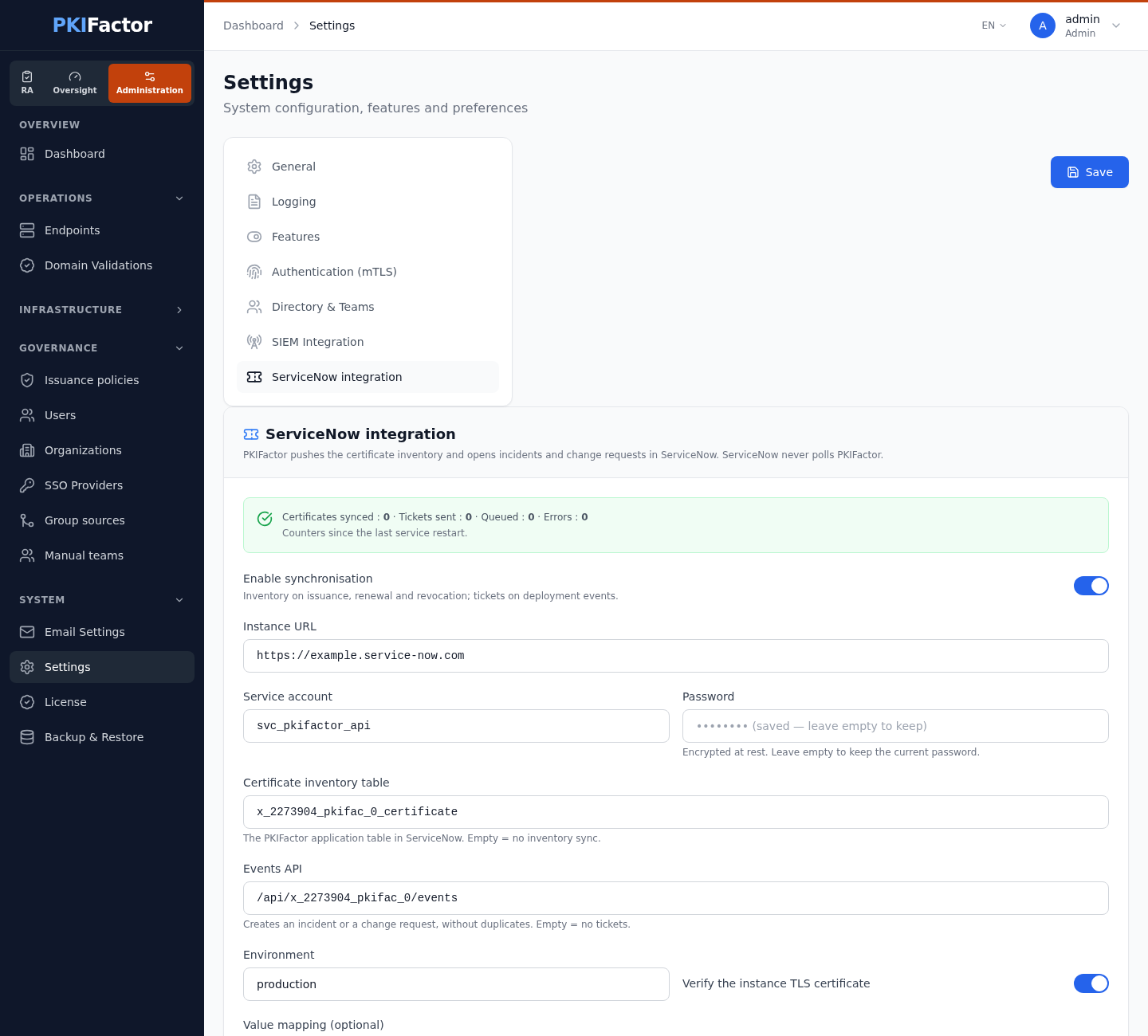
| Field | Value |
|---|---|
| Enable synchronisation | on |
| Instance URL | https://<instance>.service-now.com |
| Service account / Password | svc_pkifactor_api and its password (encrypted at rest; leave the password empty to keep the current one) |
| Certificate inventory table | x_<id>_pkifac_0_certificate (empty: no inventory synchronization) |
| Events API | /api/x_<id>_pkifac_0/events (empty: no tickets) |
| Environment | production (written on each record) |
| Verify the instance TLS certificate | on |
| Value mapping (optional) | JSON, when your choice lists use other values, for example {"algorithm": {"RSA-2048": "rsa_2048"}} |
Then:
- Test connection: PKIFactor reads one record of the certificate table with the service account, and reports whether the events API path is set (the events API itself is not called by the test).
- Resync the whole fleet: PKIFactor queues every issued, revoked or expired certificate for the initial load (the first 5,000; through the API,
resync?limit=accepts up to 20,000). Afterwards, each change is sent as it happens.
When synchronization is enabled, the tab shows Certificates synced, Tickets sent, Queued, Errors, Last successful sync and Last error. The counters start again at each restart of the service.
Failed sends are not retried
Updates waiting to be sent are kept in memory. If ServiceNow refuses or cannot be reached (wrong password, instance down), the update is counted in Errors and dropped; a restart of PKIFactor also empties the queue. After fixing the cause, click Resync the whole fleet to bring the inventory up to date. Incidents and change requests that failed in the meantime are not sent again.
Via the API
# Session cookie of an administrator (see REST API > Authentication)
curl -s -b jar -X PUT https://clm.example.com/api/v1/admin/servicenow/config \
  -H "Content-Type: application/json" \
  -d '{"servicenow_enabled": true,
       "servicenow_instance_url": "https://acme.service-now.com",
       "servicenow_username": "svc_pkifactor_api",
       "servicenow_password": "<password>",
       "servicenow_cert_table": "x_1234567_pkifac_0_certificate",
       "servicenow_events_path": "/api/x_1234567_pkifac_0/events"}'
curl -s -b jar -X POST https://clm.example.com/api/v1/admin/servicenow/test
curl -s -b jar -X POST https://clm.example.com/api/v1/admin/servicenow/resync
curl -s -b jar https://clm.example.com/api/v1/admin/servicenow/status
https://, a malformed table name or path). The inbound part is configured with GET/PUT /api/v1/admin/servicenow/inbound, and the key with POST (generate or replace) and DELETE (revoke) on /api/v1/admin/servicenow/inbound/key.
What you get
- Inventory: one record per certificate, keyed by its SHA-256 fingerprint. A renewal creates a new record linked to the previous one (
renewed_from), which becomes Superseded. Fields include common name, alternative names, serial number, issuer, validity, key algorithm and size, status, profile, organization, owner, and the devices where the certificate is deployed. - Incidents for
deploy_failed(deployment failed or refused, device configuration not saved, high-availability pair out of sync, configuration drift, previous certificate still served elsewhere)key_custody_refused(deployment refused because of the key custody rules) andct_alert(a Certificate Transparency rule with the ServiceNow action raised an alert; the certificate's common name, or its first name when it has none, identifies it); change requests forinstall_required(for example a Check Point certificate published, policy installation pending), with the expiry of the previous certificate as due date. A repeated event with the same correlation identifier adds a work note to the open ticket instead of opening another one. - Expiry warnings are not sent to ServiceNow: PKIFactor sends them by e-mail.
- Certificate Transparency alerts need version 1.0.1 of the PKIFactor application: version 1.0.0 refused the
ct_alertevent and the alert was lost (PKIFactor 1.8.50 and later).
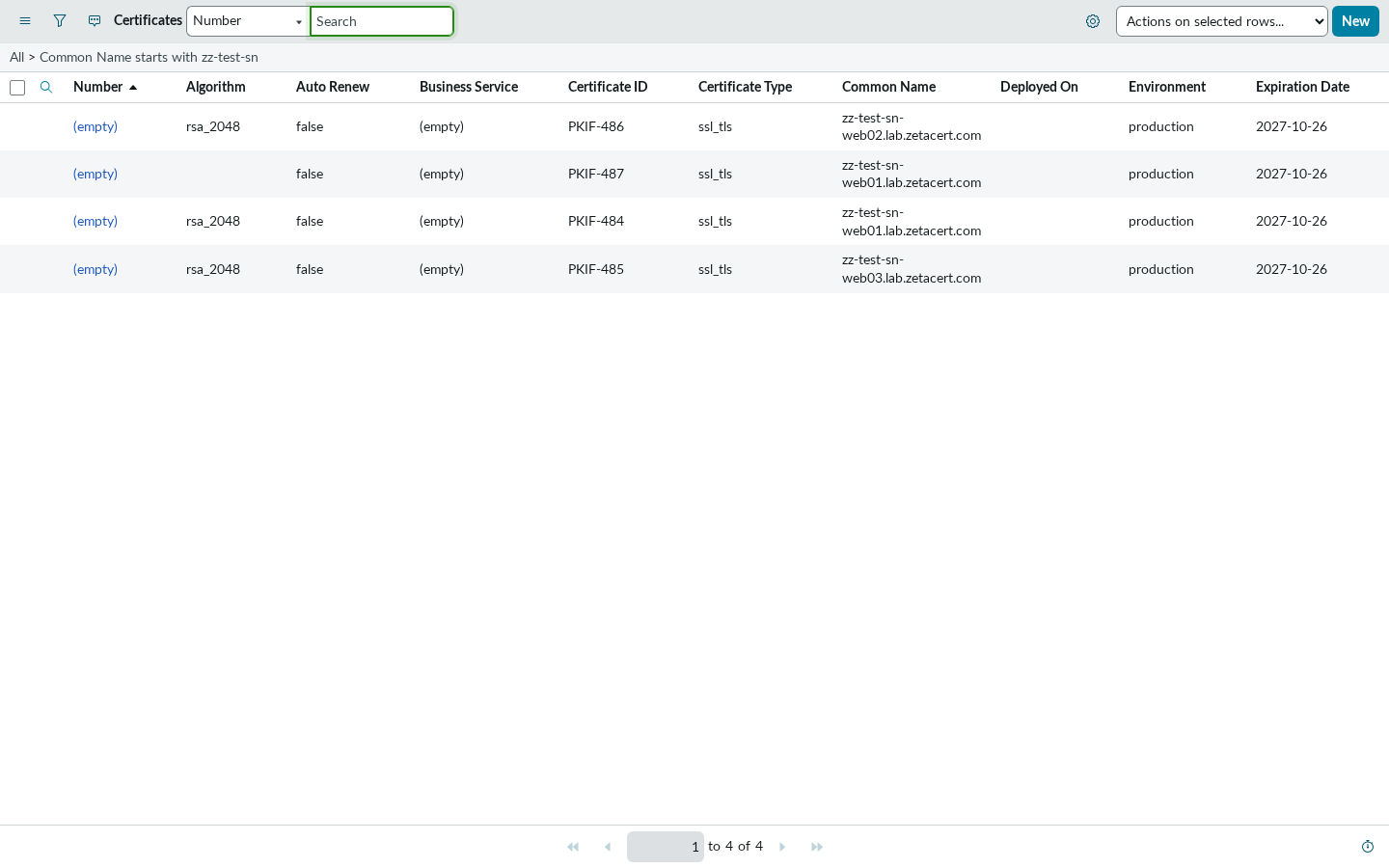
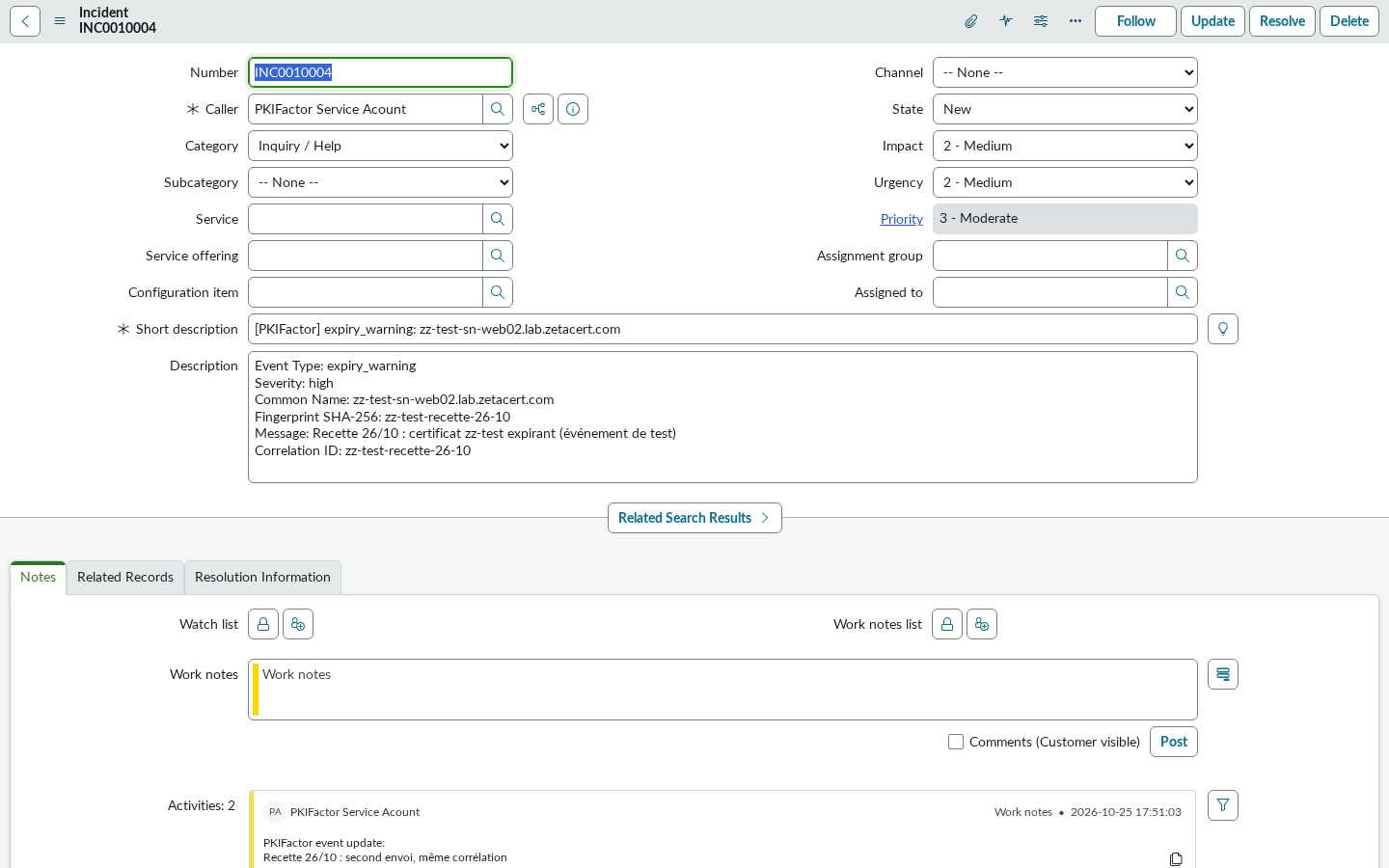
To route these tickets, use a ServiceNow assignment rule, for example caller is svc_pkifactor_api to your PKI or network group.
Part 2: service catalogue (ServiceNow to PKIFactor)
Principles
- ServiceNow decides nothing. It sends the requester's e-mail and the ticket number. Organization, profile restrictions and approval are exactly those that apply when the person uses PKIFactor directly. A requester never approves their own request.
- The list of profiles comes from PKIFactor, for the person selected in Requested for: never a fixed list, never a profile of another organization.
- Disabled by default, allow list of profiles. Only the profiles the administrator ticks are usable from ServiceNow.
- A dedicated API key, shown once, stored as a hash. Rotation and revocation are immediate.
- Everything is audited: successful, refused and unauthenticated calls, with the ticket number and the requester.
In PKIFactor
In System > Settings > ServiceNow integration, block Inbound calls: requests from the ServiceNow catalog:
- Generate the key. Copy the key (prefix
pkf_sn_): it is shown once, and PKIFactor keeps only its fingerprint. The block then shows the start of the key and its creation date. Replace the key makes the old one stop working at once; Revoke the key also disables inbound calls. - Under Profiles open to ServiceNow, tick the profiles that ServiceNow may use. With none ticked, ServiceNow cannot request anything.
- Tick Allow inbound calls (possible only once a key exists).
- Tick Write to the original ticket when the certificate is issued or revoked, and set Note API path (recommended) to the path of the PKIFactor Ticket Feedback API installed in ServiceNow, for example
/api/1234567/pkifactor_feedback/note. PKIFactor then writes "certificate issued" and "certificate revoked" into the ticket, without any right to read catalogue tickets. With the path empty, PKIFactor writes directly into the Ticket table (defaultsc_req_item), and the service account must then be able to read that table and update its work notes. - Language of the notes written in tickets: English or French.
The address that ServiceNow calls is shown in the block: https://clm.example.com/api/integrations/servicenow.
In ServiceNow
The ServiceNow part is delivered as an update set (PKIFactor - Catalog integration 1.0) or as an installation script. It contains:
| Element | Role |
|---|---|
Script Include PKIFactorClient |
Calls PKIFactor through the MID Server; reads the key server-side; builds the work notes |
| Catalog category and three items | Request a certificate, Renew a certificate, Revoke a certificate |
| Catalog client script | Fills the profile list with the profiles PKIFactor allows for the selected person |
| Business rule (async) | Sends the request when the requested item is created |
| Scheduled job, every 10 minutes | Retries requests deferred because PKIFactor or the MID Server was unreachable |
| Scripted REST API PKIFactor Ticket Feedback | Lets PKIFactor write a note in a ticket created from a PKIFactor item, and nothing else |
System properties x_pkifactor.* |
Address of PKIFactor, MID Server name, credential, timeout, language, items |
Installation steps for the ServiceNow team, including the MID Server and the credential: Guide for your ServiceNow team.
The requester's experience
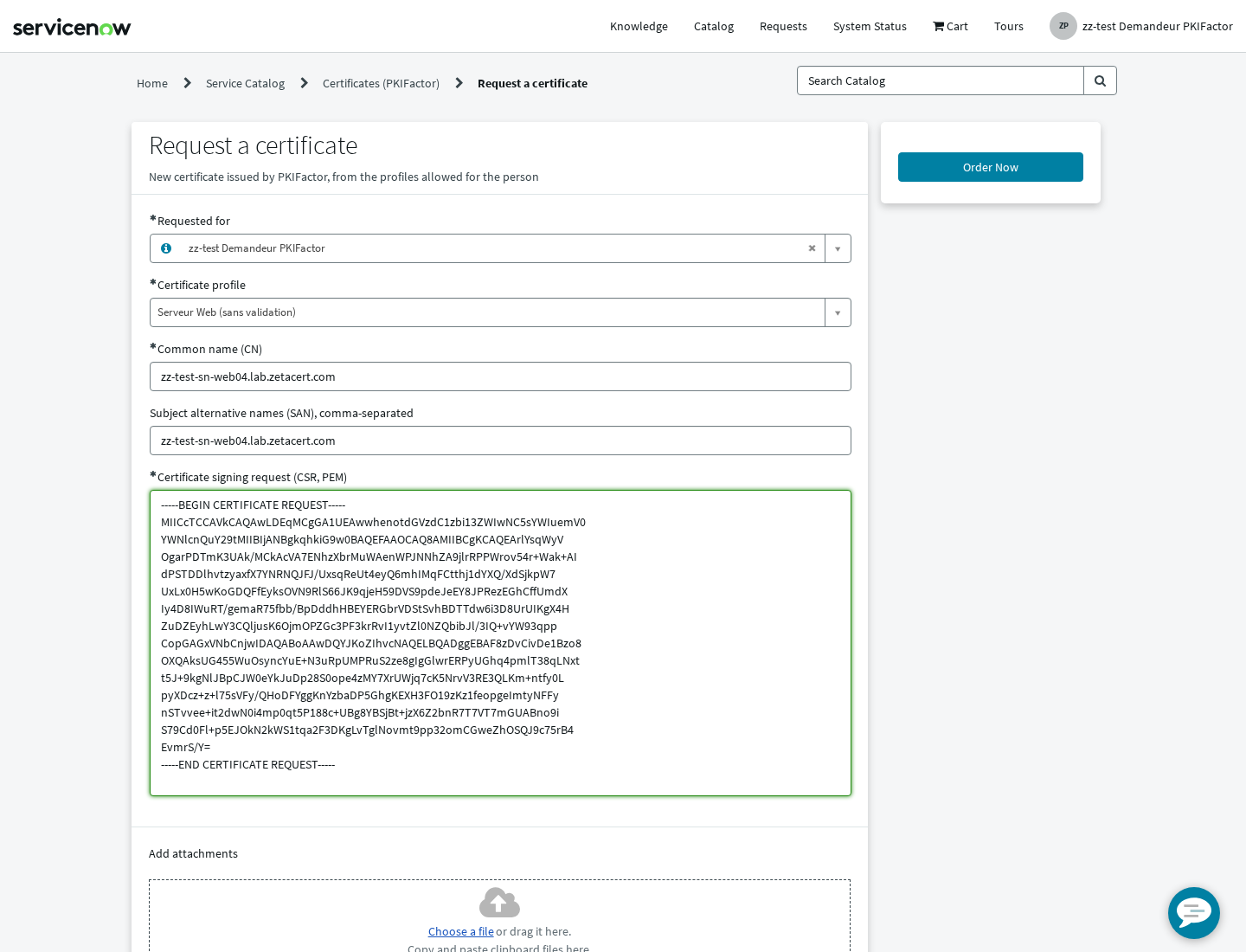
- In the Service Portal, the person opens Certificates (PKIFactor) > Request a certificate. The profile list shows only the profiles PKIFactor allows for them, and states which ones need approval.
-
They fill in the common name, the alternative names and paste the CSR, then Order Now.
-
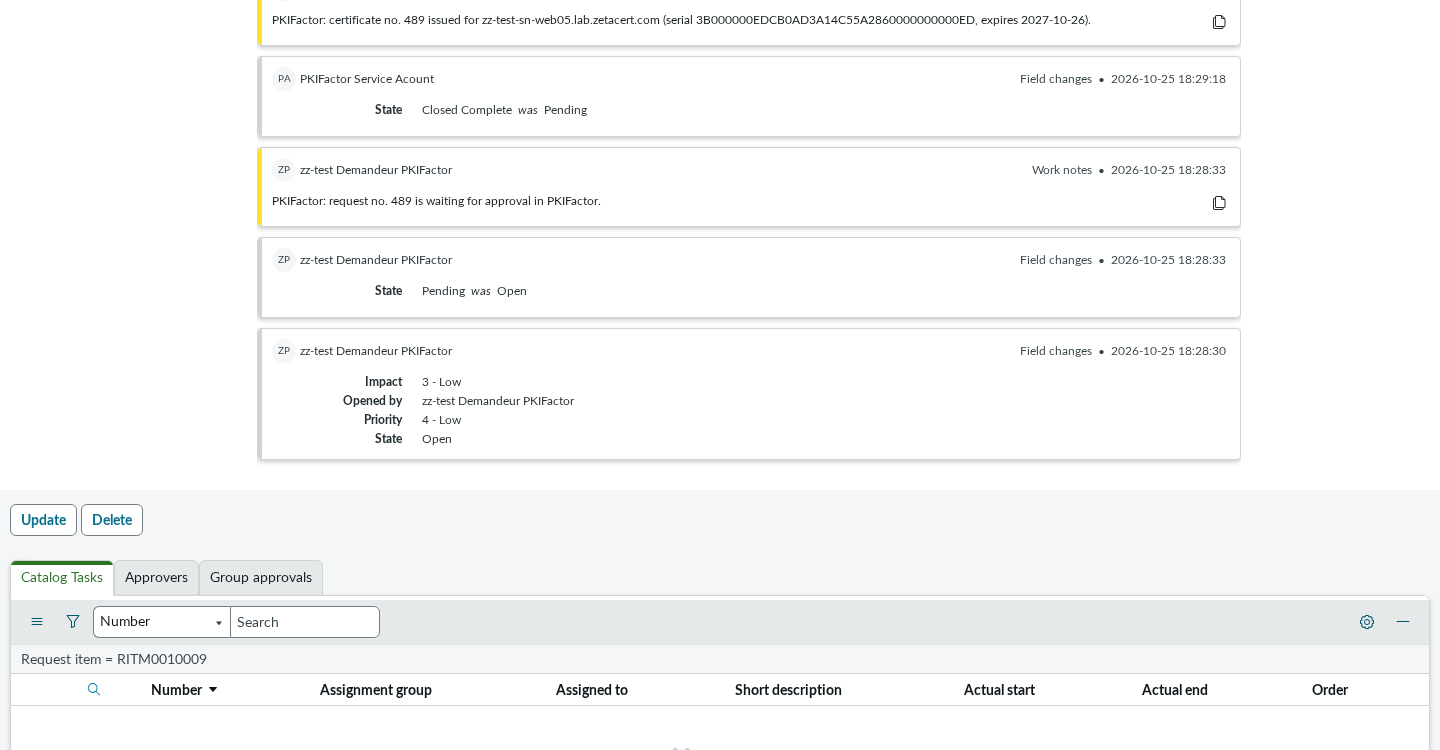
Within seconds, the requested item receives a work note:
- certificate no. 484 issued: the item is closed complete; the certificate is available in PKIFactor;
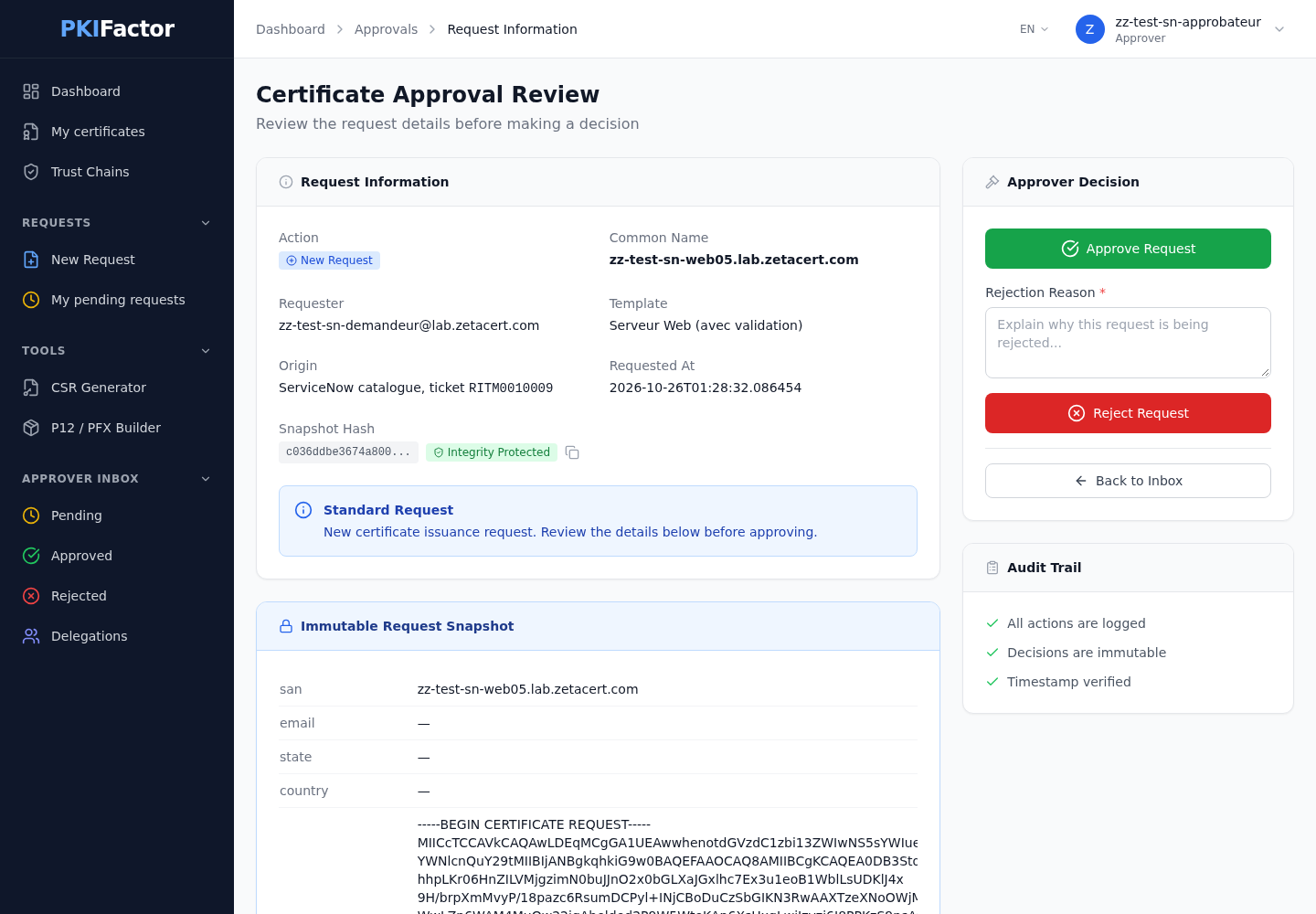
- or request no. 486 is waiting for approval in PKIFactor: the item is set to Pending. When an approver of the organization approves it in PKIFactor (the approval page shows the originating ticket), PKIFactor writes certificate no. 486 issued (serial ..., expires ...) into the ticket, which is closed complete.
-
A refusal (profile not allowed, field that cannot be changed, unknown requester) closes the item incomplete with PKIFactor's reason in the work notes.
Renewal and revocation work the same way, from the certificate number shown in PKIFactor. The confirmation of a revocation goes to the revocation ticket.
A renewal with a CSR is accepted only when the person the ticket is for (Requested for) owns the certificate or belongs to its team; otherwise PKIFactor refuses it and the item closes incomplete with that reason. Without a CSR, the rights are the same as in PKIFactor's own interface (see Renew a certificate).
When PKIFactor is unreachable
If PKIFactor or the MID Server cannot be reached, or answers with a server error, nothing has been decided: the item stays open (Work in Progress) with a work note, and the scheduled job retries every 10 minutes. Before sending a request or a renewal again, the job asks PKIFactor whether it already received that ticket, so that a call whose answer was lost does not produce a second certificate.
Reference: inbound API
All routes require Authorization: Bearer pkf_sn_.... Any authentication failure (integration disabled, key missing or wrong) returns the same 401.
| Method and path | Purpose |
|---|---|
GET /api/integrations/servicenow/templates?requested_for_email= |
Profiles the person may use from the catalogue |
POST /api/integrations/servicenow/requests |
Request a certificate |
POST /api/integrations/servicenow/certificates/{id}/renew |
Renew |
POST /api/integrations/servicenow/certificates/{id}/revoke |
Revoke |
GET /api/integrations/servicenow/certificates/{id}?requested_for_email= |
Status of a certificate the person may see |
GET /api/integrations/servicenow/requests?ticket_number=&requested_for_email= |
Certificates linked to a ticket |
Request a certificate
curl -s -X POST https://clm.example.com/api/integrations/servicenow/requests \
  -H "Authorization: Bearer $PKF_SN_KEY" -H "Content-Type: application/json" \
  -d '{"requested_for_email": "alice@example.com",
       "ticket_number": "RITM0010023",
       "template_id": 12,
       "common_name": "web01.example.com",
       "san": "web01.example.com",
       "csr_pem": "-----BEGIN CERTIFICATE REQUEST-----\n..."}'
{"success": true, "message": "Certificat émis", "certificate_id": 481, "pending_approval": false}
key_algorithm and p12_password (when PKIFactor generates the key), team_email (default: the requester's address), organization_id, and the subject fields organization, organizational_unit, country, state, locality, email. The ticket number takes 3 to 40 letters, digits, - or _.
Errors: 403 profile not open to ServiceNow, requester who is an administrator, an operator or an auditor (ServiceNow never acts on behalf of such an account), or renewal with a CSR by someone who is neither the owner nor in the certificate's team; 404 inactive profile or unknown requester; 400 invalid ticket number, invalid CSR, or refused by an issuance policy. Since version 1.8.49, a policy refusal gives the rule's reason (for example the name that is not allowed) instead of the code POLICY_VIOLATION.
Troubleshooting
| Symptom | Cause | Fix |
|---|---|---|
401 User is not authenticated on every call from PKIFactor |
Service account password expired or Password needs reset ticked; or basic authentication restricted on the instance and the account is not Web service access only | Untick Password needs reset, Update; keep the account Web service access only |
| Setting the service account password through the API silently does nothing | The instance password policy (for example "at least one special character") rejected it | Use a password that satisfies the policy; check the user's login events |
| Profile list shows Unavailable with "credential not found" | The credential sys_id in x_pkifactor.credential_id is wrong, or the credential is inactive |
Fix the property; the key is read server-side, the requester needs no role |
| Profile list empty: No profile allowed for this person | The person belongs to no organization in PKIFactor, or none of their profiles is ticked for ServiceNow | Attach the person to the organization; tick the profile in PKIFactor |
| Work note "Unknown requester" (404) | No active PKIFactor user with that e-mail | The person signs in once to PKIFactor, or an administrator creates or attaches them |
| Work note "temporarily unreachable", item stays Work in Progress | PKIFactor or the MID Server down, TLS trust missing on the MID Server | Check the MID Server status, its trust store and PKIFactor; the scheduled job retries |
| Catalogue tasks appear for Field Services or Software | The items still use the default execution plan | Clear Execution plan on the three items |
The service account keeps getting the role snc_required_script_writer_permission |
ServiceNow scripting governance is not configured: an auto-provisioning job adds new accounts to Conditional Script Writer | Configure scripting governance, or accept it on a web-service-only account |
| No note "issued" after an approval | Ticket feedback disabled, or note API path empty or wrong | Enable feedback and set the note API path in PKIFactor |
The PKIFactor audit trail records every inbound call (SERVICENOW_INBOUND_*) with the ticket number, including refused and unauthenticated ones (SERVICENOW_INBOUND_REQUEST_REFUSED, SERVICENOW_INBOUND_AUTH_FAILED), every configuration change (SERVICENOW_CONFIG_UPDATED, SERVICENOW_INBOUND_CONFIG_UPDATED) and every key operation (SERVICENOW_INBOUND_KEY_ROTATED, SERVICENOW_INBOUND_KEY_REVOKED).